
Most ecommerce sites don’t have an SEO problem first.
They have a structure problem.
You add products wherever they seem to fit. You create categories based on how your team thinks about the store, not how your customers search. Your filters create hundreds of thin URLs. Your blog brings in traffic, but barely supports the pages that actually make money.
Then you look at your rankings and wonder: why is Google not picking up our best pages?
That’s why I always look at ecommerce site structure before anything else.
Table of Contents
TLDR – Proper Ecommerce Structure
The proper ecommerce SEO structure starts with the homepage, then search-led main categories, specific subcategories, product pages, and supporting guides. Index only pages with demand, intent, and enough products. Keep filters, tags, search results, and duplicate parameter URLs controlled so Google crawls the pages that can rank and sell.
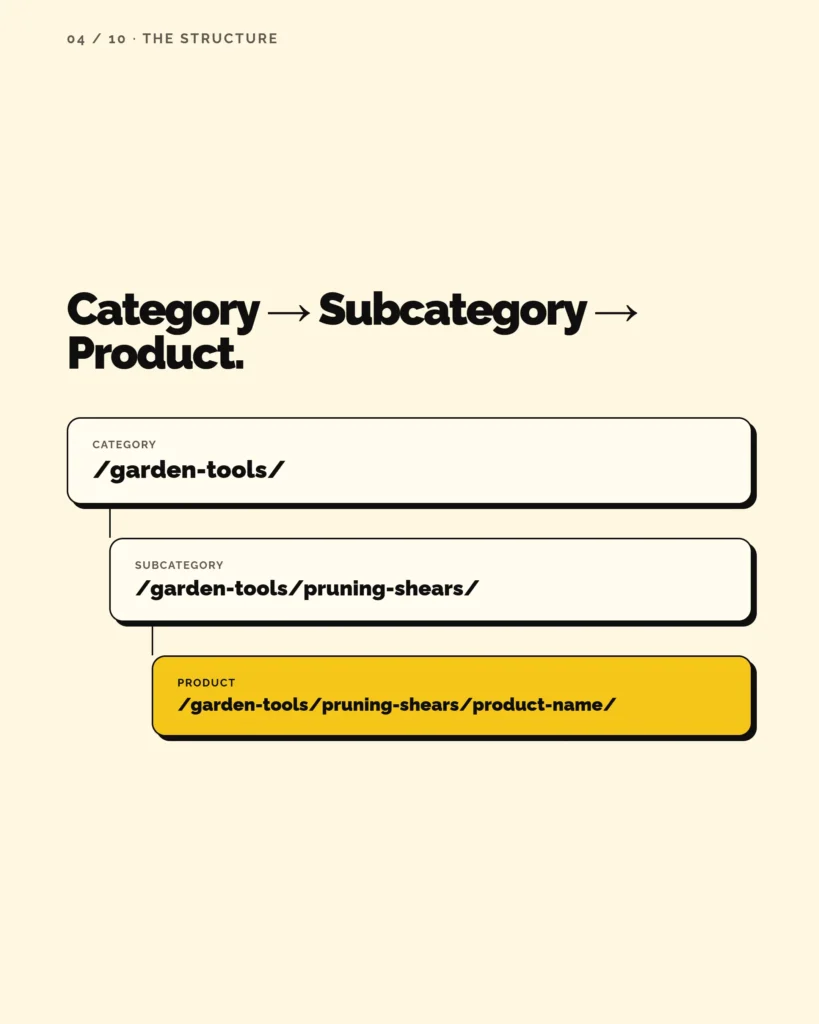
Example structure:
- Category: https://example.com/garden-tools/,
- Subcategory: https://example.com/garden-tools/pruning-shears/,
- Product: https://example.com/garden-tools/pruning-shears/product-name/.
Your Ecommerce Structure Directly Influences Shop’s Revenue
When your structure is clear, every page has a job. Your main categories capture broad commercial searches. Your subcategories target more specific buying intent. Your product pages convert visitors who already know what they want. Your blog content answers pre-purchase questions and pushes people toward the right product or category.
Your site structure is not just your main menu. It is not just your URL format. It is not just the sitemap you submit to Google Search Console.
Those things matter, but they are only pieces of the bigger system.
Your real structure answers questions like:
- Which categories are important enough to sit in the main navigation?
- Which subcategories deserve their own indexable pages?
- Which filters should help shoppers narrow down products, but stay out of Google’s index?
- Which product pages should receive more internal links?
- Which blog posts should support your commercial category pages?
That is what makes SEO site structure for ecommerce different from basic website architecture.
A service website may only need a few core pages and supporting blog content. An ecommerce site has to handle product depth, filters, seasonal inventory, discontinued items, product variants, category overlap, and hundreds or thousands of URLs that can easily get out of control.
So, when I talk about ecommerce site structure SEO, I’m not talking about making your store look tidy.
I’m talking about building a structure that helps Google find your important pages, helps shoppers find the right products, and helps your store grow without turning into a messy catalog nobody wants to crawl or use.
I will analyze your store’s SEO, tell you which pages deserve more authority, and give you implementation plan to boost your ecommerce revenue in the next 90 days.
Book a strategy callYour Store Structure Decides Which Pages Can Rank
You can have great products, strong product descriptions, clean design, and a fast website. But if your ecommerce site structure is not built around how people actually search, your rankings will always be limited.
This is where I see ecommerce stores lose a lot of SEO potential.
They leave default URL paths like /product-category/ or /category/ because no one questions them during development. They name categories based on internal logic, branding, or “vibes” instead of keyword research. They create broad categories like “Garden” when people are searching for specific product groups like “garden tools,” “garden chairs,” “raised garden beds,” or “garden storage boxes.”
That difference matters.
You can rank a made-up category name if Google understands the page and there is low competition. But what does that actually get you? A few clicks from people who already know your wording? Maybe some branded traffic? That is not the same as building category pages around high-intent searches with real demand.
Your category pages are some of the biggest SEO assets on your ecommerce site.
They are not filler pages between the homepage and products. They are the pages that can rank for commercial keywords, pull in shoppers who are ready to compare options, and send people deeper into your store. In many ecommerce niches, your category pages have more SEO potential than individual product pages because they target broader buying intent and stay useful even when specific products go out of stock.
That is why good ecommerce site structure starts with search behavior.
You need to know what people search for before you decide what your main categories, subcategories, and indexable collection pages should be.
Do they search for “garden furniture” or “outdoor furniture”? Do they search for “patio dining sets” or “garden dining sets”? Do they search for “ceramic dinnerware” or “ceramic plates”?
Those are not small naming choices. They decide which keywords your store can realistically target.
A strong SEO site structure should help you capture the highest-intent keywords with the highest useful search volume. That does not mean every keyword deserves a category. It means your structure should separate broad categories, specific subcategories, filters, and product pages based on search demand, product depth, and commercial value.
For example, “garden tools” may deserve a main category if you sell enough products in that group. “Garden hand tools” may deserve a subcategory if people search for it and you have enough products to support the page. But “green metal garden hand tools under $50” is probably a filter, not a category you want indexed.
This is the part many ecommerce stores skip.
They build the store first, then try to “SEO it” later. But by that point, the wrong category names are already in the menu, the URLs are already messy, the filters are already creating indexation problems, and the best commercial pages may not even exist.
That is why structure is not just a development decision. It is an SEO strategy decision.
Before you create categories, ask:
- Are people searching for this exact product group?
- Does this category match commercial intent?
- Is there enough product depth to make the page useful?
- Is this keyword valuable enough to deserve a permanent page?
- Would this page help shoppers choose, compare, and buy?
If the answer is yes, that category may deserve a real place in your structure. If the answer is no, it may be better as a filter, collection, tag, or internal merchandising page that does not need to compete in Google.
Because your goal is not to create a pretty catalog.
Your goal is to build a store structure that gives your best SEO opportunities their own clear, crawlable, indexable pages.
What’s The Best SEO Structure for Ecommerce Sites?
A lot of ecommerce sites treat category pages like simple product archives.
You click a category, see a grid of products, maybe sort by price, maybe use a few filters, and that is it. No real strategy. No search intent. No useful copy. No internal links. No clear reason for Google to see that page as one of the most important pages on the site.
Think about how people search when they are ready to buy. They do not always search for one exact product name. They often search for a product group because they still want to compare options.
They search for “garden tools,” not just one specific shovel.
They search for “outdoor dining sets,” not only one exact table model.
They search for “ceramic dinnerware sets,” not only one product SKU.
That is where your category pages can win.
A product page is useful when someone already knows what they want. A category page is useful when someone knows the type of product they want, but still needs to browse, compare, filter, and choose. That makes category pages perfect for commercial-intent keywords.
And what do you think, which has more searches?
They are not just there to help people reach products. They are there to rank, attract qualified traffic, organize product demand, and guide shoppers toward the right buying decision.
Strong ecommerce site structure SEO depends on giving those pages enough importance. That means they need to be based on keyword research, placed properly in your hierarchy, linked internally, supported with relevant copy, and kept clean from technical issues that weaken their value.
Here is a simple example.
A weak structure might look like this:
| Weak category setup | Why it limits SEO |
|---|---|
| Garden | Too broad and vague. It does not match specific buying intent. |
| Outdoor | Unclear. Could mean furniture, decor, tools, lighting, or anything else. |
| Essentials | Made-up category name with no clear search demand. |
| Favorites | Useful for merchandising, but weak as an SEO category. |
A stronger structure would look more like this:
| Stronger SEO category setup | Why it works better |
|---|---|
| Garden Tools | Matches how people search for a clear product group. |
| Outdoor Dining Sets | Targets a specific commercial keyword. |
| Garden Chairs | Gives a specific product type its own ranking opportunity. |
| Raised Garden Beds | Captures buyers searching for a defined product category. |
The second structure gives Google and shoppers more clarity.
Each page has a specific job. Each one can target a keyword with buying intent. Each one can hold relevant products, helpful copy, FAQs, filters, and internal links to related subcategories or buying guides.
This is also where many ecommerce stores make a quiet but expensive mistake. They create categories based on how they want to merchandise the store, not how people search.
You still need stable, keyword-driven category pages that match real demand.
For example, “Backyard Refresh” may sound nice as a campaign page. But if people are searching for “patio furniture,” “garden benches,” “outdoor rugs,” and “fire pits,” then those terms need proper pages in your structure.
Otherwise, you are asking Google to rank a page around a concept your customers may not even search for.
And yes, you can sometimes rank pages with creative category names. But ranking is not the only goal. You need the page to rank for terms that can actually bring qualified buyers. A made-up category that gets five clicks a month is not the same as a researched category page that can pull in hundreds or thousands of high-intent visits.
That is why category strategy should come before category design.
Before you name a category, ask what keyword it should target. Before you add it to the menu, ask if it deserves that much internal link weight. Before you create a subcategory, ask if there is enough product depth and search volume to support it.
This is how you stop building a store around guesses.
You build it around demand.
And once your category pages are built around demand, every other part of your ecommerce site structure becomes easier to plan. Your homepage can link to the right commercial pages. Your blog can support the right categories. Your filters can stay focused on helping shoppers. Your internal links can push authority toward pages that can actually rank and sell.
That is the difference between a store that simply lists products and a store that has a real SEO site structure for ecommerce.
How to Decide What Becomes a Category, Subcategory, Filter, or Collection Page
This is where ecommerce site structure usually gets messy.
You know you need categories. You know you need filters. You may also want seasonal collections, gift guides, landing pages, and product tags. But if you do not define the role of each page type early, everything starts blending together.
That is how you end up with category pages that should have been filters, filters that should have been SEO landing pages, and collections that compete with your main commercial pages.
So, before you add another page to your store, decide what job that page should do.
Here is the framework I use.
| Page type | Use it when | SEO action |
|---|---|---|
| Category | The product group has strong search demand and clear buying intent | Make it indexable, add it to your structure, and internally link to it |
| Subcategory | The product group is more specific, searched, and supported by enough products | Make it indexable and link to it from the parent category |
| Filter | The attribute helps shoppers narrow products, but does not need its own ranking page | Keep it useful for UX, but usually noindex, canonicalize, or block crawl paths carefully |
| SEO facet page | A filter combination has search volume, commercial intent, and enough products | Create a clean, indexable landing page for it |
| Collection | The page is curated around a season, trend, campaign, or use case | Index only if it has search demand and long-term value |
| Product tag | The tag is mainly for internal grouping | Usually keep it out of Google’s index |
Start With Keyword Research, Not Platform Defaults
Do not open WooCommerce or Shopify and start creating categories from memory. Open your keyword tool first. Look at the exact terms people search when they are trying to buy your products.
For example, if you sell outdoor products, do not start with broad category ideas like:
- Garden
- Outdoor
- Tools
- Furniture
- Accessories
Those are too vague. They may make sense to you, but they do not always match how people search.
Instead, look for product groups with commercial demand:
- garden tools
- garden chairs
- outdoor dining sets
- raised garden beds
- garden storage boxes
- fire pits
- patio umbrellas
- outdoor rugs
Now you have something useful to work with.
Once you have the keyword list, sort each term into one of four groups.
Use Categories for Major Product Groups With Search Demand
First, look for main category keywords.
These are broad enough to hold many products, but specific enough to match buying intent. “Garden tools” is a good example. It is not as vague as “garden,” and it is not as narrow as “stainless steel hand trowel.” It gives you a clear category page that can rank, hold products, and link to more specific subcategories.
If a keyword describes a major product group and you have enough inventory to support it, it probably deserves a category page.
A good category should usually pass this test:
| Question | What you want to see |
|---|---|
| Do people search for this product group? | Yes, there is real demand. |
| Is the intent commercial? | Yes, people are looking to browse, compare, or buy. |
| Do you have enough products? | Yes, the page will not feel thin. |
| Is the category specific enough? | Yes, it is clearer than a vague label like “Garden” or “Essentials.” |
| Can it support subcategories? | Ideally, yes. It can become a parent page in your structure. |
Use Subcategories for More Specific Product Types
Next, look for subcategory keywords.
These are more specific product types inside a parent category. If “garden tools” is the main category, subcategories might be:
- garden hand tools
- pruning shears
- garden tool sets
- weed pullers
- garden trowels
Do not create these just because they sound logical. Create them when people search for them and you have enough products to make the page useful.
A subcategory with one or two products often feels thin. A subcategory with ten, twenty, or fifty relevant products has a much better chance of working as an SEO page.
A simple structure could look like this:
| Parent category | Subcategory |
| Garden Tools | Garden Hand Tools |
| Garden Tools | Pruning Shears |
| Garden Tools | Garden Tool Sets |
| Garden Tools | Weed Pullers |
| Garden Tools | Garden Trowels |
The goal is not to create the deepest structure possible. The goal is to create useful, search-led pages that match how people narrow their buying decision.
I will analyze your store’s SEO, tell you which pages deserve more authority, and give you implementation plan to boost your ecommerce revenue in the next 90 days.
Book a strategy callUse Filters for Attributes, Not Full SEO Pages
Then, identify filters.
Filters should help people narrow a product list. They usually describe attributes, not full product categories.
That includes things like:
- color
- size
- material
- price
- brand
- availability
- rating
- length
- capacity
- finish
For example, “black” is not a category. “Under $50” is not a category. “In stock” is not a category.
Those are filters.
The mistake happens when your platform creates crawlable URLs for every filter combination and Google starts finding pages like:
/garden-tools/?color=green
/garden-tools/?price=under-50
/garden-tools/?brand=random-brand&material=steel&sort=latest
Most of those pages should not be competing in Google.
They may be useful for shoppers, but they do not need to become indexable SEO pages.
Create SEO Facet Pages Only When There Is Real Demand
Finally, look for SEO facet pages.
This is where you can turn some filtered demand into proper landing pages.
For example, “black garden chairs” might have real search volume. If you sell enough black garden chairs, and the page can hold unique copy, useful filters, relevant products, and internal links, it may deserve a clean indexable URL.
Instead of relying on a messy filter URL like:
/garden-chairs/?color=black
You can create a proper page like:
/garden-chairs/black/
Or even better, depending on your URL logic:
/black-garden-chairs/
The point is not to index every filter. The point is to identify the few filter combinations that match real search demand and give them proper pages.
That is how you capture more long-tail commercial traffic without creating crawl bloat.
Here is the rule I’d follow:
- If people search for it, you have enough products for it, and it has buying intent, consider making it a page.
- If people use it only to narrow choices after they land on the site, keep it as a filter.
- If it is a temporary campaign, make it a collection.
- If it is just an internal label, keep it as a tag and do not let it clutter the index.
This is especially important for WooCommerce stores because product categories, tags, attributes, and filters can get messy fast. If you leave everything on default settings, you can easily create too many thin archive pages, duplicate product paths, and ugly URLs that include unnecessary folders like /product-category/.
Clean Up WooCommerce URL and Archive Defaults
Before development, decide what your structure should look like.
A cleaner WooCommerce structure might look like this:
/garden-tools//garden-tools/garden-hand-tools//garden-tools/pruning-shears//garden-chairs//garden-chairs/folding-garden-chairs//outdoor-dining-sets/
A weaker structure might look like this:
/product-category/garden//product-category/outdoor//product-tag/summer-favorites//product-category/accessories//shop/?filter_color=green&filter_material=metal
The first version gives Google clear, keyword-led pages. The second version gives Google vague categories, default platform folders, tag archives, and parameter URLs.
That difference matters.
Your structure should not be based on what your ecommerce platform creates by default. It should be based on what your customers search for, how your products should be grouped, and which pages deserve to rank.
Use Collection Pages for Campaigns, Seasons, and Curated Buying Paths
Collection pages can be useful, but they should not replace your core SEO categories.
A collection is usually built around a theme, season, trend, campaign, or use case. For example:
- Summer Garden Essentials
- Gifts for Home Cooks
- Small Balcony Furniture
- Backyard Party Picks
- New Arrivals
These pages can work well for email, ads, homepage merchandising, and returning customers. But from an SEO perspective, you need to be careful.
If the collection targets a real keyword with commercial intent, enough products, and long-term value, it may be worth indexing.
If it is temporary, vague, or based on a phrase people do not search, use it for merchandising but do not treat it like a core SEO page.
“Small balcony furniture” could be a strong collection or category page because people search with that kind of intent.
Keep Product Tags Out of the Index in Most Cases
Product tags are usually for internal organization, not SEO.
In WooCommerce especially, product tags can create lots of thin archive pages if they are left indexable. You may end up with tag pages for random attributes, product themes, brands, or internal labels.
Examples:
/product-tag/bestseller//product-tag/green//product-tag/under-50/
Most of these pages do not need to be indexed. They usually compete with better category, subcategory, or filter pages.
So if you use product tags, keep them controlled. Use them for internal grouping, product management, or merchandising, but do not let them clutter Google’s index unless you have a very specific reason.
Make Your URLs Clean Enough to Support the Structure
Once you know which categories, subcategories, filters, and collections deserve pages, your URLs need to support that structure.
They do not need to do all the SEO work. A clean URL will not fix a weak category. But messy URLs can make a strong structure harder to manage, crawl, and scale.
Your goal is simple: every important URL should clearly show what the page is about.
For example:
/garden-tools/
is cleaner than:
/product-category/garden-tools/
And:
/outdoor-dining-sets/
is clearer than:
/shop/outdoor/furniture/tables-and-chairs/dining/
The first version is short, readable, and focused on the keyword. The second version adds extra folders that may not help the user or the SEO strategy. A clean structure also supports site speed — lean templates and logical URL paths reduce server processing time and make caching more effective across the store.
Use URLs That Match the Page’s Search Intent
Every important ecommerce URL should match the job of the page.
A category URL should target a major product group.
A subcategory URL should target a more specific product type.
A product URL should target the product itself.
An SEO facet URL should target a filtered keyword with real search demand.
So if the page is built to rank for “garden tools,” the URL should be:
/garden-tools/
Not:
/garden/
Not:
/product-category/tools/
Not:
/shop/category-12/
This sounds simple, but it matters. When your URL, H1, title tag, breadcrumbs, internal links, and product list all point to the same intent, the page becomes much clearer.
Avoid Unnecessary Folders and Parameters
You do not need to show every parent category in the URL.
A URL like this can become hard to manage:
/outdoor/garden/furniture/chairs/folding-garden-chairs/
In many cases, this is enough:
/folding-garden-chairs/
or:
/garden-chairs/folding-garden-chairs/
The right choice depends on your store size and hierarchy, but the rule is the same: keep the URL as short as possible while still making the page topic clear.
Also, keep parameter URLs out of your SEO structure when possible.
URLs like this should usually stay as filter results, not indexable landing pages:
/garden-chairs/?color=black&material=metal&sort=latest
If “black garden chairs” deserves to rank, create a clean page for it instead:
/black-garden-chairs/
That gives you a better landing page, a cleaner URL, and more control over the copy, products, metadata, internal links, and indexation.
Be Careful Before Changing Existing URLs
If your ecommerce site is already live, do not change URLs just because the new version looks cleaner.
Before you remove folders, rename categories, or change product paths, check which URLs already bring traffic, rankings, backlinks, and sales.
For every important URL, map the change first:
- What is the old URL?
- What is the new URL?
- Does the new page match the same intent?
- Will the old URL redirect to the new one?
- Are internal links updated?
- Are breadcrumbs updated?
- Is the new URL in the XML sitemap?
- Is the canonical tag correct?
Do not rely only on redirects. Redirects help protect you during a migration, but they do not replace a clean internal structure.
After the change, your menu, breadcrumbs, category links, product links, blog links, sitemap, and canonicals should all point to the final URL.
Use One Simple URL Rule
A good ecommerce URL should make sense before someone even opens the page.
If you look at the URL and cannot tell what the page is supposed to rank for, it probably needs work.
So before you approve a URL, ask:
- Does it match the keyword?
- Does it match the page type?
- Is it short enough?
- Does it avoid unnecessary folders?
- Does it avoid parameters?
- Will it still make sense when the store grows?
That is all your URL structure really needs to do. It should support your ecommerce site structure, not complicate it.
Use Internal Links to Show Google Which Pages Matter Most
Once your category pages, subcategories, and URLs are clear, the next step is internal linking.
This is where your ecommerce site structure starts sending stronger SEO signals.
You can create the right category pages and still hold them back if they are buried too deep, barely linked, or only reachable through filters. Google needs clear crawl paths. Shoppers need clear buying paths. Internal links help with both.
But internal linking for ecommerce is not about adding random links wherever you can.
It is about deciding which pages deserve the most attention.
Your highest-value pages should not be treated the same as every random product tag, sale page, or low-priority collection. If a category has strong search volume, clear buying intent, good margins, and enough products to support it, it should receive stronger internal links across the site.
That is how you tell Google: this page matters.
Link to Your Priority Categories From the Homepage
Your homepage usually has the strongest authority on the site, so do not waste it only on banners, new arrivals, or temporary campaigns.
Use it to link to your most important commercial categories.
That does not mean you need to list every category on the homepage. You need to choose the pages that matter most for SEO and revenue.
For example, if you sell outdoor products, your homepage could link to:
- Garden Tools
- Outdoor Dining Sets
- Garden Chairs
- Raised Garden Beds
- Fire Pits
- Outdoor Storage Boxes
These links can sit inside product category blocks, featured category sections, image cards, or simple text modules. The format can vary. The SEO logic stays the same.
If a page is one of your biggest commercial opportunities, do not make users and Google dig for it.
Put it closer to the homepage.
Keep Your Main Menu Focused on Search-Led Categories
Your main navigation should not be a dumping ground.
I see ecommerce stores add too many vague menu items because they are trying to show everything at once. But a messy menu can make the whole store harder to understand.
Your main menu should prioritize your core category structure.
For example, this is weak:
- Shop
- Collections
- Garden
- Outdoor
- Accessories
- Sale
- Inspiration
This is stronger:
- Garden Tools
- Garden Furniture
- Outdoor Dining Sets
- Raised Garden Beds
- Outdoor Storage
- Fire Pits
The second version is clearer because it uses product-led, search-led language. It helps shoppers understand what you sell faster. It also gives your important category pages sitewide internal links.
That matters.
A page linked from the main menu gets more internal visibility than a page hidden under a filter, tag, or deep collection. So before you add something to the menu, ask:
Is this a core product category?
Does it match how people search?
Is it important enough to receive a sitewide link?
Does it help shoppers move toward a buying decision?
If the answer is no, it may not belong in the main menu.
Use Parent Categories to Push Users Into Subcategories
A parent category should not only display a product grid.
It should help people choose the next step.
If someone lands on your “Garden Tools” page, they may not know exactly which type of tool they need yet. Your job is to guide them.
At the top of the page, add links to important subcategories, such as:
- Garden Hand Tools
- Pruning Shears
- Garden Tool Sets
- Weed Pullers
- Garden Trowels
This helps users narrow their search. It also gives Google a clear relationship between the parent category and its subcategories.
You can add these links as category cards, text links, image blocks, or a “Shop by type” section.
The key is to make the links visible and useful.
Do not hide your best subcategories at the bottom of the page where no one sees them. If those pages matter for SEO, link to them near the top of the parent category page.
Add Related Category Links Where They Help the Buyer
Internal links should also connect related buying paths.
For example, someone shopping for “garden chairs” may also care about:
- Outdoor dining sets
- Patio umbrellas
- Outdoor cushions
- Fire pits
- Garden tables
Those pages should not sit in separate silos if they support the same buying journey.
Add a “Related categories” section to important category pages. Use it to link to pages that make sense together.
This is useful because ecommerce shoppers rarely move in a perfectly straight line. They compare. They change their mind. They discover related products. Your structure should support that.
From an SEO perspective, related category links also help distribute authority between commercial pages that belong to the same topic cluster.
Link From Blog Content to Commercial Pages
This is one of the easiest ecommerce SEO wins, and many stores still miss it.
They publish blog content, get some traffic, and then leave readers sitting in informational content with no clear path to the products.
If you write a blog post like:
How to Choose the Right Garden Tools for Beginners
That post should link to your:
- Garden Tools category
- Garden Hand Tools subcategory
- Garden Tool Sets subcategory
- Pruning Shears subcategory
Do not only link to other blog posts. Blog content should support the category pages that can actually make money.
This matters even more if you are investing in SEO content. Your blog should not live in a separate content world. It should feed your commercial structure.
A simple rule:
Every buying guide should link to the most relevant category or subcategory page.
Every comparison post should link to the product groups being compared.
Every how-to post should link to the tools, products, or collections that help the reader take action.
That is how content becomes part of your ecommerce site structure SEO, not just a traffic play.
Use Descriptive Anchor Text
Internal link anchor text should tell users and search engines what the linked page is about.
Generic anchor text like this is weak:
Shop now
View more
Click here
Explore
Sometimes you need those for buttons, and that is fine. But where possible, use descriptive links too.
For example:
Shop garden tools
Browse outdoor dining sets
View folding garden chairs
Explore raised garden beds
These anchors are clearer. They reinforce the target page topic. They also help users understand where they are going before they click.
You do not need to force keywords into every link. Just use natural language that matches the page.
Create an Internal Linking Priority Map
If your store has many categories, do not try to link everything equally.
Create a simple priority map.
Start with your top commercial pages. These are usually the pages with the best mix of search volume, buying intent, margin, inventory depth, and business value.
Then decide where each page should receive links from.
| Priority page | Should receive links from |
|---|---|
| Main category | Homepage, menu, related categories, blog guides |
| Subcategory | Parent category, related subcategories, blog guides |
| SEO facet page | Parent category, relevant collections, buying guides |
| Product page | Category page, related products, buying guides |
| Collection page | Homepage, email/ads landing pages, relevant categories |
This keeps your internal linking intentional.
You are not adding links because “internal linking is good.” You are building paths toward the pages that deserve to rank and convert.
Product Pages Still Need a Clear Place in Your Structure
Category pages may be your biggest SEO assets, but product pages still matter.
They just have a different job.
A category page helps people compare options. A product page helps them decide on one specific item. That means your product pages should not float around the site without a clear parent category, clean internal links, and a consistent URL logic.
This is where many ecommerce stores get messy.
A product gets added to five categories because it technically fits all of them. The breadcrumb path changes depending on how someone finds the product. Similar products compete with each other. Out-of-stock products stay live with no plan. Discontinued products get deleted without redirects. And product URLs end up telling Google very little about where the item belongs.
That weakens the whole ecommerce site structure. Getting structure right is the foundation – ecommerce SEO services can then build on it with content, authority, and the technical work that moves rankings.
Assign Each Product to the Most Relevant Primary Category
Many products can belong to more than one category.
A wooden garden chair could fit under:
- Garden Chairs
- Outdoor Furniture
- Wooden Garden Furniture
- Patio Seating
- New Arrivals
But for SEO, you still need to decide where that product primarily belongs.
The primary category should be the one that best matches how people search and buy. If the product is mainly a garden chair, its strongest parent should probably be “Garden Chairs,” not “New Arrivals” or “Outdoor.”
This matters because your breadcrumbs, internal links, related products, and product path should all reinforce the same structure.
If every product has a clear primary category, your site becomes easier to understand. Google can see which category owns the product. Shoppers can move back to the right product group. Your internal links become cleaner.
Keep Product URLs Simple and Stable
Product URLs should usually stay short and stable.
For example:
/wooden-folding-garden-chair/
or:
/garden-chairs/wooden-folding-garden-chair/
Both can work. The best choice depends on your store setup.
What you want to avoid is a product URL that changes every time you edit the category, move the product, or run a campaign.
For example, this can become risky:
/new-arrivals/summer-sale/garden/wooden-folding-garden-chair/
That URL may look organized today, but what happens when the sale ends? What happens when the product is no longer new? What happens when you move it to a different collection?
Product URLs should not be built around temporary merchandising.
Use the product name, keep the path clean, and make sure the product still makes sense in your structure a year from now.
Use Product Pages to Support Category SEO
Product pages should not only receive internal links. They should also give links back to the right categories.
That can happen through breadcrumbs, related categories, product details, and “shop more” sections.
For example, a product page for a pruning shear could link back to:
- Garden Tools
- Pruning Shears
- Garden Hand Tools
- Garden Tool Sets
This helps users continue shopping if that specific product is not right for them. It also reinforces the relationship between the product and its parent categories.
You can also use related product blocks to connect similar items:
- Other pruning shears
- Garden gloves
- Garden tool sets
- Replacement blades
- Tool storage
This is useful for conversions, but it also keeps product pages connected to the larger ecommerce structure.
Handle Out-of-Stock and Discontinued Products With a Rule
Product availability changes all the time.
That is normal. But if you do not have a rule for out-of-stock and discontinued products, your site structure can get messy fast.
For temporarily out-of-stock products, you usually want to keep the page live if the product will return. Add a clear out-of-stock message, expected restock information if available, email signup, and links to similar products or the parent category.
For permanently discontinued products, decide based on SEO value.
If the product page has no traffic, no links, and no replacement, you may remove it and let it return a proper status code.
If it has traffic, backlinks, or a close replacement, redirect it to the most relevant alternative product or parent category.
Do not delete product pages blindly.
A product page may not be important to your team anymore, but it may still hold search value, links, or internal structure value.
Avoid Thin Product Pages That Depend Only on Manufacturer Copy
If you use supplier or manufacturer descriptions, your product pages may look almost identical to every other store selling the same item.
That makes it harder for those pages to stand out.
You do not need to write a novel for every product. But your important products should have enough useful information to help someone choose.
Add details like:
- Who the product is best for
- What problem it solves
- Key dimensions or specs
- Material and care details
- Compatibility information
- Shipping or delivery notes
- FAQs
- Links to relevant categories or guides
This is especially useful for products that rank, get traffic, or sit in high-value categories.
The goal is simple: make the product page useful enough to deserve its place in the structure.
Build Your Ecommerce Store With SEO Structure From the Start
If you are building a new ecommerce store, structure should not be something you fix later.
It should be part of the build from day one.
Because by the time your store is live, a lot of SEO decisions are already baked in. Your categories are created. Your URL logic is set. Your filters are working a certain way. Your product tags may already be indexable. Your breadcrumbs may follow the wrong path. Your category pages may not have space for copy, FAQs, internal links, or buying guidance.
And once Google starts crawling that structure, cleaning it up becomes harder.
At Phrase It, we help you avoid that.
We plan ecommerce SEO structure before the store is built, so your website is not just nice to look at. It is built around how people search, how Google crawls, and how shoppers move from category to product to checkout.
That means your main categories are based on search demand, not guesses. Your subcategories match real buying intent. Your URLs are clean. Your filters are controlled. Your product pages sit inside a clear structure. And your category pages are treated like SEO assets, not basic product archives.
We also offer custom WooCommerce development for ecommerce brands that want the right foundation from the start.
So instead of launching with default WooCommerce settings and fixing SEO later, you can build a store that is set up to rank and sell from the beginning.
That can include:
- Category and subcategory planning
- Keyword-led ecommerce site structure
- Clean WooCommerce URL setup
- Product page structure
- Filter and indexation planning
- Category page SEO
- Internal linking strategy
- SEO content support for commercial pages
- Custom WooCommerce design and development
If your store already exists, we can audit the structure, find what is holding your rankings back, and help you clean it up without blindly changing URLs or breaking pages that already work.
If you are planning a new ecommerce site, this is the best time to get the structure right.
You can explore our services or contact us if you want an ecommerce store that is built with SEO in mind from the beginning.
New Store vs Existing Store: Structure Decisions Are Different
The right ecommerce site structure depends on where your store is today.
A new ecommerce site gives you a clean start. You can plan the structure before development, choose the right categories before products are uploaded, and build WooCommerce around SEO from the beginning.
An existing ecommerce site is different. You may already have indexed URLs, rankings, backlinks, internal links, category pages, product paths, and old platform decisions that cannot be changed without care.
That is why I do not approach both situations the same way.
A new store needs planning.
An existing store needs auditing, mapping, and careful migration.
If You Are Building a New Store, Plan the SEO Structure Before Development
This is the best time to get ecommerce SEO right.
Before the design. Before the product upload. Before the menu. Before WooCommerce settings. Before the developer starts building templates.
Start with the structure.
That means you should know:
Which main categories deserve to exist
Which subcategories should support them
Which filters should stay as filters
Which filter combinations deserve SEO pages
What the URL structure should look like
How breadcrumbs should work
Which product attributes you need
Which pages should be indexable
Which pages should stay out of Google
How blog content will support commercial pages
This prevents a lot of cleanup later.
For example, if you know “garden tools” is a high-value keyword before development starts, you can build that category properly from day one. You can create the right URL, product grouping, category copy area, internal links, breadcrumb path, filters, and supporting content plan.
You are not trying to fix the structure after the store is already live.
That is a much better way to build.
If You Are Using WooCommerce, Do Not Leave SEO Structure to Defaults
WooCommerce is flexible, but the default setup is not a full ecommerce SEO strategy.
You still need to decide how product categories, tags, attributes, filters, and URLs should work.
Before launch, make decisions like:
- Should product category bases be removed or customized?
- Will product URLs include category paths or stay flat?
- Will product tags be indexable?
- Will attribute archives be indexable?
- How will filtered URLs be handled?
- Which category template elements should be editable?
- Where will category copy appear?
- Will breadcrumbs use the primary category?
- How will out-of-stock products be handled?
These decisions affect rankings, crawling, and scalability.
If you skip them, you may launch a store that looks good but creates SEO problems quietly in the background.
This is exactly why custom WooCommerce development should not be separated from SEO planning. The way the store is built affects how well it can rank later.
If You Already Have a Store, Audit Before You Restructure
An existing store needs a different approach.
Do not rename categories, remove URL folders, delete product tags, or change product paths just because the new structure looks better.
First, find out what is already working.
Check which category pages get traffic. Check which product pages rank. Check which URLs have backlinks. Check which pages drive revenue. Check which pages are indexed. Check which pages are buried but valuable.
Then decide what to keep, improve, merge, redirect, or remove.
A structure audit should answer questions like:
- Which categories are ranking now?
- Which categories target the wrong keywords?
- Which high-volume keywords do not have a proper page?
- Which categories are too thin?
- Which categories overlap in search intent?
- Which product tags or filters are indexed by accident?
- Which important pages have weak internal links?
- Which URLs should not be changed?
- Which URLs need redirects?
This is how you avoid breaking the parts of the site that already work.
Map Old URLs Before Making Changes
If you are restructuring an existing ecommerce site, URL mapping matters.
Every important old URL needs a plan.
For each page, decide:
- Keep it as is
- Optimize it without changing the URL
- Rename and redirect it
- Merge it with another page
- Redirect it to a parent category
- Remove it if it has no SEO or business value
This step is not glamorous, but it protects rankings.
For example, you may want to change:
/product-category/garden/
to:
/garden-tools/
That may be the right move. But before you do it, check if the old URL has rankings, traffic, backlinks, and internal links. Then create the redirect, update internal links, update breadcrumbs, update the XML sitemap, and make sure the new page matches the same or better intent.
Do not make Google figure out the new structure alone.
Your job is to make the transition clear.
Fix Structure in Stages When the Site Is Large
If your ecommerce site has a lot of products and indexed URLs, do not try to fix everything at once.
Start with the pages that matter most.
Usually, that means:
- Top commercial categories
- High-traffic category pages
- High-margin product groups
- Pages with keyword opportunities
- Pages with crawl or indexation problems
- Pages used in paid campaigns or email campaigns
Then move to lower-priority categories, filters, tags, and product cleanup.
This staged approach is safer and easier to measure. You can see how Google responds, watch rankings, monitor indexation, and catch issues before they spread across the whole store.
Use a Different Rule for New and Existing Stores
For a new store, the rule is:
Build the structure before you build the website.
For an existing store, the rule is:
Understand the current structure before you change it.
Both matter.
A new store gives you the chance to set up clean SEO site structure for ecommerce from the beginning. An existing store gives you the chance to fix what is holding rankings back, but only if you protect what already works.
That is why structure should not be treated like a design detail.
It affects development, SEO, content, migration, internal linking, category strategy, and how easily your store can grow.
The earlier you make those decisions, the less SEO cleanup you need later.