
Your website can load perfectly for you and still be unusable to an AI agent.
The agent may receive a 403 from your firewall, see an empty JavaScript shell, lose a button from the accessibility tree, click the wrong “Continue,” or stop at a payment step because that handoff is intentional. Those failures look similar in a demo. They are not the same technical problem.
I treat agentic browsing failures like a request pipeline. Test access first, then rendering, meaning, interaction, state, and safety. If you start by adding llms.txt or schema before you know which layer broke, you can improve a report while leaving the real task impossible.
Table of Contents
What Is Agentic Browsing, and What Does “Failure” Actually Mean?
Agentic browsing is when an AI system uses a browser to inspect pages and take goal-directed actions for a person, such as comparing products, filling a form, or booking an appointment. A failure occurs when the agent cannot access, understand, operate, verify, or safely complete one of those steps—not only when a Lighthouse audit turns red.
Google describes Gemini in Chrome’s auto browse as an experimental system that can work across pages and ask the user to take over for sensitive steps. Other agents use a cloud browser, a local browser session, direct HTTP retrieval, screenshots, the DOM, the accessibility tree, or a combination of them.
That distinction matters because “the agent cannot use my site” can mean at least five different things:
- Discovery failure: The agent cannot find the right URL, product, policy, or action.
- Access failure: DNS, TLS, robots rules, a CDN, WAF, rate limit, login wall, or CAPTCHA stops the request.
- Interpretation failure: The page loads, but its hierarchy, labels, price, availability, or next action is ambiguous.
- Execution failure: The agent identifies the action but cannot operate the control, preserve state, or submit valid data.
- Safety stop: The agent deliberately waits for confirmation or human takeover before a consequential action.
A Lighthouse pass is not proof that an end-to-end journey works. Chrome’s experimental Agentic Browsing category currently evaluates deterministic signals such as WebMCP registration, agent-critical accessibility, Cumulative Layout Shift (CLS), and llms.txt. It does not reproduce every agent, account state, checkout, bot-control rule, or business workflow.
The practical success criterion is task completion. Define a real task, its starting state, the expected result, and the steps that must remain human-controlled. Then test that journey instead of chasing a generic “AI-ready” label.
How Should You Diagnose an Agentic Browsing Failure First?
Start with one reproducible task and record the first point where observed behavior differs from the expected behavior. Test the same URL as a normal visitor, an unauthenticated request, a JavaScript-capable browser, and the target agent. The first divergent layer—not the final error message—usually identifies the owner and the correct fix.
Use a concrete test such as: “From a logged-out session, find the monthly price of Plan B, select it, create an account, and stop before payment.” Avoid “see if the site works with AI.” The second prompt has no acceptance condition.
Step 1: Write the Expected State Sequence
Document the journey before debugging it:
1. Starting URL and whether the visitor is logged in.
2. Data the agent must read before acting.
3. Controls the agent must identify and operate.
4. State changes after every action.
5. Steps that require confirmation, authentication, or human takeover.
6. Final observable result, such as a confirmation number or updated cart.
This becomes your test contract. It also exposes assumptions such as “the agent will know which Continue button I mean” or “the cart persists across a subdomain redirect.”
Step 2: Capture Evidence at the First Failure
At the failing step, save:
- The final URL and redirect chain.
- HTTP status, response headers, and response body.
- Browser console errors and failed network requests.
- A screenshot and DOM snapshot.
- The relevant accessibility-tree node.
- Cookies, storage, login state, locale, and viewport.
- CDN/WAF event ID and origin log entry.
- WebMCP tool list, arguments, result, and error.
Do not debug from the agent’s summary alone. “I couldn’t complete the task” may hide a 403, validation error, missing accessible name, stale cart, or intentional policy stop.
Step 3: Assign the Failure to a Layer
| Symptom | Most Likely Layer | First Check |
|---|---|---|
| Agent cannot open any page | Access | DNS, TLS, robots, WAF/CDN logs, HTTP status |
| HTML response has almost no content | Rendering | View source, disabled-JS test, hydration/network errors |
| Agent reads the page but chooses the wrong option | Meaning | Labels, headings, product grouping, schema, duplicate controls |
| Agent finds a form but enters data incorrectly | Interaction | <label>, input types, autocomplete, validation, field state |
| Agent repeats or loses progress | State | Cookies, storage, redirects, idempotency, completion signal |
| Agent stops before purchase or account creation | Safety | Confirmation policy, takeover requirement, permissions |
| Lighthouse result changes between runs | Test/WebMCP timing | Chrome version, origin trial, registration lifecycle, DOM variability |
Fix the first failing layer. A clearer product description cannot repair a blocked request. A perfect WebMCP schema cannot help if the tool registers after the audit snapshot.
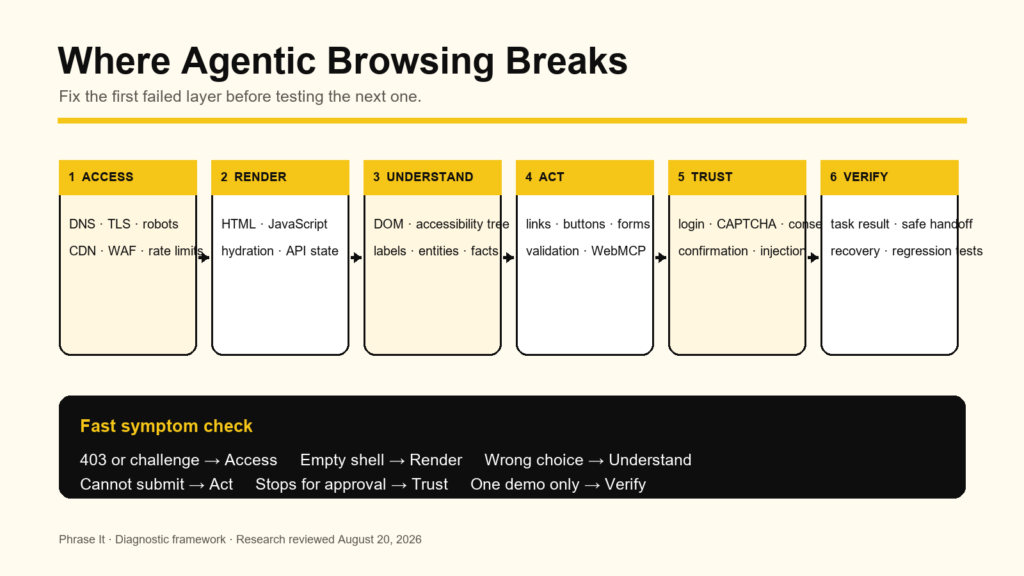
Figure 1. Agentic browsing troubleshooting order: fix the first failed layer, then rerun the full journey.
If your team has five plausible causes and no agreed first fix, you do not need another generic AI-readiness checklist. You need a technical diagnosis that traces the failed task from request to result and turns it into developer-ready priorities.
See the technical SEO approachWhy Does the Google Lighthouse Agentic Browsing Audit Fail or Fluctuate?
Lighthouse may fail because the site has a real accessibility, layout, llms.txt, or WebMCP problem, but it can also fail because the experiment is not configured correctly. Chrome says the category requires Chrome 150 or later, WebMCP checks require its origin trial, and dynamic registration timing or DOM variability can change what the audit captures.
Fix 1: Confirm You Are Testing the Experimental Feature Correctly
1. Check the Chrome version at chrome://version and use Chrome 150 or later for the category described in the current documentation.
2. Confirm the page is in the WebMCP origin trial if you expect WebMCP checks to run.
3. Test the exact production or staging origin enrolled in the trial. Origin-trial tokens are origin-specific.
4. Run in a clean profile or Incognito window with extensions disabled.
5. Preserve the report JSON so you can compare audit IDs and error details, not only the pass ratio.
Chrome does not calculate a conventional 0-100 Agentic Browsing score. It reports a fractional pass ratio and per-audit status because the standards are still emerging. Treat 2/3 as “one deterministic check did not pass,” not as a ranking penalty or proof that two-thirds of agents can use the site.
Fix 2: Stabilize WebMCP Registration Timing
An imperative tool registered in JavaScript can appear in one run and disappear in another if registration depends on hydration, an API call, consent, route transitions, or a component mounting late.
1. Register stable, page-relevant tools as early and consistently as practical.
2. Prefer static registration when the tool is valid throughout the page state.
3. Register and unregister state-specific tools deliberately, rather than leaving stale tools available.
4. Listen for the toolchange event during development and log the final tool list.
5. Test await document.modelContext.getTools() after each important state change.
6. Keep external APIs out of the registration path. The tool can call an API during execution without waiting on that API before it becomes discoverable.
If older sample code uses navigator.modelContext, update it. Chrome’s current imperative API documentation says that interface is deprecated in Chrome 150 in favor of document.modelContext.
Fix 3: Remove Variability From the Accessibility Tree and Layout
Cookie banners, rotating promotions, personalization, A/B tests, injected chat widgets, and late-loading navigation can change both the DOM and accessibility tree. Run a controlled test with a known consent and login state, then repeat it with production states. The goal is not to hide variability; it is to identify which state creates the failure.
Free Agentic Browsing Audit with Fixes
How Do You Fix `llms.txt` Without Treating It Like a Ranking Factor?
Create https://example.com/llms.txt as a small, valid Markdown map of the site’s purpose and important links, return it directly with a successful response, and keep it current. Use it as optional agent-discovery infrastructure. Google Search explicitly says it ignores llms.txt for rankings and generative Search visibility, even though Lighthouse checks it.
That apparent contradiction disappears when you separate products. Google Search uses its index and ranking systems. Chrome’s Lighthouse Agentic Browsing audit evaluates machine interaction and discoverability. One Google product can test an optional file that another Google product does not use as a ranking input.
What the Lighthouse Check Actually Means
Chrome’s documentation says:
- A server error while fetching /llms.txt is flagged.
- A 404 is marked Not Applicable because the file is currently optional.
- A valid file should live at the domain root and provide a concise Markdown summary with key links.
That means a broken llms.txt endpoint is worse for this audit than deliberately having no file. Do not deploy a plugin route that intermittently returns 500, a login page, or an HTML security challenge at a .txt URL.
A Minimal, Useful `llms.txt` Example
# Example Company
> Example Company provides inventory software for multi-location retailers in the United States. The links below contain current product, pricing, support, and policy information.
## Product
– [Platform overview](https://example.com/platform/): Core inventory, purchasing, and reporting capabilities.
– [Pricing](https://example.com/pricing/): Current plans, billing periods, limits, and purchase path.
## Support
– [Documentation](https://example.com/docs/): Setup and feature documentation.
– [Contact support](https://example.com/support/): Support options and response expectations.
## Policies
– [Privacy](https://example.com/privacy/): Data collection and privacy terms.
– [Terms](https://example.com/terms/): Service terms and account rules.
The proposed llms.txt specification requires an H1. It then allows a blockquote summary, explanatory text, H2 sections, and Markdown link lists. Keep the file curated. Dumping thousands of sitemap URLs into Markdown gives an agent more tokens to process without explaining which destinations matter.
Step-by-Step `llms.txt` Validation
1. Request the exact root URL: curl -i https://example.com/llms.txt.
2. Confirm the final status is 200 and inspect every redirect. Avoid redirecting the file to a homepage or locale selector.
3. Confirm the body is Markdown text, not HTML from WordPress, a CDN challenge, or a login page.
4. Confirm the first content heading is one H1 containing the site or project name.
5. Open every linked URL and remove redirects, 404s, staging hosts, tracking URLs, and expired offers.
6. Compare its claims with the live pages. Prices, plan names, availability, and policies must agree.
7. Purge page cache and CDN cache, then request the file from a clean network.
8. Re-run Lighthouse and save the report.
9. Add maintenance ownership. Update the file when core URLs or commercial facts change.
For WordPress, a plugin-generated file can be convenient, but verify the actual response. A setting in Yoast or AIOSEO does not prove that another cache, security plugin, Nginx rule, or CDN is serving it correctly.
Do not confuse `llms.txt` with `robots.txt`. llms.txt is a proposed content map. robots.txt expresses crawler access preferences. Neither file grants an agent permission to log in, bypass a CAPTCHA, or complete a transaction.
How Do Robots Rules Block AI Crawlers and Browser Agents?
Robots rules can prevent some retrieval crawlers from accessing content, but user-controlled browser sessions may behave differently. Audit rules by named user agent, URL path, and product purpose. Do not assume User-agent: * affects every agent identically, or that allowing one Google token enables Gemini, Google Search, and browser automation in the same way.
Separate the Fetchers You Are Controlling
At minimum, distinguish:
- Search indexing crawlers.
- Model-training or grounding controls.
- User-triggered retrieval agents.
- Cloud-browser or interactive task agents.
- Your own monitoring and testing tools.
Google documents Google-Extended as a robots control token for Gemini model training and certain grounding uses; it is not a separate HTTP user-agent string and does not control Google Search inclusion or ranking. A rule for Google-CloudVertexBot applies to crawls requested by site owners building Vertex AI agents, not Google Search.
OpenAI similarly documents different purposes and agent identities. The useful lesson is not to copy a giant allowlist from a blog. Build a policy by purpose, verify current operator documentation, and validate traffic rather than trusting a spoofable user-agent string.
Step-by-Step Robots Audit
1. Fetch /robots.txt from the same hostname the agent uses, including www versus apex and any regional subdomain.
2. Record redirects, status, cache headers, and body.
3. Parse the file using the exact user-agent token you are testing.
4. Check the requested page and every required dependency path, API route, asset, and redirect destination.
5. Review broad rules such as Disallow: /, wildcard patterns, and CMS-generated exclusions.
6. Check page-level noindex, nosnippet, data-nosnippet, and X-Robots-Tag separately. Those controls have different purposes.
7. Change only the rules that conflict with the policy you actually want.
8. Re-fetch after clearing caches and test several representative URLs.
Never expose private pages because an agent needs them. Authentication and authorization remain the access control. robots.txt is a voluntary crawling protocol, not a security boundary.
How Do You Fix CDN, WAF, Bot-Management, Rate-Limit, and CAPTCHA Blocks?
Inspect edge-security logs for the agent’s request before changing application code. Legitimate agents may be blocked by bot scores, JavaScript challenges, IP reputation, missing cookies, header anomalies, geo rules, or rate limits. Allow verified agent traffic narrowly when the provider supports verification; never trust a claimed user-agent string by itself.
Identify the Edge Failure
Common signatures include:
- 401, 403, 406, 409, or 429 responses.
- A 200 response whose body is a “Just a moment” or JavaScript challenge page.
- Repeated redirects to a consent, region, or login page.
- A CAPTCHA iframe replacing the intended form.
- Requests that work from an office network but fail from a cloud browser.
- Missing Signature, Signature-Input, or Signature-Agent headers after an intermediate proxy.
Match the request ID in the response to Cloudflare, Akamai, HUMAN, AWS WAF, or another edge log. Determine which rule fired and why. Disabling the whole WAF to make a demo pass is not a fix.
Allow Verified Agents, Not Spoofed Names
OpenAI’s current cloud-browser guidance documents Web Bot Auth using HTTP Message Signatures. For supported providers, the CDN can verify the signature and identify the agent. For a custom edge, verification includes the signature headers and the published key directory.
1. Confirm your provider recognizes the signed agent identity.
2. Create a narrowly scoped allow or skip rule for that verified identity.
3. Preserve authentication, authorization, abuse prevention, and application rate limits.
4. Confirm proxies preserve all signature headers.
5. Log allowed requests so the policy remains auditable.
6. Test an invalid or unsigned request to prove the rule does not trust a spoofed header.
If an agent does not support cryptographic verification, use a controlled test path, authenticated test account, or provider-specific integration. Do not allow an entire cloud IP range unless you accept the unrelated traffic that comes with it.
Return Machine-Usable Rate-Limit Errors
A bare 429 gives the agent little recovery information. Return a standard status, Retry-After when appropriate, and a concise body explaining whether retrying is safe. For state-changing actions, use idempotency keys so a retry cannot create two orders, two tickets, or two bookings.
AI visibility work fails when crawling, technical SEO, content, and measurement are handled as separate projects. Phrase It connects those layers so you can see whether an agent can access the page, understand the answer, and move a qualified user toward the next step.
Explore AI SEO servicesHow Do JavaScript Rendering and Hydration Break Agentic Browsing?
JavaScript breaks agentic browsing when the initial HTML lacks useful content or controls, hydration fails, required data arrives late, or a client-side route does not create stable state. Serve essential information and navigation in HTML where possible, make loading and error states explicit, and verify the rendered DOM under slow, failed, and blocked network conditions.
Diagnose an Empty or Partial Page
1. Use View Source, not only DevTools Elements. If the source contains a root <div> and script tags but no useful content, the agent depends entirely on rendering.
2. Disable JavaScript and inspect which content and links remain.
3. Throttle the network and CPU. Watch whether controls exist before their labels or data.
4. Block one API request at a time and confirm the page shows a meaningful error instead of an endless spinner.
5. Check console errors, CSP violations, CORS failures, module-load failures, and hydration mismatches.
6. Inspect the DOM and accessibility tree after the page reaches a stable state.
Server-side rendering or static generation is useful for core content, headings, links, product facts, and policies. It does not mean every application must work without JavaScript. It means the agent should not need a perfect client runtime merely to discover what the page is and where the next action lives.
Replace Opaque Client State With Addressable State
Agents recover more reliably when meaningful read-only state has a URL:
- Use real <a href> links for navigation.
- Represent search, filters, pagination, and comparison state with stable URLs when appropriate.
- Avoid forcing a hover-only menu before any category link exists.
- Give modals and route changes an accessible name and explicit completion state.
- Preserve cart or workflow state across required subdomains and redirects.
Do not put an irreversible action in a GET URL. Read-only state can be addressable; state-changing actions should use protected POST-style operations, CSRF controls, authorization, confirmation, and idempotency.
Make Loading, Error, and Success States Observable
An animation is not a completion contract. When an action starts, expose a busy state such as aria-busy=”true”, disable duplicate submission appropriately, and provide a named status region. When it finishes, update the page with a specific success message, identifier, and next action.
The agent should be able to distinguish:
- Still processing.
- Completed successfully.
- Validation failed and can be corrected.
- Temporary dependency failure and safe to retry.
- Permanent or policy failure requiring the user.
How Do You Repair the Accessibility Tree and Semantic HTML?
Use native HTML elements, programmatic names, valid roles, and visible state so the accessibility tree describes the same controls a person sees. Agents often use that tree as their machine-readable map. A visually obvious control can still be invisible or ambiguous to an agent if it is an unlabeled <div>, hidden with ARIA, or nested incorrectly.
Fix Links and Buttons
Use <a href=”/pricing/”>View pricing</a> for navigation and <button type=”button”>Add to comparison</button> for an in-page action. Do not attach click handlers to generic <div> or <span> elements and assume visual styling communicates purpose.
For icon-only controls, provide a programmatic name:
<button type=”button” aria-label=”Remove Acme Pro from comparison”>
<svg aria-hidden=”true” focusable=”false”>…</svg>
</button>
Avoid ten buttons all named “Select” or “Learn more.” Include enough context in the accessible name for the agent to choose the correct item.
Fix Form Labels and Errors
<label for=”work-email”>Work email</label>
<input
id=”work-email”
name=”email”
type=”email”
autocomplete=”email”
required
aria-describedby=”work-email-help work-email-error”>
<p id=”work-email-help”>We will send the booking confirmation here.</p>
<p id=”work-email-error” role=”alert”></p>
Every field needs a stable name, an associated label, the correct input type, and an understandable error. Placeholder text is not a durable label. It disappears when data is entered and often fails to explain format or purpose.
Fix Custom Components
Prefer a native <select>, checkbox, radio group, disclosure, or dialog where it meets the requirement. If you build a custom combobox, listbox, date picker, tab set, or menu, implement the full keyboard and ARIA pattern—not only role=”combobox”.
Inspect Chrome DevTools’ Accessibility pane and answer:
1. Does the element have the expected role?
2. Is its accessible name unique and meaningful?
3. Are current value, selected state, expanded state, disabled state, and errors exposed?
4. Is an actionable element incorrectly inside an aria-hidden=”true” ancestor?
5. Does focus move predictably after opening, closing, submitting, or navigating?
Google’s agent-friendly website guidance also warns about transparent overlays and “ghost” elements. A node can exist in the DOM while being covered or visually filtered from a screenshot-based agent.
How Does Layout Shift Make Agents Click the Wrong Element?
Layout shift makes an agent’s observation stale: it identifies a control, then an image, ad, banner, font, or injected widget moves that control before the click. Reduce CLS by reserving space, stabilizing fonts and dynamic regions, and keeping important actions in predictable locations. Chrome treats layout stability as an agentic-readiness signal for this reason.
Fix the Common CLS Causes
1. Add width and height attributes to images and videos, with responsive CSS preserving the aspect ratio.
2. Reserve fixed or minimum space for ads, embeds, review widgets, recommendation modules, and consent UI.
3. Do not inject banners above the current viewport without reserved space.
4. Preload only critical fonts, use an appropriate font-display strategy, and select fallback metrics that reduce reflow.
5. Animate with transform where suitable rather than layout-changing properties.
6. Measure real user CLS at the 75th percentile as well as the controlled Lighthouse run.
Google defines a good CLS as 0.1 or less for at least 75% of page visits. That performance threshold is not an “agent ranking factor,” but the underlying stability helps both people and agents interact reliably.
Test the exact state where the agent failed. Personalized banners, inventory notices, chat widgets, and consent tools often behave differently in production than they do in an empty staging profile.
How Do You Make Forms and Multi-Step Workflows Reliable for Agents?
Make each field’s purpose, allowed value, requirement, error, and completion state explicit. Keep steps addressable and stateful, use native controls where possible, and return corrective errors that explain what the agent should change. A form that is visually understandable but programmatically ambiguous will produce wrong values, skipped steps, and repeated submissions.
Build an Unambiguous Form Contract
- Use unique labels such as “Billing ZIP code,” not three fields named “ZIP.”
- Set type, name, required, min, max, step, and autocomplete accurately.
- Use radio buttons for one choice, checkboxes for independent choices, and a select only when the option set is appropriate.
- Put units in the label or description: “Budget per month (USD).”
- Explain date and identifier formats in text and validate them server-side.
- Keep option values meaningful. shipping=”Express” is clearer than shipping_id=”1″.
Make Validation Recoverable
Return errors next to the field and in an accessible summary. “Invalid input” is not actionable. “Enter a US ZIP code using five digits” tells the agent what to repair.
Preserve valid fields when one field fails. If the server clears the whole form, the agent has to reconstruct state and may enter inconsistent data on the retry.
Make State Changes Idempotent and Verifiable
For actions such as add-to-cart, booking, support tickets, and subscriptions:
1. Accept an idempotency key or detect duplicate submissions.
2. Return a stable resource or confirmation ID.
3. Update the visible interface and machine-readable state.
4. Provide a safe read-only status endpoint or page.
5. Distinguish “request received” from “booking confirmed.”
If a workflow crosses domains—for example, from your site to a payment processor—document what the agent can complete, what the person must confirm, and how the original site verifies the result after return.
When Should You Add WebMCP, and Why Does It Fail?
Add WebMCP when a repeated site action benefits from a structured tool contract, especially complex forms, search, booking, or stateful application functions. It is experimental, not a replacement for accessible HTML. Failures usually come from missing origin-trial setup, invalid or overlapping schemas, lifecycle timing, cross-origin permissions, unclear outputs, runtime errors, or unsafe tool design.
WebMCP lets a page register tools with a name, description, JSON input schema, and execution function. The browser can expose those tools to an agent, reducing the need to infer every action from pixels and DOM nodes.
Choose Declarative or Imperative WebMCP Deliberately
Use the declarative API when a standard HTML form already represents the task. Current Chrome documentation uses toolname and tooldescription on the <form>, with optional toolparamdescription on fields.
Use the imperative API when the task is not a standard form submission or requires application logic, state management, or API calls. Register with document.modelContext.registerTool() and provide a clear input schema.
Fix Tool-Selection Failures
If the agent calls the wrong tool:
1. Give each tool one distinct job.
2. Use a verb that states the effect, such as getOrderStatus or createSupportRequest.
3. Explain when the tool applies in positive, concrete language.
4. Remove overlapping tools or expose them only in the relevant page state.
5. Keep the tool list small enough that near-duplicates do not compete for context.
Chrome’s best-practice guidance recommends static registration as the default for most applications and warns that more overlapping tools make selection harder.
Fix Argument and Schema Failures
1. Mark required properties explicitly.
2. Use appropriate types and enums.
3. Describe units, formats, identifiers, and business meaning.
4. Accept natural input when the server can normalize it safely.
5. Validate strictly in code and return descriptive errors that support correction.
Do not expect JSON Schema alone to enforce business rules. The execution function still needs authorization, validation, rate limiting, CSRF protections where relevant, and safe error handling.
Fix Execution, Output, and State Failures
Catch runtime exceptions and report whether the failure is temporary, correctable, or terminal. Keep tool output concise and include the minimum state the agent needs for the next decision.
After execution:
- Update the user-visible interface.
- Return a stable success result.
- Register or unregister the next valid tools.
- Honor cancellation with AbortSignal for long-running work.
- Test dependency outages and timeouts.
For cross-origin iframes, tool registration is disabled by default. The embedding page must delegate the tools Permissions Policy, and origin exposure must be configured explicitly. Do not broaden exposedTo simply to make a test pass.
Build Evals Around Real Journeys
Chrome’s WebMCP guidance recommends evaluations because model behavior is probabilistic. Test whether the model chooses the right tool, supplies the right arguments, uses the result, and completes the intended journey. Continue using deterministic tests for your JavaScript, API, validation, permissions, and state transitions.
If your Lighthouse report, AI crawler logs, and real agent tests tell three different stories, I can turn them into one prioritized roadmap: what blocks access, what breaks task completion, what affects AI visibility, and what is merely experimental noise.
Book a 30-minute strategy callWhy Do Authentication, CAPTCHA, Consent, and Safety Checks Stop an Agent?
Some stops are correct security behavior. Agents may lack a login session, lose cookies across redirects, hit CAPTCHA or MFA, or require a person to confirm a purchase, account creation, form submission, communication, or sensitive-data action. Design a clear handoff and resume path rather than weakening controls or disguising consequential actions as harmless ones.
Fix Session and Authentication Problems
1. Reproduce the task from the same login state as the agent.
2. Check whether cookies use the correct Domain, Path, Secure, and SameSite attributes across every required origin.
3. Inspect redirects through identity providers and confirm the return URL preserves state.
4. Make login errors explicit and avoid silent loops.
5. Provide a supported takeover step for password, passkey, MFA, or account recovery.
6. After takeover, show an obvious “resume” state and preserve the incomplete task.
Google says Gemini in Chrome can use Google Password Manager only with permission and does not share the passwords with Gemini. Your site should work with standard browser authentication patterns; it should not ask the agent to receive or expose credentials in page text.
Treat CAPTCHA as a Policy Decision
CAPTCHA exists because you do not trust the request yet. Replacing it with no control may increase abuse. Instead:
- Use verified agent identity where supported.
- Apply risk-based challenges rather than challenging every session.
- Offer human takeover for unresolved challenges.
- Provide accessible CAPTCHA alternatives.
- Keep server-side abuse controls after a challenge passes.
Distinguish a Failure From a Required Confirmation
Gemini in Chrome’s documented safeguards may request takeover for final financial transactions, accepting terms, or creating an account, and may request confirmation for communications, data changes, form submission, scheduling, or sensitive sites. Your acceptance test should expect those boundaries.
Success may be: “The agent prepares the correct order and stops at the final purchase confirmation.” Marking that as a site failure encourages developers to remove a safety boundary the user needs.
How Do Unclear Content and Structured Data Cause the Wrong Result?
Agents can operate a technically accessible page and still return the wrong answer when price, availability, identity, location, units, conditions, or dates are unclear. Put decisive facts in visible text near the relevant entity, keep them consistent across the site, and use valid structured data as corroboration—not as a substitute for the page people see.
Make Commercial Facts Explicit
Replace:
Plans from 49. Get started today.
With:
Starter costs $49 per month when billed monthly. It includes up to three users. Annual billing is $490 per year. Taxes are calculated at checkout.
The second version resolves currency, billing period, plan, limit, and condition. Those details reduce wrong comparisons for people and agents.
For products and services, clarify:
- Legal product or company name and common brand name.
- Current price, currency, billing period, and “starting from” condition.
- Availability, geography, shipping, and eligibility.
- Variant relationship, size, quantity, and unit.
- Effective date and update date for time-sensitive policies.
- What the button does before the user selects it.
Use Structured Data Consistently
Add the schema type that matches the visible entity—such as Organization, Product, Offer, Service, FAQPage, or BreadcrumbList—when it is appropriate and supported. Validate syntax and make sure values match the page.
Structured data cannot repair inaccessible content, an incorrect price, or a blocked page. Google also says there is no special schema required for its generative Search features. Use schema because explicit entities and properties reduce ambiguity and support established search features, not because it guarantees an agent will choose your business.
How Do You Verify the Fix Across Real Agents and Real Journeys?
Verify each repair with deterministic technical tests and repeated end-to-end agent tasks. A pass requires the correct result, preserved security boundary, visible state update, and no regression for keyboard or human users. Test multiple agents and states because their retrieval, browser, policy, and authentication capabilities differ. Record success rate, not one impressive demo.
Build a Small Agentic Browsing Test Matrix
| Dimension | Minimum Coverage |
|---|---|
| Agent | Target production agent, one alternative, and a deterministic browser test |
| Session | Logged out, logged in, expired session, consent accepted/not accepted |
| Device | Desktop and mobile where the journey is supported |
| Network | Normal, slow, API timeout, and blocked third-party request |
| Content | Typical, empty, out of stock, validation error, and long-text cases |
| Safety | Read-only task, state-changing task, and consequential confirmation |
Run each realistic prompt more than once. A model can choose a different route even when the website is unchanged.
Track Layer-Specific Metrics
- Access success: Percentage of required URLs returning the intended response.
- Interpretation accuracy: Percentage of tasks where the agent selects the right entity, option, and control.
- Tool-call accuracy: Correct WebMCP tool and arguments.
- Task completion: Percentage reaching the defined acceptable endpoint.
- Safe handoff: Percentage stopping at the required confirmation with state preserved.
- Recovery rate: Percentage correcting a validation or temporary error without duplicating an action.
- Human parity: Keyboard and assistive-technology users can complete the same journey.
Store the prompt, environment, build version, agent version, timestamps, action trace, and result. If a release drops completion from 9/10 to 4/10, you need enough evidence to distinguish a changed model from a changed site.
Add deterministic checks to CI for HTML validity, accessibility, schema, status codes, redirects, llms.txt, CLS budgets, form labels, and WebMCP registration. Keep probabilistic agent evals in a separate suite with tolerances and reviewed traces.
What Should You Fix First?
Fix the earliest failed layer in the user’s real journey: access before rendering, rendering before semantics, semantics before interaction, and interaction before optimization extras. Keep security stops intentional and measurable. llms.txt, schema, and WebMCP can help, but none of them compensates for a firewall block, empty DOM, ambiguous form, lost state, or unsafe workflow.
My preferred order is:
1. Correct the test setup and define success.
2. Resolve DNS, TLS, HTTP, robots, CDN, WAF, and rate-limit failures.
3. Make core content and navigation render reliably.
4. Repair semantic HTML and the accessibility tree.
5. Stabilize layout and make state changes observable.
6. Fix forms, validation, session continuity, and idempotency.
7. Add or repair llms.txt as an optional discovery layer.
8. Add WebMCP where a structured tool creates real reliability.
9. Preserve authentication, confirmation, and prompt-injection defenses.
10. Run repeated end-to-end evals and monitor regressions.
That order produces developer-ready work instead of an audit full of disconnected warnings.
If an AI agent can find your business but cannot complete the journey, I can audit the exact failure path and tell you what to fix first. Bring one task, one URL, and any Lighthouse or agent trace you already have.
Discuss your agentic browsing issueFrequently Asked Questions About Agentic Browsing
These answers address the implementation questions site owners most often encounter after seeing a Lighthouse result or a failed browser-agent task. The important distinction is whether you are diagnosing Google Search visibility, an experimental Chrome readiness audit, a retrieval crawler, or an interactive agent acting inside a browser session.
Is Agentic Browsing a Google Ranking Factor?
Google has not documented Lighthouse’s experimental Agentic Browsing category as a Search ranking factor. The category reports deterministic readiness checks rather than a conventional 0-100 score. Fix the underlying accessibility, stability, access, and content issues because they improve usability and task reliability, not because a fractional Lighthouse result guarantees rankings.
Why Does Lighthouse Show 2/3 for Agentic Browsing?
A 2/3 result means one of the current checks did not pass or apply as expected; it does not mean your site is “66% AI-ready.” Open the individual audit details. Confirm Chrome version and origin-trial setup, then inspect llms.txt, agent-critical accessibility, CLS, and WebMCP registration or schema errors.
Do I Need `llms.txt` for Google AI Overviews or AI Mode?
No. Google Search’s current guidance says it does not use llms.txt for Search rankings or its generative Search features. Chrome’s separate experimental Lighthouse category checks the file as an optional machine-readable summary for agents. Create it if it supports agent discovery, but do not present it as an AI ranking requirement.
Is `llms.txt` the Same as `robots.txt`?
No. robots.txt contains access preferences for named crawlers and paths. llms.txt is a proposed Markdown map that summarizes a site and links to important resources. llms.txt does not grant permission, override a disallow rule, authenticate an agent, or make private content safe to expose.
Does Passing Lighthouse Mean Gemini in Chrome Can Use My Checkout?
No. Lighthouse checks a limited set of deterministic signals. A checkout can still fail because of login state, cookies, bot management, CAPTCHA, ambiguous controls, third-party payment iframes, validation, inventory changes, or agent safety policies. Test the exact purchase journey and expect a person to confirm consequential actions where the agent requires it.
Should I Allow All AI Bots Through My Firewall?
No. User-agent strings can be spoofed. Prefer provider-supported cryptographic verification or a verified bot directory, then allow only the traffic and paths that match your policy. Keep authorization, abuse protection, rate limits, transaction confirmation, and logs. If verification is unavailable, use a controlled test integration rather than a blanket bypass.
Does WebMCP Replace Accessibility Work?
No. WebMCP is an experimental structured-tool layer, while semantic HTML and accessibility support the page’s core machine-readable interface and human access. Build an accessible journey first. Add WebMCP when it makes a repeated action more reliable, and test both the tool contract and the underlying human interface.