
The most expensive SaaS technical SEO problem is rarely a missing meta description. It is a release that quietly turns a revenue page into an empty JavaScript shell, gives a deleted route a 200 response, points canonicals at the wrong host, or leaks staging URLs into search.
I have worked in SEO and organic growth since 2019 across agency, freelance, and in-house B2B SaaS roles. I have managed technical and content priorities across multiple software products, written developer-ready tickets, led migrations, and built reporting systems that follow the result after implementation. The pattern is consistent: technical SEO works when it becomes part of how the company ships.
This guide is not a 100-point audit. It is a release framework for protecting the pages that create product discovery, trials, demos, and pipeline.
Table of Contents
What Is Technical SEO for SaaS?
Technical SEO for SaaS is the release infrastructure that keeps public product, feature, use-case, integration, comparison, documentation, and content routes accessible to search systems and people. It defines how those routes respond, render, consolidate, link, perform, migrate, and get monitored whenever engineering or marketing changes the site.
A normal checklist asks whether a canonical exists. A release contract asks whether the canonical still identifies the intended acquisition page after a route refactor, locale launch, CMS deployment, or domain change.
That distinction matters because SaaS websites change constantly. The marketing site may use Next.js, Nuxt, Webflow, or WordPress. Documentation may sit on another platform. The product may live behind authentication on an app subdomain. Feature flags, experiments, reverse proxies, and CDN rules can change what a crawler receives without anyone editing the page copy.
My broader SaaS SEO strategy framework explains how buyer demand, page architecture, authority, conversion, and measurement fit together. Technical SEO is the layer that makes that strategy shippable.
Free Download: The 100-Point SaaS SEO Audit Checklist
A crawler can flag hundreds of issues without telling you which one is costing you trials, demos, or revenue.
I turned this audit framework into a practical 33-page checklist covering 100 revenue-influencing SaaS SEO mistakes. Every check includes the revenue risk, the fix, and the evidence you should use to verify the work.
Use it to audit:
- Revenue-relevant demand and page architecture
- Search intent, content relevance, and product evidence
- Crawling, rendering, indexation, and canonicalization
- Internal links and external authority
- AI mentions, citations, and message accuracy
- Trial, demo, and signup paths
- Analytics, CRM attribution, and implementation priorities
This is not another list of technical warnings to clear indiscriminately. It helps you find the earliest failure in the path from buyer demand to revenue—and decide what deserves fixing first.
What Must Be True Before a Public SaaS Route Ships?
| Release Gate | Required Evidence | Failure That Blocks Release |
|---|---|---|
| Response | Final URL and redirect chain return the intended status | Error, loop, soft 404, or temporary redirect used for a permanent move |
| Rendered Page | Essential heading, copy, links, and metadata survive rendering | Empty shell, hydration error, or blocked dependency removes the page’s meaning |
| Index Signals | Robots directives, canonical, and locale annotations agree | Public page is noindex, canonical points elsewhere, or staging remains preferred |
| Discovery | Real links and the correct sitemap expose the route | Orphan page, script-only navigation, or sitemap contains the wrong URL |
| Performance | Template passes the agreed lab budget and field data is monitored | Release creates a material LCP, INP, or CLS regression |
| Observation | Owner, alert, verification query, and rollback condition exist | Failure can persist until traffic reports arrive weeks later |
This is the visual I use to explain the system to developers and marketing owners.
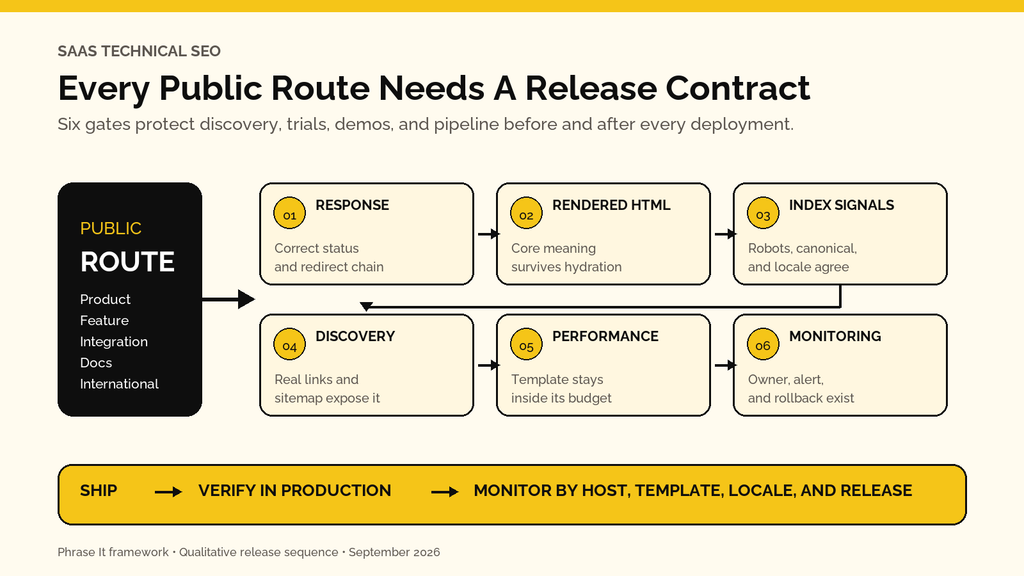
The gates are ordered deliberately. Schema cannot rescue a page that returns a firewall challenge. Internal links cannot make a deleted route return 404. A perfect Lighthouse lab run cannot prove the canonical points to production.
How Should SaaS Teams Handle JavaScript Rendering and Hydration?
Serve the page’s essential meaning in the initial or reliably rendered HTML, then use hydration to add interactivity without replacing, delaying, or contradicting that meaning. Test source HTML, rendered DOM, blocked API calls, slow networks, and hydration errors on representative templates so a client runtime failure does not erase an acquisition page.
Google processes JavaScript pages through crawling, rendering, and indexing. Its JavaScript SEO documentation also says server-side rendering or pre-rendering remains useful because it is faster for users and crawlers, and not every bot runs JavaScript.
For a SaaS marketing page, I want the initial response or dependable rendered result to include:
- One descriptive H1 and the copy that explains the product, feature, integration, or use case.
- Real <a href> links to important public destinations.
- A unique title, robots directive, canonical, and any required hreflang annotations.
- Visible pricing, availability, compatibility, or plan facts the page claims in structured data.
- A useful loading or error state when a secondary API dependency fails.
Hydration is the step where client-side JavaScript attaches behavior to server-rendered HTML. A mismatch can cause the browser to discard or replace markup, duplicate elements, lose links, or leave the page in an incomplete state. That is why “we use SSR” is not an acceptance test.
I compare View Source, the live DOM, Google Search Console’s rendered page, and a browser session with throttled or blocked dependencies. If the product copy disappears when one personalization endpoint times out, the page is not resilient enough for acquisition.
If JavaScript, canonicals, and release changes keep producing conflicting evidence, Phrase It can isolate the failing mechanism and turn it into developer-ready priorities. The goal is a route your team can ship, retest, and monitor, not another export of warnings.
See the technical SEO approachHow Should Client-Side Routes Return Real Status Codes?
Every meaningful URL state needs a server response that matches reality. Public pages should return 200; permanent moves should return 301 or 308; missing routes should return 404 or 410; gated routes may return 401 or 403. A client-side “not found” message inside a 200 response creates a soft 404.
Google queues 200 responses for rendering, while non-200 responses may skip rendering. Its JavaScript guidance specifically warns that single-page applications often return 200 for client-side error views.
Use the History API and real links for navigation, but make the origin or edge understand the route. Pasting /integrations/salesforce/ into a fresh browser session must return the same intended page as clicking there from the homepage. Pasting a deleted integration URL must not return the homepage shell with “not found” added after JavaScript runs.
The acceptance check is simple:
- Request the URL without a prior session.
- Record every redirect and the final status.
- Compare the response body with the rendered state.
- Test a valid route, a removed route, and a fabricated sibling route.
- Confirm error pages are not included in navigation or XML sitemaps.
How Do You Stop Canonicals and Duplicate Routes From Splitting Signals?
Choose one indexable URL for each distinct page purpose, then make redirects, internal links, sitemap inclusion, canonicals, and locale annotations support that choice. Parameters, trailing slashes, mixed hosts, case variants, preview routes, and client-side filter states should not create competing copies of the same acquisition page.
Google treats redirects and rel=”canonical” as strong canonical signals, while sitemap inclusion is weaker. Its canonicalization guidance also recommends stacking consistent signals.
For SaaS, duplicate routes often appear when:
- A CMS preview, campaign, or experiment URL becomes publicly linked.
- Both marketing and docs platforms publish the same integration explanation.
- Query parameters alter presentation but not the page’s core purpose.
- A router serves the same component at old and new paths.
- Locale detection creates multiple URLs without stable language ownership.
- An app help route and a public support article answer the same query.
Do not canonicalize genuinely different feature or use-case pages just because their templates look similar. Canonicalization is not a substitute for deciding whether each page serves a distinct buyer question.
How Should Marketing, App, and Docs Subdomains Work Together?
Treat the marketing site, app, and documentation hosts as separate operational systems with one acquisition plan. Decide which public questions each host owns, keep private application states out of search, connect useful docs to commercial pages, verify every host in Search Console, and monitor cross-host redirects, canonicals, cookies, and access rules independently.
The marketing site usually owns category, product, feature, use-case, integration, comparison, pricing, and case-study demand. Public docs can earn visibility for configuration and troubleshooting questions. The authenticated app normally should not create crawlable account, dashboard, search, or customer-data routes.
Subdomains are not automatically an SEO disaster. Unclear ownership is. If docs.example.com/integrations/slack and www.example.com/integrations/slack target the same intent, decide whether one should become the canonical acquisition page and what unique job the other performs.
I also check links in both directions. Docs should not become an isolated high-authority library that never helps an evaluator understand the product. Marketing pages should not promise an integration without linking to the technical evidence a buyer needs.
That connected model is part of Phrase It’s SaaS SEO consulting approach: public page types operate as one acquisition system even when different teams and platforms own them.
How Do Staging, Internationalization, Sitemaps, and Schema Fit the Release?
These controls belong in the release configuration, not a cleanup sprint. Protect staging with authentication, give every locale a stable URL and reciprocal annotations, generate sitemaps from the canonical indexable inventory, and validate structured data against visible production facts. Each control should fail a deployment when it contradicts the intended public route.
Keep Staging Out of Search
Password or network protection is stronger than relying only on robots.txt. Blocking crawling does not guarantee a discovered URL disappears, and it can prevent a crawler from seeing a noindex directive.
If a staging environment must be publicly reachable for a limited test, use layered controls: authentication where possible, noindex on every response, no production internal links, no inclusion in sitemaps, production canonicals only when content parity is intentional, and an automated hostname check. Remove staging-only directives from the production build through an explicit release test, not memory.
Give Every Locale Its Own Address
Google recommends separate URLs for language versions and says hreflang annotations help it serve the correct version. The localized-pages documentation requires each version to reference itself and its alternates.
Avoid automatic redirects that make the US crawler unable to reach other locales. Keep language selectors as crawlable links. Canonicals should generally remain within the locale when pages are legitimate equivalents, while hreflang connects the set.
Generate Sitemaps From Publishing Truth
An XML sitemap should list canonical, indexable, final 200 URLs you want search engines to discover. Generate it from the same publishing state that controls routes, and test it for redirected, blocked, noindex, staging, and non-canonical URLs.
Google calls sitemap inclusion a canonical signal and supports sitemap indexes for larger inventories. A sitemap is still a hint, not a way to override contradictory page signals.
Use Schema as Corroboration
For SaaS, useful types may include Organization, BreadcrumbList, Article, and SoftwareApplication where the page meets the requirements. Google’s SoftwareApplication documentation was updated September 8, 2026 and requires supported properties such as the app name and offer price for rich-result eligibility.
Only mark up facts visible on the page. Phrase It’s schema markup for AI research goes deeper on what schema can and cannot do. It clarifies entities and may enable search features; it does not fix inaccessible content or guarantee an AI citation.
Planning a redesign, replatform, domain move, or major routing change? Phrase It’s migration work builds the baseline, URL decisions, staging comparison, launch checks, and monitoring into one controlled release.
Review the migration serviceHow Should Internal Linking Reflect the SaaS Product Model?
Internal linking should express product relationships and buyer progression, not distribute links evenly. Connect educational pages to the relevant feature, use case, integration, comparison, proof, and conversion step; link docs back to the commercial context; and make every priority route reachable through descriptive HTML links from another useful indexable page.
When I build SaaS architectures, I map links around what the reader needs next. A “how to automate client reporting” guide may link to the reporting feature, the HubSpot integration, a workflow template, a comparison page, and a case study. Those destinations do different jobs.
This also gives engineering a testable requirement. A release should fail when a priority route becomes orphaned, navigation changes point to redirected URLs, or JavaScript turns an anchor into an unparseable click handler.
The principle has shown up across my public and confidential SaaS work. I built 25-plus-article programs for individual software brands, and across one SaaS client portfolio, content selected and prioritized for optimization produced a 10x average increase in clicks. Technical access and internal paths were dependencies in that work, not a claim that one technical fix caused the result.
How Should Core Web Vitals Become a Release Budget?
Set Core Web Vitals budgets by representative SaaS template, test them before deployment, and monitor real-user field data after release. LCP measures loading, INP measures responsiveness, and CLS measures visual stability. Passing one homepage lab test cannot protect feature, pricing, docs, signup, or international templates from a regression.
The current “good” thresholds are LCP at 2.5 seconds or less, INP at 200 milliseconds or less, and CLS at 0.1 or less at the 75th percentile. The web.dev threshold methodology explains why field data and the 75th percentile matter.
SaaS releases commonly regress performance through:
- A new hero video, personalization SDK, chat widget, or tag-manager script.
- Hydration work and long main-thread tasks on interactive templates.
- Pricing tables or banners that shift after API data arrives.
- Fonts and images that are not discoverable early enough for LCP.
- Consent and experimentation layers that behave differently in production.
I write performance tickets around the failing mechanism: the LCP element and its discovery chain, the long task and responsible script, the component causing layout movement, or the slow origin request. “Improve PageSpeed” is not developer-ready.
How Do You Protect SEO During a SaaS Migration?
Treat a SaaS migration as a controlled acquisition release: preserve the production baseline, map every valuable URL, compare old and new templates, test redirects and signals before launch, define stop conditions, and monitor both hosts afterward. Change fewer variables at once so the team can identify which release decision caused a material difference.
Google’s site-move documentation recommends testing the new site, preparing a URL map, using server-side redirects, monitoring old and new URLs, and keeping redirects for at least one year. It also warns that Google may crawl the new site more heavily after a move.
I have led migration work designed to preserve organic visibility and protect high-value pages. My release sequence is:
- Save crawls, search performance, backlinks, conversions, analytics configuration, robots files, sitemaps, rendered templates, and Core Web Vitals baselines.
- Decide which URLs stay, move, merge, disappear, or need investigation.
- Compare staging and production across content, metadata, directives, canonicals, hreflang, schema, links, status codes, and rendering.
- Test the old-to-new redirect map and important user journeys.
- Launch with named stop conditions, owners, a freeze on unrelated changes, and a rollback path.
- Monitor URL groups, templates, queries, conversions, logs, and server capacity until the move stabilizes.
Phrase It’s full website migration SEO checklist covers the detailed audit sequence. The point here is narrower: a migration belongs inside release management because it changes the addresses and signals acquisition already depends on.
If your technical backlog contains 80 issues and no agreed release order, bring the site, the highest-value templates, and the current constraints. I will show you which dependency I would protect first and what evidence should prove the fix.
Book a 30-minute strategy callHow Should SaaS Teams Handle Search Crawlers, AI Crawlers, and Browser Agents?
Separate search indexing crawlers, AI search crawlers, training controls, user-triggered fetchers, and interactive browser agents because they have different purposes and access patterns. Define policy by product and route, verify real traffic at the edge, and test CDN or WAF behavior. A permissive robots.txt file does not prove the request reaches production content.
Google documents common crawlers and user-triggered fetchers separately. Its user-triggered fetcher documentation says some user-triggered clients generally ignore robots.txt and warns that user-agent strings can be spoofed.
OpenAI’s publisher guidance distinguishes OAI-SearchBot access for ChatGPT search inclusion. Its cloud-browser allowlisting documentation separately describes signed HTTP requests that site operators can verify before creating narrow CDN or WAF rules.
For each named system, record:
- Purpose and current official identifier.
- Allowed public hosts and paths.
- Robots policy where applicable.
- Verification method, edge rule, and rate limit.
- Expected status, response body, and required assets.
- Log query and owner.
Do not allow an entire cloud IP range because one demo failed. Preserve authentication, authorization, abuse controls, and human confirmation for consequential actions.
Where Accessibility Trees and WebMCP Fit
Semantic HTML and accessible names help people and can also give browser agents a clearer machine-readable interface. That is defensible release work when the product exposes public interactive tools, forms, comparison controls, or signup flows.
WebMCP is different. Chrome currently describes it as an experimental way for a page to expose structured tools to agents. Use it only when a real user task benefits from a tool contract, and keep the underlying accessible human interface. Phrase It’s agentic browsing troubleshooting guide covers those interaction and safety layers in depth, so I do not turn this technical SEO article into a WebMCP implementation manual.
Free Agentic Browsing Audit with Fixes
What Do Developer-Ready Acceptance Criteria Look Like?
Developer-ready acceptance criteria describe the affected routes, expected request and rendered behavior, test method, owner, and rollback condition. They avoid vague instructions such as “fix indexing” or “improve speed.” A ticket is complete only when the change passes on representative URLs, survives deployment, and appears correctly in the monitoring system.
| Requirement | Acceptance Criteria |
|---|---|
| Deleted Integration Routes | Each supplied legacy URL returns one 301 to its mapped replacement or 410 when no relevant replacement exists; no legacy URL returns 200 or enters a chain |
| React Feature Template | Initial or rendered HTML contains the unique H1, core product explanation, canonical, robots directive, and at least three crawlable destination links when a secondary API is blocked |
| Locale Launch | Every locale returns 200, self-canonicalizes, lists reciprocal hreflang alternates including itself, and remains reachable through an HTML language selector |
| Sitemap Deployment | Generated sitemap contains only canonical indexable 200 URLs; automated tests reject staging hosts, redirects, noindex URLs, and duplicates |
| LCP Regression | Representative pricing, feature, and docs templates remain within the agreed lab budget; field data is segmented by template and reviewed after launch |
| Bot Access | Verified crawler or agent request reaches the intended public response through the CDN/WAF; unsigned spoofed traffic does not inherit the allow rule |
I normally add evidence to the ticket: affected URL samples, request headers, rendered screenshots, Search Console inspection, log query, performance trace, or crawl export. The developer should not need to reverse-engineer what the SEO meant.
What Should You Monitor After Every Release?
Monitor signals that can reveal a release failure before monthly traffic reporting: status-code changes, robots and canonical drift, sitemap validity, rendered-content checks, orphan routes, Core Web Vitals, CDN/WAF denials, crawler activity, Search Console index signals, and conversion events. Segment alerts by host, template, locale, and release version so an owner can act.
A practical monitoring stack does not require one giant platform. It can combine synthetic URL checks, CI tests, scheduled crawls, log analysis, PageSpeed or CrUX data, Google Search Console, analytics, and a release annotation in the reporting dashboard.
I track implementation rather than stopping at recommendations. For one SaaS client, optimizing content and key landing pages increased sign-up conversions; I do not publish an unsupported percentage or attribute that outcome to technical work alone. Phrase It’s AI referral traffic case study shows the same measurement discipline: it reports 1,458 AI referral sessions, 80 key events, and 37 free trials over an exact 365-day window, while stating that closed revenue was not available.
The Phrase It work library is built around that standard: publish the result, the measurement window, and the limitation. Your technical release reporting should do the same.
Phrase It’s SEO revenue reporting guide explains how to connect page and query performance to trials, pipeline, and revenue once the release-level signals are trustworthy.
Make Technical SEO Part of the Definition of Done
SaaS technical SEO should be part of the definition of done for every public route. Protect the response, rendering, canonical, discovery, performance, and observation contracts before launch, then verify them in production. That is how technical SEO protects acquisition without turning every release into a separate quarterly audit project.
Your next step is to choose the highest-value public templates, define what must remain true when they change, and give every failure an owner and rollback condition.
If your SaaS site ships faster than SEO can verify it, Phrase It can build the release gates, developer-ready priorities, and monitoring plan around the acquisition paths that matter most. Bring one recent release or recurring failure, and I will tell you where I would start.
Discuss your SaaS release processFrequently Asked Questions About Technical SEO for SaaS
Technical SEO questions become easier when you separate the public acquisition site from the authenticated product and treat every change as a release. The answers below cover the scope, priority, JavaScript risk, app indexation, and review cadence SaaS teams most often need to decide.
How Is Technical SEO for SaaS Different From Regular Technical SEO?
The fundamentals are the same, but SaaS sites create a distinctive operating problem: frequent releases, JavaScript frameworks, client-side routes, an authenticated app, public docs, multiple subdomains, integration libraries, experiments, and international expansion. The work therefore needs engineering acceptance criteria and monitoring, not only periodic SEO recommendations.
Does a Small SaaS Website Need Technical SEO?
Yes, but it does not need enterprise crawl-budget theater. A small site should protect real status codes, index directives, canonicals, rendered content, crawlable links, sitemap accuracy, important templates, and release monitoring. Scale the depth to the routes and acquisition value at risk.
Should the SaaS App Be Indexed?
Usually, authenticated dashboards, account routes, internal search, and customer data should not be indexed. Public product-led resources, templates, directories, or tools may deserve indexation when they provide stable standalone value and meet a real search need. Decide at the route level rather than blocking or opening an entire host by habit.
How Does JavaScript Affect SaaS SEO?
JavaScript can delay or remove essential content, links, metadata, and error signals when rendering or hydration fails. Google can render JavaScript, but not every crawler can, and rendering adds dependencies. Serve core meaning reliably, use real links and routes, then test the rendered result under failure conditions.
How Often Should a SaaS Company Run a Technical SEO Audit?
Run a focused release QA check whenever relevant code, templates, routing, infrastructure, or content systems change. Use automated monitoring continuously and schedule a deeper review based on release volume, site complexity, past regressions, and business risk. A fixed quarterly audit is not enough for a team shipping weekly.
Which SaaS Technical SEO Issues Should Be Fixed First?
Fix the earliest failure affecting valuable public routes: access and status before rendering, rendering before index signals, index signals before discovery, and discovery before enhancements. Then prioritize by trials, demos, pipeline, links, and search demand at risk, balanced against implementation effort and release risk.