
Most stores do not have a product-description problem first. They have a prioritization problem.
They optimize every SKU the same way, copy manufacturer text into hundreds of pages, or spend weeks rewriting metadata while important products remain buried three or four clicks from the homepage. The result is more SEO activity without a reliable increase in qualified traffic or revenue.
I approach ecommerce product page SEO differently. First, I decide which searches deserve a product page. Then I choose which products are commercially important enough to optimize, fix the technical and content signals that block them, and measure whether the work changes shopper behavior.
This guide gives you that sequence. You can use it for ten products or ten thousand.
What Is Ecommerce Product Page SEO?
Ecommerce product page SEO is the work of making an individual product URL understandable, discoverable, and useful at the moment someone is ready to buy. It combines query targeting, product content, crawlability, structured data, internal links, and page experience so qualified shoppers can find the product and confidently purchase it.
The distinction between discovery and persuasion matters. Search engines need consistent information about what the product is, while shoppers need price, availability, images, specifications, delivery details, returns information, proof, and a clear next step.
Shopify’s current guide describes the same two-part job: help the search engine understand the page and help the user buy. I agree with that framing, but I would add a third requirement: the page must deserve priority inside the store’s wider architecture.
A perfectly written product page can still underperform if the query actually deserves a category page, the item keeps going out of stock, or no meaningful internal links point to it. Page-level optimization cannot rescue the wrong strategic target.
Table of Contents
Should You Optimize Product Pages or Category Pages First?
Use a product page when the searcher wants one specific item, model, SKU, size, material, or branded product. Use a category page when the searcher expects to compare several options. Before optimizing either page, inspect the current results and match the page type Google consistently rewards for that query.
This is the ecommerce SEO decision I would make before touching a title tag. A query such as ‘women’s trail running shoes’ usually needs a collection of choices. A query such as ‘Salomon Speedcross 6 women’s size 8’ is specific enough for a product page.
Google’s ecommerce guidance says site navigation and internal relationships help it understand page importance. That makes the page-type decision structural, not cosmetic: your categories should organize broader demand, while product URLs close specific demand.
| Signal | Category Page | Product Page |
|---|---|---|
| Query | Broad product type or use case | Specific product, model, SKU, or defining attribute |
| Shopper need | Compare several options | Evaluate one item |
| Inventory | Multiple suitable products | One stable product or meaningful variant |
| SEO risk | Thin grid or faceted duplication | Thin copy, unstable stock, or cannibalization |
| Best outcome | Discovery and narrowing | Decision and purchase |
How Do You Choose Keywords for Ecommerce Product Pages?
Choose one primary product intent, then support it with the attributes buyers naturally include when they search. Start with the product name, brand, model, SKU, material, size, use case, and compatibility terms. Confirm that ranking results favor individual product URLs before assigning the query to your product page.
I do not set a fixed keyword count. I map one purchase intent to the page and include the vocabulary required to describe the item accurately.
For a technical product, that may mean model number, capacity, voltage, compatible systems, and applications. For apparel, it may mean product type, cut, material, color, gender, and fit. Those are not keywords to sprinkle; they are facts shoppers use to choose.
Use Google Search Console to find impressions already reaching the URL, then compare the queries with the page’s visible information. Ahrefs or Semrush can expand the demand set, while your site-search data and support tickets reveal the language buyers use after they arrive.
- Export current product-page queries and landing-page performance from Google Search Console.
- Group terms by product identity, attribute, problem, use case, and compatibility.
- Inspect the search results to confirm whether Google prefers a product, category, marketplace, or guide.
- Assign one dominant intent to the page and move incompatible demand to a category, comparison, or guide.
- Record the primary query and required attributes in the product template or content brief.
| If you have thousands of products, do not turn keyword mapping into a spreadsheet nobody finishes. Start with products that combine demand, margin, stable inventory, and ranking opportunity. Explore Phrase It’s ecommerce SEO services. |
Which On-Page Elements Matter Most?
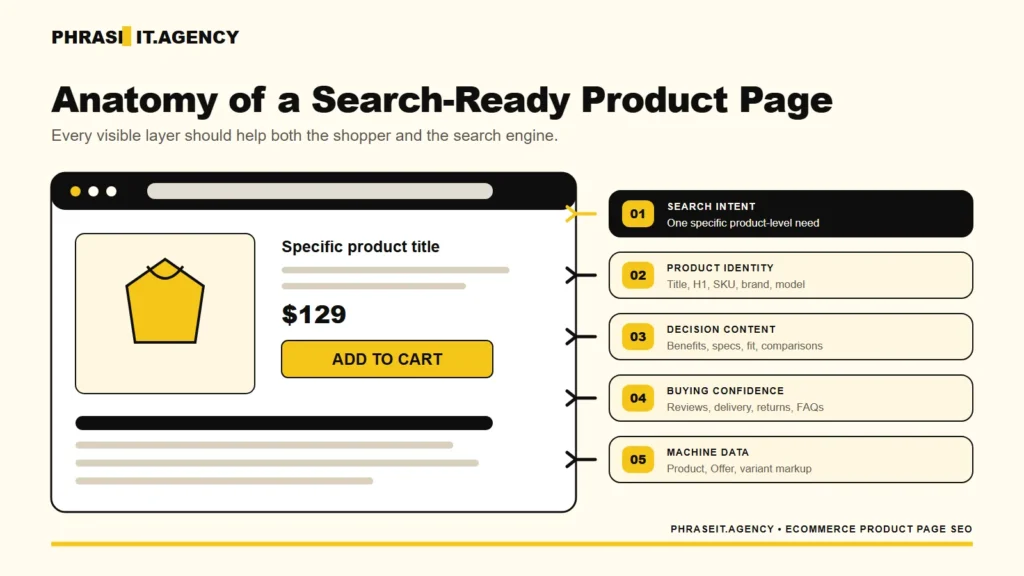
The most important on-page elements are the title tag, H1, product name, opening description, specifications, price, availability, images, delivery information, and supporting proof. These elements should describe the same product consistently. Optimization works when the page answers a buying query clearly, not when it repeats an exact keyword everywhere.
I start with the information hierarchy shoppers see, not the SEO plugin fields. The product name and primary value should be obvious above the fold, followed by the facts that remove uncertainty.
Build the Search Snippet Around Product Identity
A useful title usually combines the product name with the most decision-relevant attribute and brand. Include the model or SKU when buyers search for it. Keep the H1 natural and consistent with the product shown on the page.
The meta description is your pitch for the click, not a ranking lever to stuff. Use it to clarify the product, distinctive benefit, delivery or availability signal, and why this result deserves attention.
Put Decision Information Before Marketing Copy
Shoppers should not have to decode three paragraphs of brand language to learn the dimensions, ingredients, compatibility, material, warranty, or shipping time. Lead with what changes the decision. Then use brand voice to make those facts easier to understand.
- State what the product is and who it is best suited to.
- Show price and current availability consistently.
- Surface the specifications that determine fit or compatibility.
- Explain delivery, returns, warranty, and care requirements.
- Use reviews, demonstrations, and comparisons where they reduce risk.
How Do You Write Unique Product Descriptions at Scale?
Do not rewrite every product description in alphabetical order. Prioritize products with search demand, reliable stock, useful margins, existing impressions, or strong conversion potential. Build accurate base copy from structured attributes, then add original guidance, comparisons, use cases, and objections where the commercial opportunity justifies deeper editorial work.
Manufacturer copy creates two problems. It gives shoppers no reason to choose your result, and it leaves search engines comparing multiple stores that publish essentially the same information.
That does not mean every SKU needs 800 words. A replacement cable may need a precise compatibility table, dimensions, warranty, and a short installation note. A high-consideration appliance may need comparisons, energy use, delivery constraints, installation requirements, video, and FAQs.
Use a Tiered Content Model
| Tier | Products | Content Standard |
|---|---|---|
| Tier 1 | High demand, margin, or ranking opportunity | Original description, proof, comparisons, FAQs, media, and internal links |
| Tier 2 | Stable mid-value products | Structured attributes plus a concise original benefit and use-case layer |
| Tier 3 | Low-demand or volatile products | Accurate templated essentials, correct schema, and clean crawl handling |
This is where automation can help without pretending every generated sentence adds value. Pull reliable facts from the product information management system, use rules to assemble the basic layer, and reserve human review for claims, positioning, comparisons, and high-value pages.
I have built reusable SEO briefs and prioritization systems because scale is usually an operations problem before it is a writing problem. The strongest template defines what evidence each product type needs and where that evidence comes from.
How Should You Optimize Product Images and Page Speed?
Use product images that answer buying questions, then deliver them in the smallest practical format and dimensions. Write descriptive alt text for accessibility and image understanding, not keyword repetition. Protect the main product image’s loading priority, lazy-load lower-page media, and test real product templates with Core Web Vitals data.
Google says filenames provide light clues, while alt text and surrounding page content help it understand an image. A filename such as ‘walnut-dining-table-extension-leaf.webp’ is more useful than ‘IMG_4832.jpg’; the alt text should describe what the image actually shows.
The largest product image often becomes the Largest Contentful Paint element. Do not lazy-load that image. Resize source files, use responsive image markup, preload only when testing shows it helps, and remove sliders or app scripts that delay the first meaningful view.
Google’s current good thresholds are LCP within 2.5 seconds, INP under 200 milliseconds, and CLS under 0.1. Measure field data in Search Console or CrUX, then use PageSpeed Insights and Chrome DevTools to diagnose the template.
For a deeper template-level process, use the ecommerce site speed guide. WooCommerce teams can also work through the WooCommerce speed checklist.
| If product galleries, review widgets, or personalization scripts are slowing the buying path, explore Phrase It’s WordPress page-speed optimization services. |
Which Product Structured Data Should You Add?
Use Product and Offer markup that matches the product information visible on the page, including price, currency, availability, identifiers, images, and seller details. Add review or aggregate rating data only when it follows Google’s rules. For variants, connect Product entities through ProductGroup and keep markup synchronized with the page and feed.
Structured data is not a substitute for visible content. It is a machine-readable version of the product facts shoppers can verify on the page.
Google distinguishes product snippets from merchant listings. For a page where someone can purchase directly, merchant listing properties can support richer product information such as shipping and return details. Product data can come from on-page structured data, a Merchant Center feed, or both.
I prefer both when a store can maintain them. Google explicitly says using structured data and a Merchant Center feed maximizes eligibility and helps it verify information. The operational catch is consistency: price and availability must match the landing page, checkout, markup, and feed.
- Product identity: name, image, brand, SKU, GTIN, or MPN where applicable.
- Offer details: price, priceCurrency, availability, URL, and seller.
- Commercial policies: shipping and return information when supported.
- Proof: legitimate review and aggregate rating properties that meet Google’s guidelines.
- Variants: ProductGroup, productGroupID, hasVariant, variesBy, and unique variant IDs.
Validate examples with Google’s Rich Results Test and inspect merchant listing reports in Search Console. A valid result means the syntax is eligible; it does not promise that Google will display a rich result.
How Should You Handle Variants and Unavailable Products?
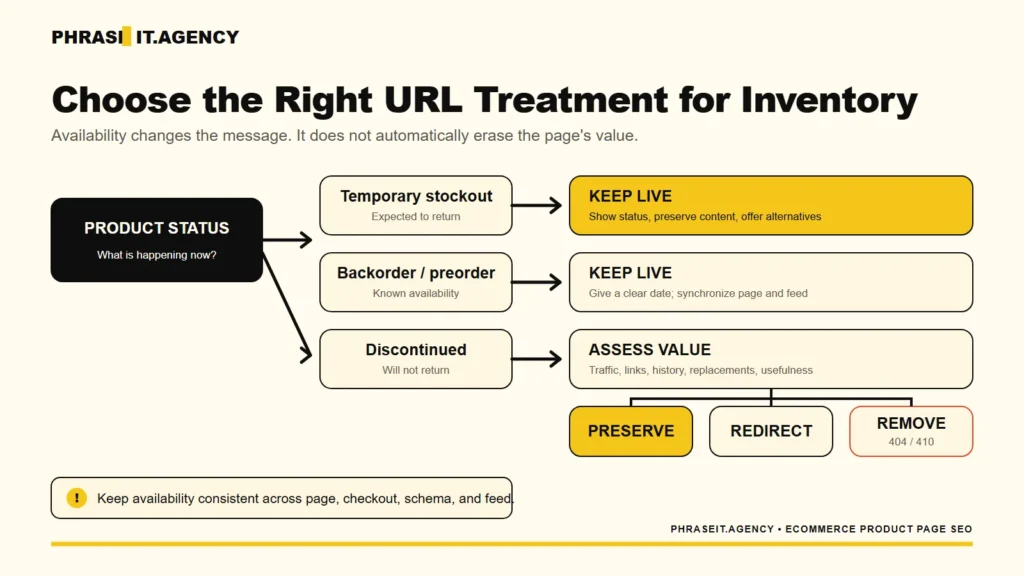
Give variants separate indexable URLs only when each version serves meaningful demand and can present distinct, self-contained information. Keep temporary stockouts live when the product will return, show accurate availability, and offer useful alternatives. For discontinued products, preserve, redirect, or remove the URL according to demand, links, replacements, and user value.
Decide Whether Variants Need Separate URLs
Google supports single-page and multi-page variant designs. On single-page implementations, ProductGroup markup can connect the choices, and a stable URL should preselect each crawlable variant. Multi-page variants need complete markup on each page.
Do not index every color and size combination automatically. A black version may deserve its own page if people search for it, it has distinct images, and the inventory supports the demand. A barely different internal code usually does not.
Match the Response to the Inventory Situation
| Situation | Recommended Page Treatment | Shopper Path |
|---|---|---|
| Temporary stockout | Keep live; show accurate out-of-stock status and preserve useful content | Waitlist, alternatives, or parent category |
| Backorder or preorder | Keep live; show expected availability and synchronize feed data | Order or notify with a clear date |
| Discontinued with replacement | Keep temporarily or redirect when the replacement satisfies the same need | New model or closest substitute |
| Discontinued without replacement | Assess traffic, links, history, and usefulness before returning 404/410 | Parent category or relevant alternatives |
| Unavailable variant | Keep the product group useful and mark the exact variant accurately | Available sizes, colors, or equivalent products |
Google Merchant Center specifically advises merchants not to delete a product merely because it is temporarily unavailable; set availability to out_of_stock instead. It also requires availability to match across the product data, landing page, and checkout.
The SEO decision still needs business context. A discontinued product with backlinks, historical demand, manuals, or compatibility value may remain useful. A thin page for an obsolete item with no demand, links, or replacement may not.
How Do Internal Links, Reviews, and FAQs Help Product Pages?
Internal links help search engines discover product pages and understand their relative importance, while reviews and FAQs add buyer language, proof, and missing decision information. Link priority products from relevant categories, guides, and related-product paths. Publish only authentic reviews and questions that genuinely apply to the product being sold.
Google recommends crawlable links from menus to categories, categories to subcategories, and subcategories to products. It also notes that a product reachable only through site search may not be discovered through normal crawling.
I would prioritize internal links using demand, margin, conversion potential, inventory stability, and ranking opportunity. A bestseller with reliable stock should not receive the same internal support as an obscure, low-margin SKU that disappears next month.
Our ecommerce internal linking framework explains how to route authority across categories, products, buying guides, filters, and seasonal pages without adding random links.
Reviews and product-specific questions can make a thin page more useful, but do not paste the same generic FAQ across the whole catalog. Ask support, sales, and returns teams what people misunderstand. Then answer the questions that remove hesitation for that exact product type.
| If your products are technically indexable but buried, competing, or linked according to template defaults, it is worth fixing the architecture before producing more copy. You can model the commercial upside with the ecommerce SEO ROI calculator. |
How Do You Prioritize and Measure Product Page SEO?
Prioritize product pages by combining organic demand, business value, inventory reliability, current visibility, conversion potential, and implementation effort. Measure indexed pages, nonbranded impressions, clicks, add-to-cart actions, purchases, revenue, and margin by product group. Rankings are useful diagnostics, but they are not the final business result.
I use a scoring model because large catalogs create endless plausible tasks. The score does not need to be mathematically perfect; it needs to make tradeoffs visible.
- Fix indexation, canonical, rendering, and feed problems that prevent the product from appearing correctly.
- Map demand to the correct product or category page and resolve obvious cannibalization.
- Improve Tier 1 product content, images, proof, and structured data.
- Strengthen internal links from categories, guides, navigation, and related-product modules.
- Measure changes by product cohort and scale only what improves qualified traffic or revenue.
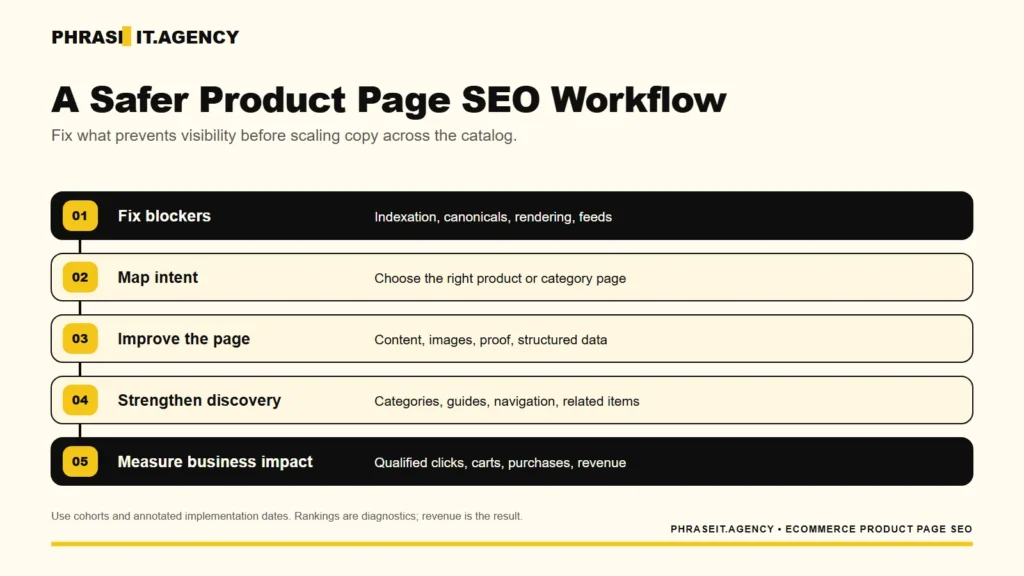
Annotate the implementation date and compare product cohorts rather than mixing every SKU into one average. A change can raise traffic while lowering revenue if it attracts the wrong search intent. It can also improve conversion without creating more sessions, which may still be the better commercial result.
In Google Analytics 4, track view_item, add_to_cart, begin_checkout, purchase, item revenue, and product attributes that help you segment results. In Search Console, compare clicks, impressions, click-through rate, position, queries, and pages. Join those views in a spreadsheet or Looker Studio when the catalog warrants it.
The question is not ‘Did rankings move?’ It is ‘Did the right products become easier to find and buy?’ That is the standard I use for ecommerce SEO work.
Ecommerce Product Page SEO Checklist
Show shoppers what the product is, whether it suits them, what it costs, and how to buy it. Make sure the page loads quickly and can be found through your categories. Use this checklist for high-priority pages before turning it into a catalog-wide quality-control process.
- The target query deserves a product page rather than a category, marketplace, or guide.
- The title, H1, description, specifications, images, price, and availability describe one consistent product.
- The page is indexable, canonical, internally linked, and reachable without using site search.
- Product, Offer, review, and variant markup match visible information and Merchant Center data.
- The mobile template meets buyer needs without preventable LCP, INP, or CLS problems.
- Reviews, FAQs, alternatives, delivery, returns, and warranty information reduce purchase uncertainty.
Turn Product Page Traffic Into Revenue
The most important product page SEO decision is not how many fields to optimize. It is where the work can create commercial value. Choose the right page type, prioritize stable products with demand, fix the technical foundation, answer the buyer’s real questions, and measure whether qualified shoppers move closer to purchase.
If you are deciding what to do next, start with a small cohort of products that already show demand or business value. Fix them properly, annotate the changes, and use the result to refine the process before applying it to the rest of the catalog.
That is slower than generating thousands of descriptions overnight. It is also far more likely to produce something worth measuring.
| If you want to apply this framework to your store – or find out whether product pages are even the right starting point – book a free 30-minute SEO strategy call. |
Frequently Asked Questions About Ecommerce Product Page SEO
Current ranking-page FAQs repeatedly focus on optimization steps, keyword targeting, duplicate descriptions, indexation, and structured data. The live US results did not show a People Also Ask module during this research, so the questions below are verified from ranking content rather than mislabeled as live PAA questions.
How Do You Optimize a Product Page for SEO?
Match the page to a specific product-level search intent, then improve its title, H1, useful description, specifications, images, internal links, page experience, and Product structured data. Keep price and availability accurate across the page, markup, checkout, and Merchant Center feed. Measure qualified clicks and revenue, not rankings alone.
How Many Keywords Should a Product Page Target?
Target one clear purchase intent rather than a fixed number of keywords. Support that intent with the product name, brand, model, SKU, material, size, compatibility, and use-case terms shoppers naturally need. If a keyword expects multiple choices or a different page type, assign it to a category, comparison, or guide.
Does Duplicate Product Content Affect Rankings?
Duplicate manufacturer copy makes it harder for a store to show why its page deserves visibility, especially when many competitors publish the same text. Prioritize original value on commercially important products: distinctive benefits, specifications, comparisons, expert guidance, reviews, FAQs, images, and clear delivery or returns information.
Should I Noindex or Keep Product Pages Indexed?
Keep a product page indexed when it serves real demand, remains useful, and can accurately represent an available, returning, or historically valuable product. Consider noindexing or removing thin and low-value URLs that should not compete. For discontinued items, assess links, traffic, replacements, and user value before choosing a redirect or error status.
Do Product Pages Need Schema Markup?
Product pages can rank without schema markup, but valid Product and Offer structured data helps Google understand details such as price, availability, ratings, shipping, and variants. The markup must match visible page content and current inventory. Eligibility for a rich result does not guarantee that Google will display one.