
A redesign can look perfect in the launch meeting and still erase the search demand that paid for it. The dangerous migrations are not always the dramatic domain changes. A CMS rebuild that quietly rewrites product URLs, removes internal links, or ships a staging noindex tag can do just as much damage.
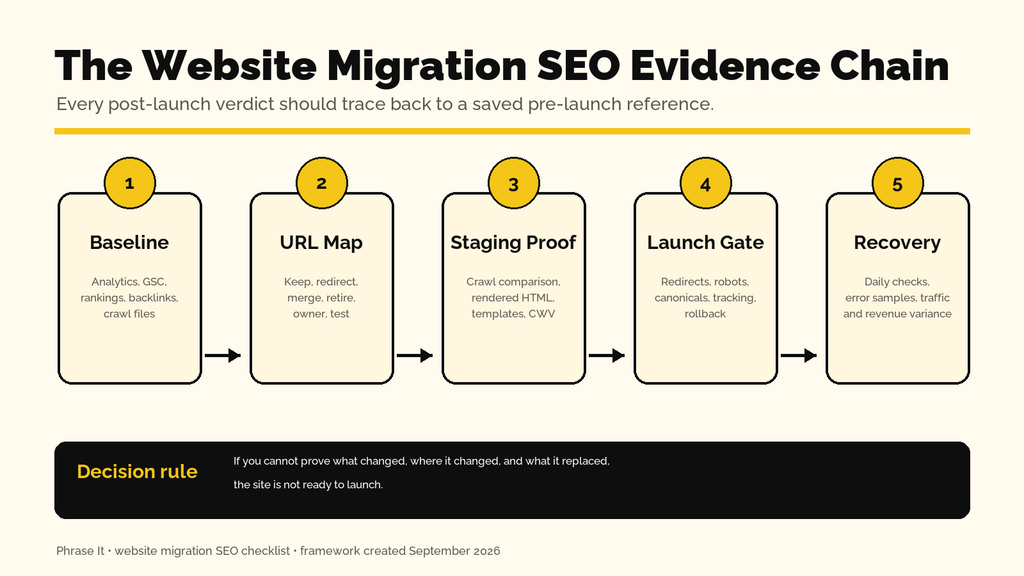
I treat a migration as a controlled transfer of assets: URLs, content, rankings, links, analytics, conversion paths, and the technical signals search engines use to connect the old site to the new one. The audit matters. The planning, implementation, and evidence trail matter more.
| My launch rule: If the team cannot show me the saved baseline, approved URL map, tested redirect results, staging-versus-production crawl comparison, and named rollback owner, the migration is not ready. |
Table of Contents
Why Migration SEO Starts Before The Audit
Migration SEO is the discipline of carrying organic visibility and its business value through a website change. An audit finds defects at a point in time; migration planning decides what must be preserved, what may change, who implements each requirement, what evidence proves it worked, and when the company must pause or roll back.
An SEO brought in after development can report that 8,000 old URLs now return 404. An SEO involved in planning can prevent the routing logic that created those 404s, preserve the navigation paths that made category pages discoverable, and stop the launch before the damage reaches customers and Googlebot.
This is cross-functional work. The SEO owns search requirements and acceptance criteria; product or marketing owns business priorities; developers own implementation; analytics owns measurement; content teams approve consolidation; and one launch lead owns the final go/no-go decision. Without that division, everyone assumes redirects are someone else’s task.
If the company does not have senior SEO ownership in-house, fractional SEO leadership can sit inside the project team, write developer-ready requirements, challenge avoidable URL changes, and validate the release rather than appearing after traffic falls.
What Counts As A Website Migration—and What Can Break
A website migration is any material change that can alter how users or search engines access, render, understand, or value the site. That includes domain, protocol, hostname, CMS, framework, hosting, design, information architecture, URL paths, international setup, content consolidation, and major JavaScript rendering changes.
| Migration Type | Primary SEO Risk | What Must Be Proven |
|---|---|---|
| Domain or subdomain | Old authority and signals fail to transfer | One-to-one redirects, verified properties, Change of Address where applicable |
| CMS or framework | Templates change metadata, canonicals, rendering, pagination, schema | Rendered parity and template-level crawl comparison |
| Redesign | Navigation and internal links disappear; CWV regresses | Link-depth parity, mobile UX, performance traces |
| URL or architecture | High-value pages move, merge, or become orphaned | Approved mapping and destination relevance |
| Hosting or CDN | DNS, caching, headers, latency, bot access change | Status/header tests, logs, TTFB and cache behavior |
| International | hreflang, locale paths, canonicals, geotargeting conflict | Cluster-level hreflang and canonical validation |
The safest default is to change only what the project needs. If you are moving CMS, do not also rewrite every URL, delete half the content, switch the primary navigation, and launch a new JavaScript rendering model unless those changes have separate reasons, tests, and owners.
Build The ‘Before’ State Before Anyone Changes Production
The before state is a dated, reproducible record of what the current site exposes and what the business earns from it. Save raw exports, crawl databases, screenshots, configuration notes, and a URL-level priority file—not just dashboard screenshots—so you can diagnose whether a post-launch difference is expected, accidental, or revenue-threatening.
1. Freeze Scope And Assign Owners
- Write the migration type, launch window, environments, domains, systems, and explicit out-of-scope changes in one brief.
- Name owners for redirects, DNS/CDN, templates, analytics and consent, content, QA, Search Console, communications, and rollback.
- Create acceptance criteria: for example, 100% of priority URLs mapped; no unintended indexable staging URLs; no redirect chains; tracking verified; and no unexplained loss of indexable pages.
- Define stop-launch defects and post-launch rollback thresholds before the launch-day pressure starts.
2. Preserve Business And Search Baselines
- Export at least 16 months of Google Search Console page/query data when available, plus the most recent 90 and 28 days for practical comparisons. Segment brand/non-brand, country, device, search type, and directory.
- Export analytics landing-page sessions, engaged sessions, key events, leads, transactions, revenue, and channel attribution. Keep daily data around the planned launch window.
- Save rankings for priority queries, but do not use rankings alone. A stable average position can hide lost long-tail pages, tracking failures, or revenue mix changes.
- Export externally linked URLs and their referring domains from Ahrefs. These URLs deserve special mapping and outreach attention.
- Create a priority URL set: top organic landing pages, revenue pages, paid landing pages, linked assets, seasonal pages, store locators, and URLs required for customer workflows.
- Record server/CDN configuration, robots.txt, XML sitemaps, DNS values and TTL, canonical patterns, hreflang, schema, and analytics tags.
Revenue baselines should reconcile with the company’s reporting logic. My guide to connecting SEO activity to revenue explains why platform attribution and business contribution should be reported as different views.
3. Back Up What You May Need To Restore
Back up the database, media, code, environment variables, redirect rules, CDN and DNS configuration, analytics/container versions, robots.txt, sitemaps, and CMS exports. Test that the backup can be restored in a non-production environment. A backup that nobody has rehearsed is an aspiration, not a rollback plan.
| Evidence folder: Use dated folders such as 2026-09-03_before, 2026-09-10_staging, and 2026-09-17_launch. Store tool configuration notes beside exports so the comparison is reproducible. |
How To Run The Pre-Migration Audit In Ahrefs
Use Ahrefs Site Audit to create a cloud-based baseline that combines technical issues with Ahrefs data such as backlinks and estimated organic traffic. Configure the scope and URL sources deliberately, run the crawl before development freezes, export priority reports, and keep the project intact so the post-launch crawl can be compared with the same settings.
- Create or open an Ahrefs project for the canonical production scope. Verify ownership so you can control crawl speed and avoid a crawl that stops because the site blocks AhrefsSiteAudit.
- Open Site Audit settings. Under URL sources, keep Website and auto-detected sitemaps, then add specific sitemap URLs, the priority URL CSV, and backlink URLs when the plan and subscription allow. Multiple sources expose orphans and URLs that navigation alone misses.
- Match the intended scope. Decide whether to include subdomains, HTTP variants, parameters, and nofollow links. Do not remove parameters automatically if faceted, filtered, tracking, or session URLs are part of the migration risk you need to understand.
- Enable JavaScript execution when the site relies on client-side rendering. Ahrefs recommends this for JavaScript-heavy sites; compare raw and rendered HTML on representative templates to see what only appears after rendering.
- Set limits above the expected URL count and choose a crawl speed the server can tolerate. Coordinate high-speed crawling with engineering; throttling and bot defenses can create a false picture.
- Run the crawl and save the crawl date, scope, sources, limits, JavaScript setting, parameter behavior, user agent, and any exclusions in your evidence folder.
What To Export From Ahrefs
- All issues and affected URLs, including indexability, redirects, canonicals, duplicate content, titles, H1s, hreflang, sitemap conflicts, internal links, and broken resources.
- Page Explorer with URL, status, indexability, canonical URL, organic traffic, top keyword, backlinks or referring domains, depth, inlinks, outlinks, word count, and sitemap state.
- Link Explorer reports for broken internal links, redirecting internal links, and priority destinations with lost inlinks.
- A list of URLs with external backlinks, especially those that will not remain unchanged.
After launch, select the saved pre-launch and post-launch crawls in Site Audit. Use the Overview and What’s new panels, then filter for Added, New, Removed, and Lost URLs. In Page Explorer, compare indexability, status, canonical, text, HTML, internal links, word count, SERP title, and organic traffic changes rather than staring only at Health Score.
A tool can list changed canonicals. It cannot decide whether a consolidated page still satisfies the query, whether a revenue URL deserves a one-to-one replacement, or whether the release should stop. That requires an SEO owner inside the migration team.
See How Phrase It Handles Technical SEOHow To Configure And Save The Screaming Frog Baseline
Screaming Frog should be your reproducible, URL-level source of truth. Use database storage, save the exact crawl configuration, crawl production from more than one discovery source, export the migration-critical reports, and retain the crawl database. That lets you compare releases instead of recreating an old site from memory.
Set Up The Crawl
- Go to File > Settings > Storage Mode and select Database Storage. Screaming Frog requires database mode and a paid license for crawl comparison; database crawls auto-save and appear under File > Crawls.
- Choose Spider mode for the normal production crawl. Set the canonical production start URL and decide whether subdomains, non-HTML resources, external links, parameters, canonicals, nofollow links, and pagination should be followed.
- Use Configuration > Spider > Rendering. Crawl once as HTML, then run a JavaScript-rendered sample or full crawl when the frontend depends on JS. A rendering change can preserve source HTML while removing visible content or links from the rendered DOM.
- Connect Google Analytics, Google Search Console, Ahrefs, PageSpeed Insights, and link-metric APIs only when needed and authorized. Record the property, date range, dimensions, and filters. Integrations make prioritization easier but also make the crawl harder to reproduce if settings are undocumented.
- Add XML sitemap URLs and use list-mode crawls for your priority URL set, legacy URLs, paid landing pages, backlink targets, and redirect test list. A spider crawl cannot find an orphan by definition.
- Increase crawl limits only after you understand traps such as faceted navigation, calendar URLs, internal search, endless pagination, or unique tracking parameters. Exclude traps with narrow patterns and document every exclusion.
- Run the crawl. Check response-code totals and sample unexpected hosts or directories before trusting the report; authentication, WAF rules, or a mis-scoped start URL can invalidate the entire result.
Save The Crawl And Configuration
In database storage mode, confirm the crawl appears in File > Crawls and rename it with environment and date, such as production_before_2026-09-03. For portability, use File > Save As where available or export the crawl as a .seospider file; older .seospider crawls can later be imported and converted into database format.
Save the configuration separately through File > Configuration > Save As, using a matching name. Export the Overview, Internal HTML, Response Codes, Redirect Chains, Canonicals, Directives, H1, Page Titles, Meta Descriptions, Images, Structured Data, Pagination, Hreflang, Sitemaps, Crawl Depth, Inlinks, and Orphan Pages reports as relevant.
| Do not delete the source crawls: Screaming Frog’s saved comparison depends on the two underlying crawls. If either source crawl is deleted, the comparison cannot be reopened. |
Audit Staging And Compare Crawls Before Launch
Crawl staging with the production configuration, then compare the two environments through an explicit URL map. The goal is not identical issue counts; it is explainable change. Every removed URL, lost internal link, changed canonical, missing content block, deeper click path, or new indexability state should be intended and approved.
- Allow only approved audit tools and people through staging authentication. Keep public search engines blocked with authentication or IP restrictions; do not rely solely on robots.txt, and plan the exact step that removes temporary noindex directives at launch.
- Load the saved production configuration, change only the environment access and hostname requirements, and crawl staging. Keep rendering mode, sources, integrations, exclusions, and limits aligned.
- Switch to Mode > Compare, select the production baseline and staging crawl, and open Config > Compare. Enable change detection for status, indexability, canonicals, titles, descriptions, H1s, word count, content, depth, inlinks, structured data, and hreflang as applicable.
- When URLs differ, open Config > Compare > URL Mapping and map production URLs to staging URLs. This lets Screaming Frog compare corresponding pages rather than labeling the whole site missing and new.
- Run Compare. Review Overview and Issues first, then Change Detection, Site Structure, and lower-window details. Inspect Added, New, Removed, and Missing states at URL level.
- Export the comparison and triage by business priority: revenue URLs and backlink targets first, then indexable templates, navigation hubs, supporting content, and non-indexable utilities.
A useful parity test is template-based. Sample the homepage; each category, product, article, service, location, and international template; pagination and faceted states; pages with schema; logged-out conversion flows; and URLs at different crawl depths. One passing homepage does not prove that 50,000 product pages render correctly.
How To Audit A Migration With Chrome DevTools
Chrome DevTools reveals what a real browser requests, renders, executes, and shifts—details a crawler can summarize but not fully explain. Use a fixed test set on production and staging, capture sanitized HAR and performance evidence, inspect source versus rendered DOM, and repeat the same interactions after launch under consistent device and network conditions.
Network Panel: Redirects, Headers, Payloads, And Third Parties
- Open an incognito window, disable extensions where possible, open DevTools, and select Network. Check Preserve log so the chain survives navigation; check Disable cache to emulate a first-time visit.
- Reload the page and filter Doc to inspect the HTML request. Confirm the expected status, redirect chain, final URL, protocol, response headers, content type, cache directives, and timing. A redirect that only works after client-side JavaScript is not a substitute for a server-side 301.
- Filter JS, CSS, Img, Font, Fetch/XHR, and blocked or failed requests. Look for production assets still pointing at staging, mixed content, 404s, API failures, oversized files, late LCP discovery, consent-dependent tags, and third-party scripts that were added during the rebuild.
- Use the Initiator column and dependency view to find which script, stylesheet, or HTML element caused a request. Fix the source reference; do not merely redirect broken internal assets.
- Export a sanitized HAR for each representative template. Chrome excludes common sensitive headers by default, but still review the file before sharing because URLs and payloads can contain customer or internal data.
Elements And Sources: Rendered SEO Parity
In Elements, inspect the rendered DOM for the title context, meta robots, canonical, hreflang, headings, main copy, internal links, image attributes, structured data, and interactive content. Compare with View Source or the Network response. If important content exists only after delayed interaction, failed API calls or blocked scripts can make it unreliable for users and crawlers.
Performance, Lighthouse, And Coverage
- In Performance, record a fresh load under a consistent mobile device and throttling profile. Inspect LCP and its subparts, layout-shift clusters, long tasks, interaction timing, render-blocking resources, and third-party execution. Save or export the trace when you need developer evidence.
- Run Lighthouse in a clean profile for Performance, Accessibility, Best Practices, and SEO. Use it as a diagnostic sample, not proof of field performance. Repeat tests and pair them with CrUX/Search Console field data.
- Open More tools > Coverage, reload, and interact with the page. Export the report to compare total and unused JavaScript/CSS by template. A migration that doubles shipped code may create a performance regression before field data catches up.
| Chrome 132+ note: The old standalone Performance Insights panel has been removed. Use the Insights tab inside the Performance panel, alongside Lighthouse and Network. |
For deeper remediation after you identify regressions, use the WordPress page-speed optimization workflow or the free PageSpeed Fix Finder to connect symptoms to implementation steps.
Preserve URL Structure Unless A Change Earns Its Risk
Keep a URL when it still represents the same page and the new platform can support it. Change URLs only when the destination, hierarchy, localization, consolidation, or technical constraint creates a clear long-term benefit. A prettier slug alone rarely justifies remapping a URL that already ranks, earns links, and converts.
Preserving structure means more than keeping the path text.
For ecommerce, use the migration to protect rather than improvise the search-led category architecture. Category hierarchy, breadcrumbs, pagination, and contextual links decide whether products remain discoverable after the design changes.
| Old URL Situation | Correct Treatment | Avoid |
|---|---|---|
| Same content, same purpose | Keep the URL and return 200 | Redirecting for cosmetic slug changes |
| Same content, unavoidable new URL | Direct server-side 301 or 308 to one equivalent | 302, JS redirect, meta refresh, chains |
| Several pages genuinely consolidated | Redirect each old URL to the relevant consolidated page | Sending unrelated topics to one generic page |
| Product replaced by a true successor | Redirect to the successor when intent and use match | Sending every discontinued SKU to the category |
| Content permanently removed, no equivalent | Return 404 or intentional 410; remove internal links and sitemap entry | Homepage redirect that becomes a soft 404 |
| Temporary campaign or maintenance state | Use 302/307 only when the move really is temporary | Leaving temporary redirects indefinitely |
Build A Redirect Map That Developers Can Implement And SEOs Can Test
A redirect map is a decision register, not a two-column spreadsheet produced at the end. It should combine crawled URLs, sitemaps, analytics landing pages, Search Console pages, backlink targets, CMS exports, paid URLs, and server logs; assign one final destination or intentional removal; record the reason and owner; and contain the test result.
| Required Field | Purpose |
|---|---|
| Old URL | Exact canonical legacy URL, including relevant variants |
| Old status / indexability | Shows whether the URL was live, redirected, blocked, or canonicalized |
| Traffic / conversions / links | Prioritizes testing and incident response |
| Action | Keep, 301/308, consolidate, 404/410, or investigate |
| New URL | Absolute final canonical destination |
| Reason | Documents intent, not just mechanics |
| Owner / approval | Makes unresolved content decisions visible |
| Expected result | Final status, hop count, canonical and indexability |
| Test result / date | Creates launch evidence and a retest queue |
Deduplicate variants carefully. Normalize host, protocol, case, trailing slashes, default files, and encoded characters, but do not erase parameters or locale distinctions until you understand them. Join sources rather than trusting one source to contain the universe of URLs.
Implement redirects at the server, CDN, or platform routing layer. Test the old URL directly, confirm one hop to the intended final 200 URL, and ensure the destination self-canonicalizes. Update internal links, canonicals, hreflang, XML sitemaps, ads, email templates, profiles, and high-value external links to point directly to the new URL.
Google says permanent redirects do not lose PageRank and recommends keeping migration redirects for at least one year; users may benefit from keeping them indefinitely. That does not make poor mapping safe. Relevance, crawlability, destination quality, and clean internal references still decide whether the transfer works.
I review migrations as a system: the business pages, the crawl data, the templates, the routing logic, and the launch evidence. The point is to prevent revenue loss, not produce a bigger spreadsheet after it happens.
Book A 30-Minute Migration CallMigration-Day Runbook
Launch day should be a timed validation sequence with named owners and stop conditions. Freeze unrelated releases, capture the final pre-launch state, deploy during a lower-risk traffic window, test priority URLs and templates immediately, and only announce success after search directives, tracking, conversion paths, and rollback criteria have passed.
- Freeze content, routing, tag-manager, and template changes. Take final backups and export the last production crawl/configuration.
- Lower DNS TTL in advance when the plan requires it; confirm certificates, CDN, WAF, bot access, caching, and origin health.
- Deploy files, database changes, routing rules, and redirects. Remove staging-only authentication or noindex controls from the public destination while keeping the staging host protected.
- Test a smoke set: homepage, primary templates, priority organic/revenue URLs, legacy redirects, forms, search, checkout, login, consent, analytics events, and mobile navigation.
- Fetch robots.txt and XML sitemaps from the public host. Confirm the new canonical URLs, correct lastmod behavior, clean status codes, and no legacy/staging hosts.
- Run the old-URL list crawl with Always Follow Redirects enabled. Fail the gate for loops, chains, wrong hosts, 404/5xx destinations, or irrelevant mappings on priority URLs.
- Run a fast crawl of new URLs and compare it with staging. Check indexability, canonicals, directives, hreflang, schema, titles, headings, internal links, depth, and resource errors.
- Verify real-time analytics and server logs. Place test orders or leads with internal markers and confirm each downstream system receives them.
- For a domain or subdomain move, verify all relevant Search Console properties and submit Change of Address where Google supports it. Submit the new sitemap.
- Record launch time, deploy/version IDs, test results, known exceptions, and the person who approved the release.
Post-Launch Validation And Monitoring Cadence
Post-launch monitoring must separate expected reprocessing from actionable defects. Crawl and test immediately, then compare daily signals for the first week and progressively widen the window. Track priority URLs, template health, Googlebot behavior, index coverage, conversions, and organic landing-page performance against seasonality—not just one sitewide traffic line.
| When | Checks | Escalate When |
|---|---|---|
| First 2 hours | Smoke tests, priority redirects, directives, tracking, transactions/leads, server health | Critical page unavailable, tracking absent, checkout/form failure, mass block |
| First 24 hours | Full/representative crawl, logs, 4xx/5xx, canonical/hreflang/schema, sitemap processing | Unexpected indexability shift, widespread wrong redirects, persistent 5xx |
| Days 2–7 | GSC inspection samples, old/new URL impressions, Googlebot hits, top landing pages, revenue variance | Priority URLs not crawled, loss concentrated by template, unexplained commercial decline |
| Weeks 2–6 | Index coverage, rankings, long-tail page counts, backlinks, CWV field data as it matures | No recovery trend, new URLs excluded, old URLs remain dominant, regressions spread |
| Months 2–12 | Legacy hits, redirect maintenance, updated external links, cleanup after stability | Rules removed too early, campaigns still use legacy URLs, recurring chain growth |
Create alert thresholds from your own variance. A retailer with volatile daily demand may use seven-day year-over-year and forecast-adjusted comparisons; a B2B site with few leads may monitor qualified pipeline and priority-page visibility. Do not roll back because one keyword moved two positions. Do roll back when a deployment caused a measurable, technically verified failure.
The Problems That Cause Devastating Business Losses
Migration losses compound because search demand, user paths, and operational capacity fail together. A ranking drop can reduce transactions today, shrink remarketing and email audiences tomorrow, interrupt sales pipeline months ahead, waste paid-media spend on broken destinations, and force developers to abandon roadmap work for emergency recovery.
Hypothetical Ecommerce Loss
Suppose an online store receives 40,000 organic sessions per month, converts 2.5%, and has an $85 average order value. That channel produces 1,000 orders and $85,000 in monthly gross revenue. If a migration-related URL and indexability failure cuts organic revenue 40% for two months, the gross revenue at risk is $68,000.
At a 35% contribution margin, that is $23,800 in contribution at risk before emergency development, agency support, customer-service load, or paid acquisition needed to replace the demand. The loss is not ‘40% traffic.’ It is inventory that did not turn and customers a competitor acquired instead.
Hypothetical B2B SaaS Pipeline Loss
Assume organic search generates 60 qualified demos per month, 20% become customers, and each customer is worth $12,000 in first-year contract value. If a migration halves organic demos for three months, the company loses 90 demo opportunities. At the same close rate, that represents $216,000 in first-year contract value at risk—not guaranteed revenue, but missing pipeline the sales team cannot close later.
Hypothetical Local Or Professional-Service Loss
A professional-services site that closes 10 of 100 organic leads per month at an average $4,000 initial engagement produces a modeled $40,000 in monthly new business. A 30% lead decline lasting two months puts roughly $24,000 of modeled revenue at risk. If branded and location pages vanished, the decline may also push ready-to-buy prospects toward nearby competitors.
| Use your numbers: Model risk as baseline organic sessions or leads × conversion rate × average order or customer value × expected loss percentage × duration. Then show gross revenue, contribution margin, and pipeline separately so the scenario remains honest. |
They demonstrate why an SEO must be present when scope, URL policy, navigation, templates, measurement, and rollback decisions are made. Once demand disappears from search results, the company cannot retroactively capture the purchases and sales conversations that went elsewhere.
The Full-Stack Website Migration SEO Checklist
A full-stack migration checklist covers strategy, data, content, technical SEO, frontend rendering, infrastructure, analytics, QA, launch control, and recovery. Use it as an acceptance framework, then convert each relevant item into an owned ticket with evidence and a deadline. A checked box without a test result is not complete.
Strategy And Governance
- Define the migration type, business reason, scope, exclusions, timeline, dependencies, and success metrics.
- Name an SEO decision-maker and owners for development, infrastructure, content, analytics, QA, legal/privacy, and rollback.
- Schedule around low-risk demand periods and freeze unrelated changes.
- Define priority URL groups, acceptance criteria, stop-launch defects, rollback thresholds, and incident channels.
- Document every intentional SEO change and the evidence required for approval.
Baseline And Inventory
- Export GSC, analytics, rankings, conversions, revenue, backlinks, referring domains, paid destinations, and server logs.
- Crawl production in Ahrefs and Screaming Frog; save settings, crawl databases, configurations, and exports.
- Inventory URLs from crawls, sitemaps, CMS/database exports, analytics, GSC, backlink tools, ads, and logs.
- Save robots.txt, sitemaps, canonical/hreflang/schema patterns, templates, DNS/CDN/WAF settings, and analytics/tag-manager versions.
- Back up code, database, media, configuration, and routing; test restoration.
Content And Information Architecture
- Approve keep, improve, consolidate, replace, or remove decisions using demand, links, conversions, relevance, and content quality.
- Preserve high-value page purpose, primary content, metadata, headings, media, structured data, and conversion elements.
- Validate menus, breadcrumbs, contextual links, pagination, faceted navigation, related items, and footer links.
- Keep important pages at equal or shallower crawl depth where possible and identify orphans.
- Update internal links to final URLs instead of relying on redirects.
URLs, Redirects, And Indexing
- Keep existing URLs unless a change has a documented benefit.
- Create a deduplicated old-to-new map with action, relevance reason, owner, expected result, and test state.
- Use direct permanent server-side redirects for true moves; eliminate chains, loops, blanket homepage mappings, and soft 404s.
- Return 404 or 410 for permanently removed URLs with no relevant replacement and remove them from internal links and sitemaps.
- Self-canonicalize new indexable URLs; update hreflang, pagination signals, structured data URLs, Open Graph, and alternate links.
- Remove launch noindex rules and disallow directives from public pages; keep staging access-controlled.
- Create clean XML sitemaps with canonical 200 URLs only; submit the new sitemap and retain redirects for at least a year.
Frontend, Rendering, And Performance
- Compare source and rendered HTML for every key template.
- Confirm metadata, headings, copy, internal links, schema, and canonicals do not depend on failed or delayed interactions.
- Use DevTools Network with Preserve log and Disable cache; capture sanitized HAR files and inspect redirect/status/header/resource failures.
- Record Performance traces and Lighthouse samples under consistent conditions; inspect LCP, CLS, INP interactions, long tasks, and render-blocking requests.
- Export Coverage for representative templates and investigate material JS/CSS growth.
- Test responsive layouts, navigation, forms, checkout, search, consent, authentication, and accessibility with keyboard and mobile devices.
Infrastructure And Security
- Validate DNS, certificates, protocol/host rules, CDN cache behavior, origin capacity, compression, HTTP versions, and security headers.
- Confirm search and audit bots are not blocked by WAF, rate limits, authentication, robots.txt, or geographic rules.
- Load test within an approved window and ensure increased Googlebot crawling will not destabilize the origin.
- Remove staging references, credentials, debug output, source maps containing secrets, and non-production API endpoints.
- Keep a tested rollback path and version identifiers for application, infrastructure, routing, and tag manager.
Analytics, Conversion, And Communication
- Validate analytics, consent mode, channel attribution, ecommerce payloads, key events, call tracking, forms, CRM handoff, and offline conversion imports.
- Annotate the launch time and preserve pre/post dashboards at URL, directory, device, country, and template level.
- Update paid ads, email, affiliates, product feeds, profiles, QR codes, and customer communications to final URLs.
- Prepare internal and external incident messages without declaring SEO recovery before evidence supports it.
- Report traffic, revenue, contribution, leads, pipeline, and technical health as separate but connected views.
Launch And Recovery
- Run the priority smoke test, old-URL redirect crawl, new-site crawl, staging comparison, and live conversion tests.
- Verify Search Console properties; use Change of Address only for supported domain/subdomain moves.
- Inspect logs and real-time analytics immediately; monitor priority URLs daily during the first week.
- Compare Ahrefs and Screaming Frog crawls using the original settings and investigate new, missing, removed, or changed states.
- Keep an exception register with owner, business impact, workaround, deadline, and verification evidence.
- Do not remove legacy redirects, properties, or monitoring because the first week looks stable.
A Safe Migration Has Proof, Not Hope
Save the old site’s URLs and results, test the new site before launch, and check traffic and conversions afterward.
If your next question is whether your current plan is complete, review the URL map and launch gate before polishing another audit deck. Those are the points where search value is either protected or quietly traded away.
If you are planning a redesign, CMS move, domain change, or architecture rebuild, book a 30-minute strategy call. I’ll look at the scope, show you the highest-risk gaps, and tell you what needs to exist before launch.
Discuss Your MigrationFrequently Asked Questions About Website Migration SEO
These answers cover the decisions that most often delay or damage migrations: timing, redirects, URL changes, crawl tools, expected fluctuations, and ownership. Use them as short rules, then apply the detailed workflow above to your own templates, demand patterns, platform, and risk tolerance.
How long before launch should SEO migration work start?
Start while requirements and information architecture can still change—often several weeks to months before launch, depending on site size and migration complexity. The SEO needs time to inventory URLs, challenge unnecessary changes, build the map, crawl staging, file fixes, retest, and participate in the go/no-go decision.
Should every old URL be redirected?
No. Redirect an old URL when a relevant successor exists. Keep unchanged pages at the same URL, consolidate genuine overlaps to the best matching page, and return 404 or 410 when content is permanently gone with no suitable replacement. Do not redirect unrelated URLs to the homepage.
Should I keep the same URL structure during a redesign?
Yes, unless a URL change creates a documented long-term benefit that outweighs migration risk. A redesign does not require new slugs. Preserving proven URLs reduces routing work, avoids chains, and makes pre/post comparison clearer.
Can Ahrefs replace Screaming Frog for a migration audit?
No single tool covers the job. Ahrefs provides a persistent cloud audit enriched with backlink and organic data; Screaming Frog gives granular crawl control, list-mode testing, database files, URL mapping, and comparison; Chrome DevTools explains browser rendering, requests, and performance. Use them as complementary evidence.
How do I compare two Screaming Frog crawls?
Use Database Storage, keep both crawls, open Mode > Compare or select two crawls under File > Crawls, configure change detection in Config > Compare, and add URL Mapping when structures differ. Run the comparison, then inspect Overview, Issues, Change Detection, Site Structure, and URL-level differences.
Will rankings drop after a website migration?
Some fluctuation is normal while Google recrawls and processes changed URLs, especially on larger sites. A steep or persistent decline is not something to dismiss as normal. Segment the loss by URL, template, query, device, and technical state, then compare it with the saved baseline and crawl evidence.
How long should migration redirects stay live?
Google recommends keeping them for at least one year so signals can transfer and old URLs can be recrawled. Keeping useful redirects longer often protects users and old links. Continue updating internal and high-value external links so visitors do not depend on redirect hops.