You’ve published helpful content. Now you want to know whether Microsoft Copilot and Bing use it in their answers—and which pages you should improve next.
The Bing AI Performance report gives you a starting point. It shows citations, cited pages, and the subjects associated with those citations. Citation Share adds another detail: how much of the citation activity for a particular query goes to your site.
I’ll explain each metric, where to find it, and how to use it. Screenshots from Phrase It’s account show the report in practice.
What Is the Bing AI Performance Report?
Bing AI Performance is a report in Bing Webmaster Tools that shows when Microsoft Copilot, Bing AI summaries, and selected partners cite your website. You can see which pages appear, the queries associated with them, and how citation activity changes over time. Use it to find content that already gets cited and pages worth reviewing.
Microsoft introduced AI Performance in February 2026. It sits alongside the regular Search Performance report, with its own metrics for AI citations.
A citation means an AI answer displays your content as a source. For a business website, the useful questions are straightforward: Are the cited pages relevant to your customers? Do they explain your subject well? Is there a clear next step for someone who visits?
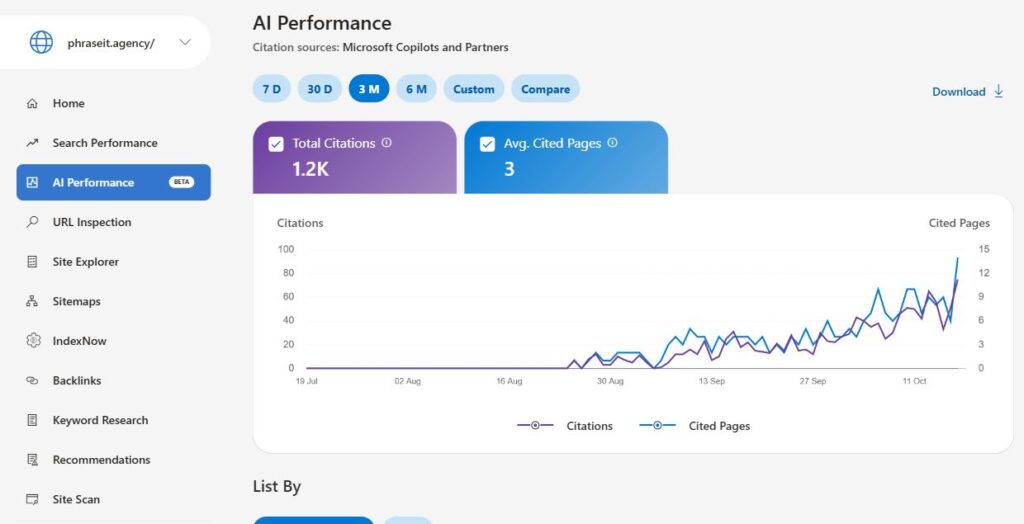
Phrase It’s Bing AI Performance dashboard shows 1.2K citations in its three-month view. That sounds useful. It still does not tell me how many prospects visited the site, understood the offer, or booked a call.
The more useful detail sits below the headline. One grounding query generated 285 citations with a 14.58% Citation Share; another generated 50 with a 27.93% share. Bigger citation volume and a bigger slice of the available citations are different things.
How Do You Open Bing AI Performance?
Sign in to Bing Webmaster Tools, select your website, and choose AI Performance from the left menu. Pick a date range before reviewing the chart or tables. If you manage several websites, check the selected property first so you’re looking at the right business and reporting period.
- Open Bing Webmaster Tools.
- Select your verified website from the website selector.
- Click AI Performance in the left navigation.
- Choose 7 D, 30 D, 3 M, or another available date range.
- Scroll to Grounding Queries or Pages to explore the results.
I start with a longer period to see which pages get cited regularly. Then I shorten the window when reviewing recent updates. If you’re comparing results with a colleague, include the dates and any filters you applied.
How Should You Read Citations and Cited Pages?
Total Citations and Average Cited Pages answer different questions: how often sources from your site appeared, and how many distinct pages appeared on an average day. Read them together to distinguish concentrated activity from broader page coverage. Neither metric establishes that someone clicked, recognized your brand, or became a qualified prospect.
Microsoft’s AI Performance documentation defines these metrics:
| Metric | What It Measures | What I Would Investigate |
|---|---|---|
| Total Citations | Displayed source citations during the selected period | Whether activity concerns commercially relevant subjects |
| Average Cited Pages | Average unique pages cited per day | Whether visibility depends on a narrow group of URLs |
| Page-Level Citations | Citation activity attributed to each URL | Which specific evidence or page deserves attention |
In our three-month overview, 1.2K citations and three average cited pages do not mean only three pages received citations during the entire period. The unfiltered Pages table returned 13 URLs.
The migration checklist had 341 citations in that table; the GEO agency comparison had 234. Those observations give me specific pages to review instead of a vague instruction to “improve AI visibility.”
Bring your current dashboard to a strategy call. I’ll explain which signals I would inspect and what extra evidence your next decision needs.
What Are Grounding Queries in Bing?
Grounding queries are short, grouped phrases that describe the subjects associated with your content’s AI citations. They help you understand which questions your pages contribute to answering. Open a relevant query to see its cited pages, then check whether those pages explain the subject clearly and cover what a reader needs.
The wording can look different from a normal search query. According to Bing’s documentation, these phrases summarize citation activity across answers; they don’t reproduce each person’s exact prompt.
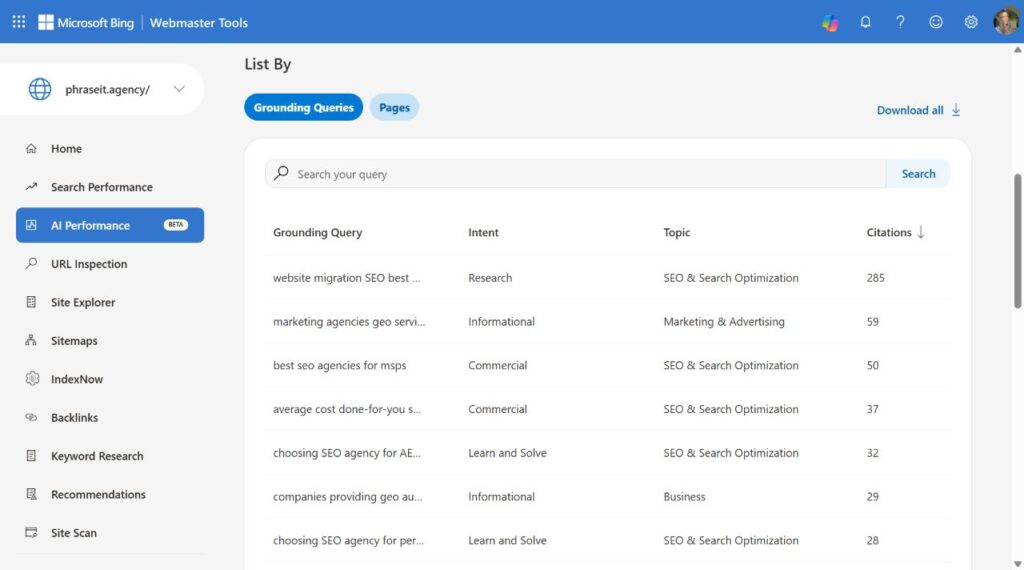
For example, website migration SEO best practices appeared in Phrase It’s report. Selecting that row opened the Pages view and showed our website migration SEO checklist, with 285 citations for that query.
| Grounding Query | Intent | Topic | Citations | Citation Share |
|---|---|---|---|---|
| website migration SEO best practices | Research | SEO & Search Optimization | 285 | 14.58% |
| best seo agencies for msps | Commercial | SEO & Search Optimization | 50 | 27.93% |
| choosing SEO agency for AEO visibility | Learn and Solve | SEO & Search Optimization | 32 | 4.37% |
Select a grounding query to find the page behind its citations. This example returned one page; another query may return several.
That gives you a specific place to start. If a migration checklist gets cited for migration advice, review its instructions, examples, and links. If a page appears for an unexpected subject, check which passage might explain the connection.
What Do Intent and Topic Labels Tell You?
Intent labels describe the kind of question associated with a grounding query, such as Commercial, Research, or Learn and Solve. Topics group related queries under a broader subject. Together, they help you sort the report and find questions that match your customers, services, or existing content plans.
Microsoft added these labels in June 2026. Here’s a simple way to use them:
| Label | Example From the Report | What to Review |
|---|---|---|
| Commercial | best seo agencies for msps | Does the cited page help someone compare providers? |
| Research | website migration SEO best practices | Does the page explain the process in enough detail? |
| Learn and Solve | choosing SEO agency for AEO visibility | Does the page give practical selection criteria? |
The labels are AI-generated, so use your judgment when a classification looks odd. A query about your service is worth reviewing even if you would have assigned it a different intent.
Microsoft also announced Topics Portfolio in October 2026. Where available, it adds topic-level estimates and opportunity queries where other sites appear. If you don’t see the tab, Microsoft says it may be because there isn’t enough data for your site yet.
How Does Bing Calculate Citation Share?
Citation Share measures your site’s proportion of citations across all cited sites for the same grounding query. It gives context to the citation count, but it does not represent traffic share, identify competitor domains, or score content quality. I compare like-for-like query observations before deciding whether a change deserves investigation.
The calculation is:
Citation Share = Your Site’s Citations ÷ All Sites’ Citations for the Same Grounding Query × 100
Microsoft describes this as an observational metric.
Our migration query had 285 citations and 14.58% share. The MSP agency query had 50 citations and 27.93% share. The first contributed more citation activity; the second occupied a larger proportion within its own query’s citation pool.
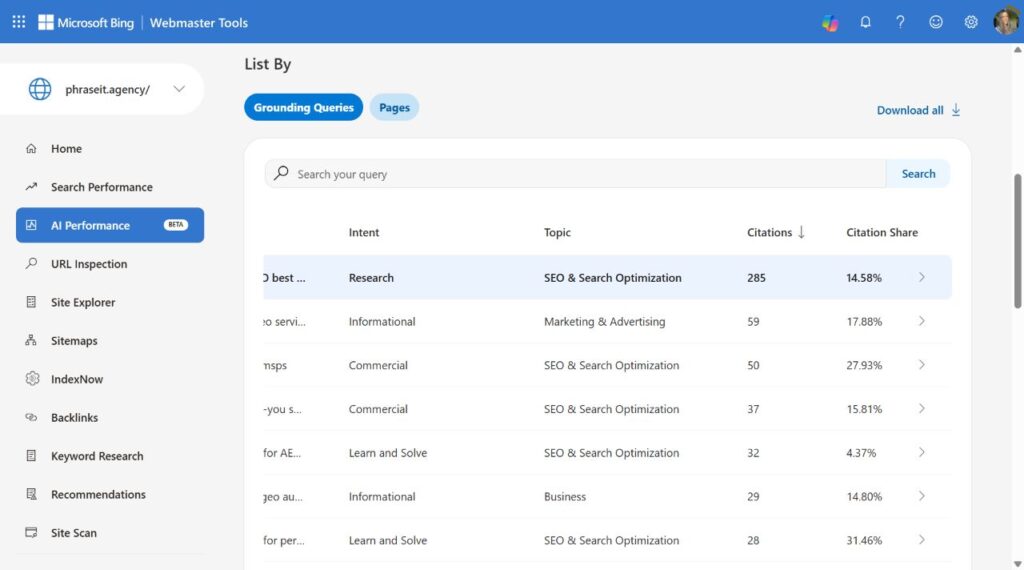
The horizontally scrolled view shows the right-hand columns for the same query list. Rows one and three correspond to the migration and MSP agency queries in the preceding table.
Here is a hypothetical example of why a count can rise while share falls:
| Period | Your Citations | All Sites’ Citations for That Query | Your Share |
|---|---|---|---|
| First Period | 20 | 100 | 20% |
| Second Period | 30 | 200 | 15% |
You earned more citations, but the citation pool grew faster. Both observations can be true.
A citation report should lead to a specific priority. Let’s review the pages and buyer questions that should shape your next round of work.
How Can You Use Bing AI Performance to Improve Content?
Use the report to choose relevant pages to review, then make a specific improvement. Check whether each page answers the associated question, includes current information, and gives enough detail to be useful. Record what you change so you can return to the same query and page when reviewing results.
1. Choose Questions Your Customers Ask
Start with queries about your products, services, comparisons, and common customer problems. A large citation count for an unrelated subject is less useful than a smaller count for a question your business can answer well.
For a service business, questions about choosing a provider, understanding costs, or solving a particular problem are sensible starting points.
2. Open the Cited Page
Select the query, then review its Pages results. Read the page as a customer would: can you find the answer quickly, and does the explanation help you act?
I would check outdated instructions, missing examples, unsupported claims, and sections that take too long to reach the point. For low-visibility pages, check Bing indexation too.
3. Improve the Existing Answer
Add what the page is missing. That might be a comparison table, a clearer explanation of costs, an example, or updated instructions.
You don’t need a separate article for every grounding phrase. Closely related questions often belong on the same page. When the work spans several pages, AI search optimization should connect those updates with technical checks and reporting.
4. Record the Update
Keep a short change log: page URL, what changed, date, and who made the change. It makes the next review much easier, especially when several people publish or edit content.
5. Check Again Over a Useful Period
Return to the same queries and pages. Check citation counts, share, and whether more pages are getting cited. If there are only a few citations, allow a longer period before deciding what the pattern means.
Start with a relevant grounding query, identify the page behind it, and inspect the evidence that page provides. Choose a specific improvement, record its implementation date, and compare subsequent observations. Keep the query, URL, and date range explicit so that your report describes a decision you can actually review later.
How Do You Compare AI Performance Over Time?
Choose Compare to review one reporting period against another. You can use a preset or select custom dates. Check the dates shown on the result cards, then compare citation counts and average cited pages. Keep the same filters when repeating the review so you’re looking at the same query or page.
The chart overlays the two periods, making changes easier to spot. In this example, the cards show 960 citations versus 265 and average cited pages of six versus two.
Our Compare view displayed these values:
| Metric | August 21–September 18, 2026 | September 19–October 17, 2026 |
|---|---|---|
| Total Citations | 265 | 960 |
| Average Cited Pages | 2 | 6 |
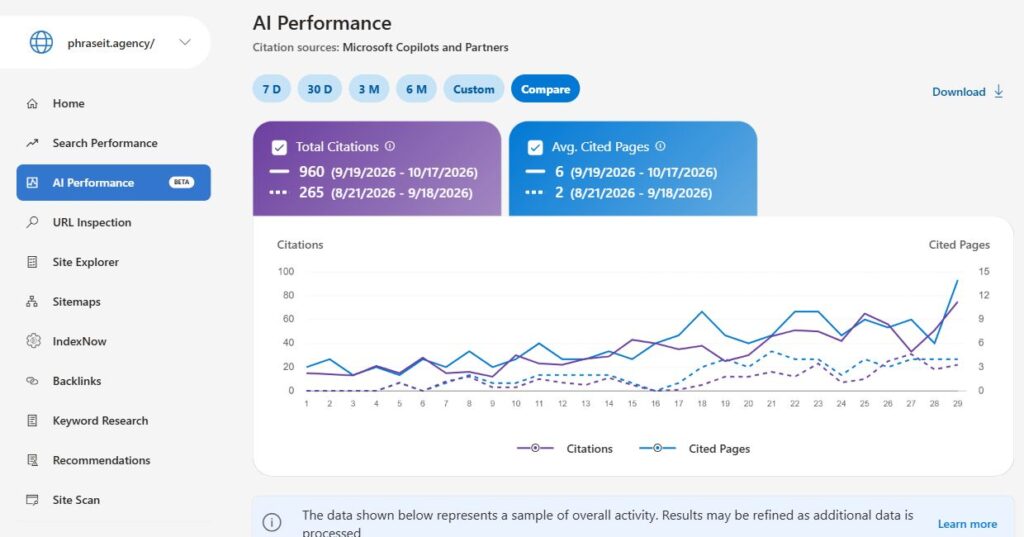
These are the exact ranges displayed on the result cards. Although I chose the last-30-days comparison preset, the cards show two 29-day windows; I have preserved the rendered ranges.
Check your change log alongside the chart. A rise after a page update is worth investigating, but demand and changes in AI systems can affect citations too. Review several checks over time before deciding what to repeat.
How Do You Track Visits and Leads From AI Search?
Keep citations, referral sessions, qualified leads, and revenue as separate reporting layers. Bing provides source-visibility evidence, while analytics and your CRM describe measurable downstream behavior. I connect those views through landing pages and reporting periods, with attribution limitations documented, rather than assuming that a citation produced a visit or a sale.
I build reporting workflows that distinguish visibility from what happens after discovery.
For example, in Phrase It’s AI-referral work that measured completed free trials, the reporting included 1,458 AI-attributed sessions and 37 AI-attributed trials over a specified 365-day period. Those figures came from a separate engagement and reporting system, not this Bing dashboard. They are not proof that Bing citations caused trials.
For your own report, I would record:
- The selected period, query, and cited URL, including active filters.
- Citation volume and query-specific share, where available.
- The content change and its implementation date.
- Measurable referral sessions and useful visitor actions.
- Qualified leads or revenue where your attribution supports them.
- The next decision and the evidence still missing.
Choosing which numbers become business KPIs rather than diagnostic metrics keeps the dashboard focused. A page can be a useful cited reference and still fail to bring the prospects you need.
When traffic is sparse, inspect actual referrals and lead quality before interpreting percentage changes.
Build the baseline, content priorities, and measurement into one program. See how Phrase It structures AI search work.
Decide What to Improve Before You Expand the Budget
Use Bing AI Performance to choose a defensible next action: improve useful evidence, investigate access, or gather more observations before changing direction. I prioritize queries and pages tied to relevant demand, then review visibility and commercial behavior separately. Your next investment should follow that assessment, rather than the most impressive number on the screen.
For our account, I would start with the migration checklist: inspect its evidence and the path to a relevant service decision.
Tell me what your website needs to achieve and what your current reporting leaves unanswered. We’ll discuss the evidence and priorities that should guide the work.
Frequently Asked Questions About Bing AI Performance
The practical questions about Bing AI Performance concern coverage, query interpretation, relative citation presence, and attribution. Read the report as evidence about supported citation activity, with its filters and sampling notices attached. Use separate monitoring and business data when you need to answer questions about other platforms, visitors, customers, or revenue.
Does Bing AI Performance Cover Every AI Platform?
No. Microsoft describes coverage across Copilot, Bing AI summaries, and selected partner integrations. Do not treat the report as complete visibility across every AI platform or prompt.
Are Grounding Queries the Same as User Prompts?
No. Grounding queries describe retrieval phrases used to find content for an answer. They should not be presented as an exhaustive list of the exact prompts customers typed.
Can Citation Share Show My Competitors?
Citation Share provides a percentage for your site within a grounding query’s citation pool. It does not expose the competitor domains behind the remaining share. Separate source inspection is needed if you want to investigate who else appears.
Can More Citations Prove More Revenue?
No. Citation growth shows more observed source appearances in the report’s scope. Revenue requires separate business evidence, and attribution gaps mean you should avoid assuming every cited appearance generated a measurable visit.
Why Might Citations Increase While Citation Share Falls?
Your citation count can grow while the total pool of citations for that query grows faster. For example, 20 out of 100 is 20%, while 30 out of 200 is 15%. That example illustrates the arithmetic; it is not Phrase It’s measured trend.