
Store owners often treat category page SEO like a hostage negotiation.
The SEO person wants content. The designer wants clean product cards. The merchandiser wants promotions above the fold. The owner looks at a 700-word block under the H1 and says, correctly, “That is ugly.”
I agree with the owner about the wall of text. I disagree with the conclusion that the page should contain no useful copy at all.
A category page without content asks Google to infer everything from a title, a breadcrumb, filters, and a grid of products that may also appear on several other URLs. A category page buried under generic SEO prose makes shoppers work to reach the products. Both versions miss the point.
The compromise is content architecture: keep the product experience visually dominant, then place concise orientation copy, buying help, related categories, and specific FAQs where each element supports a real decision. That is how I approach ecommerce category page SEO for Shopify collections, WooCommerce product categories, and custom product listing pages.
Table of Contents
What Is Ecommerce Category Page SEO?
Ecommerce category page SEO is the work of making a product collection easy for shoppers to browse and easy for search engines to understand. It combines commercial keyword targeting, useful category content, crawlable product links, internal architecture, filter control, structured data, and page experience so the category can attract qualified shoppers and help them buy.
A category page groups products that share a type, use, material, audience, brand, or another meaningful characteristic. Shopify calls these collection pages. Ecommerce teams also use product listing page, or PLP, while some larger catalogs distinguish a category listing page from the PLP beneath it.
The terminology matters less than the job. A category page should match a search where the buyer expects options, help that buyer narrow the options, and pass them to the right product.
That makes category page optimization different from improving an individual SKU. If the searcher wants “women’s trail running shoes,” a collection usually fits. If the searcher wants one specific model and size, the product page should take over.
I explain that product-level work separately in my guide to ecommerce product page SEO. The two page types should support each other, not compete for the same query.
Why Do Category Pages Matter So Much for Ecommerce SEO?
Category pages often target broader commercial searches than individual product pages, remain useful when specific SKUs change, and distribute internal authority through the catalog. A strong category can attract buyers who want to compare options, support its subcategories and products, and create a stable organic entry point tied more closely to revenue than a generic blog visit.
Semrush, Ahrefs, Shopify, and Google’s own ecommerce documentation all describe category pages as structural hubs. They connect broad demand with the products that satisfy it.
I care about that stability. A product can go out of stock next week. A well-built “linen dresses” category can keep serving the same need while the inventory changes underneath it.
Categories also make search intent visible. A shopper who searches a broad product type is usually comparing. Give that person one product and you narrow the choice too early. Give them an unstructured list of 400 products and you have the opposite problem.
The category page earns its place by helping the shopper move from broad intent to a manageable set of choices. SEO brings the right person in. Merchandising and design help that person continue.
Our ecommerce clients started driving approximately 76% more revenue from organic. We don’t just look at traffic, we look at your best-sellers, highest-margin, most lucrative products.
Book a strategy callDo Category Pages Need SEO Content or Better Design?

Category pages need both, but neither should dominate blindly. Design must keep products, filters, prices, and key choices easy to reach. Content must clarify what the category contains, answer buying questions, and create unique context. The best compromise uses short copy above the grid and modular guidance below or within the shopping experience.
Here is my opinion: you will struggle to rank a competitive category with no meaningful content, especially when the product grid appears across several collections and filter combinations. The page needs language that explains its subject, scope, differences, and value.
But “add content” does not mean “paste 800 words between the H1 and the first product.” That implementation deserves the pushback it gets. It delays shopping, looks like it was written for a crawler, and becomes painful on mobile.
The real conflict is not design versus SEO. It is unstructured copy versus purposeful modules. Once the content has a job and a place, the argument becomes easier.
The Compromise I Recommend
| Page Area | What Belongs There | Why It Works |
|---|---|---|
| Above the product grid | H1, one short orientation paragraph, key subcategory links, and essential promotion or policy information | Confirms relevance without delaying products |
| Beside or within the grid | Filters, sorting, comparison cues, badges, and concise product-card information | Helps shoppers narrow and evaluate |
| After an initial product row | Optional buying-help module or visual category chooser | Adds guidance without blocking immediate browsing |
| Below the grid | Detailed selection advice, materials or use cases, related guides, FAQs, and contextual links | Builds depth for buyers and search systems |
| Expandable on mobile | Secondary guidance that remains accessible in the HTML | Preserves a clean interface on small screens |
The exact placement depends on the category. A familiar commodity may need two sentences and strong filters. A technical category may need compatibility guidance, a comparison table, and definitions before the buyer feels safe choosing.
I would not set one word-count rule across the store. I would set a usefulness rule: every section must help someone understand the assortment, choose between options, or reach a related page.
| If your team is debating copy length while the category structure, filters, and internal paths are still unclear, solve the larger system first. Phrase It’s ecommerce SEO work is built around category pages, products, structure, speed, and organic revenue.. |
How Should You Choose Keywords for Category Pages?
Choose category keywords by matching commercial search intent to a stable group of products. Start with the product type, then assess modifiers such as material, audience, size, use case, style, compatibility, and brand. Create a permanent category only when demand, inventory depth, business value, and the ranking page type justify a dedicated URL.
I do not create a category because a keyword exists. I create it when the store can satisfy the query better with a durable collection than with a filter, product, guide, or temporary campaign.
Search the phrase and inspect the page types Google rewards. If the results are mostly collection pages, you have a category opportunity. If the results are guides, marketplaces, or individual products, forcing a category page may create the wrong experience.
- Collect product-type and modifier demand from Google Search Console, keyword tools, site search, support conversations, and merchandising data.
- Inspect the live results to confirm that category or collection pages dominate the intended query.
- Check whether the store has enough relevant, stable inventory to make the page useful throughout the year.
- Separate permanent categories from seasonal collections, shopper-only filters, and internal merchandising labels.
- Map one primary commercial intent to each indexable category and document which nearby terms belong on subcategories.
A made-up label such as “Everyday Essentials” may work in navigation or a campaign. It is rarely a substitute for a category named in the language buyers use.
My full framework for deciding what becomes a category, subcategory, filter, or collection sits in the ecommerce site structure guide. Use that decision before rewriting copy or changing URLs.
What Content Should an Ecommerce Category Page Include?
A useful category page should include a clear title, concise orientation copy, relevant subcategory or collection links, products with meaningful card information, filters that match buyer criteria, and supporting guidance for difficult decisions. Add FAQs, comparisons, policies, or buying guides only when they answer questions specific to that category rather than repeating sitewide filler.
Start With a Clear Promise
The H1 should name the product group in natural buyer language. The short paragraph beneath it should confirm what is included and mention one or two meaningful distinctions, not every synonym from the keyword export.
For “women’s waterproof hiking boots,” the intro might clarify terrain, waterproofing, available fits, and who the collection is for. That is more useful than a paragraph defining boots.
Make Product Cards Carry Their Share
The grid itself is content. Product names, prices, availability, images, review signals, colors, sizes, and key differentiators help shoppers compare. They also give search systems structured, repeated evidence about what belongs in the category.
Do not hide critical product information until hover on desktop if mobile shoppers cannot access it. Do not let generic names such as “The Classic” force everyone to open ten product pages before understanding the difference.
Use Supporting Copy to Resolve Decisions
- Explain which material, style, size, or specification fits which use case.
- Clarify category-specific delivery, returns, warranties, care, or compatibility.
- Link to relevant subcategories when buyers commonly narrow in a predictable way.
- Surface a buying guide when the choice requires more education than the category can hold.
- Answer questions unique to the product group instead of duplicating one FAQ across every category.
This is where good ecommerce category page design supports SEO content. The copy becomes a set of useful components, not a document pasted into a storefront.
Which On-Page SEO Elements Matter Most?
The most important on-page elements are the title tag, H1, introductory copy, category URL, breadcrumb path, product links, internal anchors, image context, and visible buying information. They should describe one coherent assortment. Meta descriptions can improve click appeal, but no field compensates for a category that targets the wrong intent or offers weak choices.
Use the primary category phrase naturally in the title and H1. They do not need to be identical. The title can add a useful differentiator such as audience, range, shipping, or location when that detail is accurate.
Keep URLs stable, readable, and consistent. Google says it understands ecommerce hierarchy mainly through link relationships, not because the URL contains a particular number of folders. Do not restructure a working store just to remove `/product-category/` or `/collections/` without weighing redirects, links, rankings, analytics, and implementation risk.
Breadcrumbs should reinforce the preferred path. Category images need useful alt text when they convey information, while decorative assets should not become another place to force keywords.
The meta description is a short sales argument for the search result. Mention the category, meaningful choice, and a genuine reason to visit. Do not promise free shipping, availability, or returns terms the page cannot support.
When Should You Use a Category vs. a Subcategory for SEO?
Use a category for a broad, stable product family that deserves a prominent place in the store. Use a subcategory when a narrower product group has distinct search demand, clear commercial intent, and enough reliable inventory to satisfy it. If the difference only helps shoppers filter, keep it as a filter rather than another indexable page.
Use a Category for the Broadest Buying Need
A category should represent a major product family, such as “Women’s Dresses,” “Garden Tools,” or “Office Chairs.” These pages usually target broader commercial keywords, sit prominently in the navigation, and contain enough products to act as genuine shopping destinations.
Categories work best when:
- The keyword represents a broad and recognizable product type.
- Shoppers are likely to begin browsing there.
- The store has a substantial, relatively stable selection.
- The page belongs in the main navigation or close to it.
- Several meaningful product groups can sit underneath it.
For example, “Garden Tools” makes sense as a category if the store sells pruning tools, digging tools, garden hand tools, and other related product groups.
Create a Subcategory When the Search Intent Becomes More Specific
A subcategory should target a narrower buying need that still deserves a permanent collection page. “Pruning Shears” could sit beneath “Garden Tools” because someone searching for pruning shears wants a specific product type, not every tool used in a garden.
Before creating an indexable subcategory, I look for five signals:
- Distinct search demand: People search for the narrower product group using consistent language.
- A different SERP: Google returns dedicated collection or category pages for the term, rather than the same pages ranking for the broader category.
- Sufficient inventory: The store can offer a useful selection instead of two or three loosely related products.
- Long-term stability: The collection will remain useful instead of disappearing when a temporary product line sells out.
- Clear shopper value: Customers genuinely benefit from browsing the products separately.
The product count alone does not make the decision. Six highly specialized industrial products might justify a subcategory, while 40 nearly identical fashion products might not. The page needs enough choice to satisfy the search intent and compete with what already ranks.
Use a Filter When the Difference Does Not Create a New Buying Intent
Not every product attribute deserves a subcategory. Size, color, price, material, brand, and other facets are often more useful as filters.
Here is the distinction:
| Page Type | Best Used For | Example |
|---|---|---|
| Category | Broad product family | Women’s Dresses |
| Subcategory | Distinct product type or buying intent | Maxi Dresses |
| Filter | Attribute used to refine the existing selection | Black, Size 10, Under $100 |
“Maxi dresses” may deserve a subcategory because it describes a recognized product type with its own search demand. “Black maxi dresses” could also deserve a landing page if the demand, inventory, and SERP justify it. But automatically indexing every combination, such as “black size-10 maxi dresses under $100,” creates thin pages and an enormous crawl space.
This is where Shopify and WooCommerce stores frequently run into trouble. The platform makes it easy to produce collections, tags, filters, and parameter URLs, but technical availability is not an SEO strategy.
Check Whether the Pages Would Compete With Each Other
A subcategory should have a more specific purpose than its parent category. If both pages target the same keyword, show almost the same products, and use interchangeable copy, Google may struggle to determine which one should rank.
For example:
- Category: Office Chairs
- Valid subcategories: Ergonomic Office Chairs, Executive Office Chairs, Drafting Chairs
- Potentially redundant page: Chairs for Offices
The last page does not introduce a meaningfully different product set or search intent. It is simply another way to phrase the parent category.
My rule is simple: if I cannot explain in one sentence why a shopper would choose the subcategory instead of the parent category, the new page probably does not need to exist.
Build the Hierarchy Around Demand, Not Internal Terminology
Store owners naturally organize products according to suppliers, departments, or inventory systems. Customers do not always search using that same structure.
SEO categories should reflect the language shoppers use and the way they narrow their buying decisions. That can mean keeping an internal product classification as a filter while creating a customer-facing subcategory around a more familiar term.
A clean hierarchy might look like this:
Garden Tools → Pruning Tools → Pruning Shears
It should not become:
Garden → Outdoor → Equipment → Tools → Hand Tools → Cutting Tools → Pruning Tools → Pruning Shears
More levels do not create more authority. They usually create weaker internal links, deeper products, repetitive pages, and unnecessary decisions for shoppers.
The best category structure is the shallowest one that still separates genuinely different search intents. A subcategory earns its own indexable URL when it can become a strong landing page, not simply because Shopify or WooCommerce gives you the option to create one.
How Should Faceted Navigation and Pagination Work?
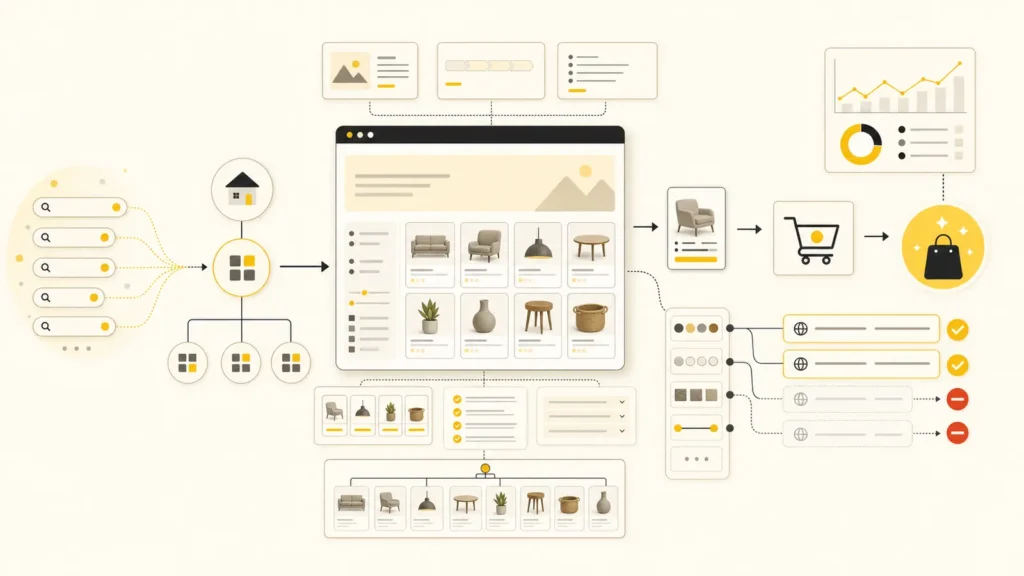
Faceted navigation should help shoppers filter without creating an unlimited crawl space. Keep only valuable, demand-backed combinations indexable; control sorting, duplicate, empty, and low-value URLs. Pagination or infinite scroll must expose stable, crawlable links so search engines can reach products without clicking buttons, submitting forms, or relying on fragment-only URLs.
This is one of the biggest gaps in competitor advice. “Canonical every filter” is not a complete strategy. Neither is “noindex everything.”
Google’s current faceted navigation documentation describes the risk directly: parameter combinations can create near-infinite URL spaces, consume server resources, and slow discovery of useful pages. If you do not need filtered URLs in Search, Google recommends preventing crawling. If you do need them, the URLs must behave consistently.
| URL Type | Search Treatment | Reason |
|---|---|---|
| Stable filter with demand and sufficient products | Create or retain a crawlable, self-referencing landing page | It satisfies a distinct commercial intent |
| Sort order, view mode, or tracking parameter | Keep out of the index and reduce crawl discovery | It changes presentation, not the product need |
| Low-value multi-filter combination | Control crawling and avoid internal promotion | It creates duplication without useful demand |
| Empty or impossible combination | Return a genuine 404 for that URL | It has no result to serve |
| Paginated product set | Use unique URLs and crawlable HTML links | Google must reach products beyond the first set |
Do not use outdated `rel=”prev”` and `rel=”next”` advice as the foundation. Google no longer uses those signals. It needs real links and unique paginated URLs.
With infinite scroll, create a paginated equivalent in the background. If the next products appear only after a user scrolls or clicks a JavaScript button, Google may not discover them reliably.
How Should Category Pages Use Internal Links?
Category pages should receive links according to demand, revenue potential, inventory stability, and strategic importance. Link priority categories from navigation, parent pages, related categories, buying guides, and relevant blog content. In return, category pages should expose crawlable links to subcategories and products while avoiding repeated links to weak filters and unavailable inventory.
Google recommends a crawlable path from menus to categories, categories to subcategories, and subcategories to products. I would add a commercial filter: not every category deserves equal authority.
A high-demand, high-margin collection ranking on page two should receive more support than a seasonal archive with five low-stock products. Your templates, navigation, and editorial links should reflect that decision.
Related-category modules are especially useful because they improve browsing and distribute authority at the same time. Use anchors such as “wide-fit hiking boots” or “waterproof trail shoes” when those destinations genuinely contain what the anchor promises.
| If a category already has impressions but sits just outside the strongest positions, check its internal support before commissioning another thousand words. The page may need clearer authority, not more copy. |
What Changes for Shopify Collection Page SEO?
Shopify collection page SEO uses the same strategic principles: map each collection to real commercial demand, keep the product grid easy to browse, add concise useful copy, connect related collections, and manage filters and pagination carefully. The main platform constraint is working within Shopify’s collection, tag, theme, and URL behavior without creating overlapping pages.
Shopify calls categories collections, and one product can belong to several collections. That flexibility is useful for merchandising, but it makes keyword ownership important. Decide which collection is the primary destination for each commercial theme.
Use collection descriptions as real buyer orientation, not a keyword field. The theme can display a short excerpt above the grid and the remaining guidance below it or inside expandable sections.
Review automated collections before indexing them. A rule can create a technically valid page with weak inventory, unstable membership, or little search value.
Check what the theme exposes in initial HTML, how filter URLs behave, whether product links are standard anchors, and whether canonical tags match the URLs you intend to rank. Shopify removes some implementation freedom, but it does not remove the need for decisions.
What Changes for WooCommerce Category Page?
WooCommerce category page SEO requires more governance because categories, tags, attributes, filters, archives, plugins, and theme templates can all generate URLs and links. Define which taxonomy pages should rank, keep internal labels out of the index, customize category templates for useful modular content, and test every change against stock, filters, speed, and checkout behavior.
WooCommerce gives you flexibility and enough defaults to create a mess quickly. Product tags, attribute archives, filter plugins, and duplicate category paths can all compete with the pages you actually want Google to prioritize.
I usually start by inventorying every product taxonomy and URL pattern. Then I classify each as a core category, subcategory, useful filtered landing page, shopper-only filter, internal label, or page that should not exist.
The category template should make space for more than one description field. A practical build may include a short intro, subcategory cards, product grid, supporting content blocks, related guides, FAQs, and manual related-category links.
How Do Speed and Mobile UX Affect Category Pages?
Category page speed depends on the full template: server response, product-card images, filter scripts, fonts, tracking, page builders, and third-party apps. Optimize the real mobile browsing path, not only the homepage. Products, filters, sorting, and pagination must remain responsive while the page meets Core Web Vitals and preserves accurate prices and inventory.
A category can contain dozens of images before the shopper interacts. Use correctly sized responsive images, lazy-load media below the initial viewport, and do not preload every product thumbnail.
Poor Interaction to Next Paint often appears when the shopper opens filters or changes sorting while a heavy script occupies the main thread. Record that interaction in Chrome DevTools instead of assuming the image optimizer will solve it.
Cumulative Layout Shift often comes from product images without reserved dimensions, late banners, font swaps, or filters that push the grid after load. Those are design and engineering problems with direct shopping consequences.
Build Category Pages for Shoppers and Search
You do not have to choose between an attractive store and category pages that can rank. Keep products and comparison tools visually dominant, then add concise, original guidance through well-designed modules. Support the page with clear architecture, crawl control, internal links, and measurement. Good ecommerce SEO should improve the buying path, not decorate it with keywords.
Schedule a 30 minute ecommerce strategy call and we’ll see how to drive more revenue with SEO
Book a strategy callIf your category pages are clean but empty of context, give them enough language to explain the assortment and help someone choose. If they are buried under copy, redesign the content instead of deleting every useful answer.
The best compromise is usually not more words. It is better placement, better decisions, and better links.
What Schema Should Category Pages Use?
Category pages can use structured data that accurately reflects visible content, such as BreadcrumbList and an ItemList describing listed products. Product markup belongs where the visible page supports those product details. Schema can improve machine understanding, but it does not create rankings by itself, and valid markup does not guarantee a rich result.
Several ranking guides overpromise schema for product category pages. I would keep the recommendation narrower and more accurate.
BreadcrumbList can describe the navigational path. ItemList can express an ordered list, although Google does not promise a special category-page rich result merely because it exists. If product cards expose price, availability, ratings, or offers, the markup must match what the shopper can see and what the store can maintain.
FAQ content may still help shoppers and answer systems, but Google generally limits FAQ rich results to authoritative government and health sites. Add FAQPage markup only when the questions and answers are visible and accurate; do not sell it internally as a guaranteed search enhancement.
Validate syntax, but also audit operational accuracy. A schema validator cannot tell you that a stale price, unavailable product, or misleading review aggregate creates a bad customer experience.
How Should You Prioritize and Measure Category Page SEO?
Prioritize categories by combining search demand, current visibility, revenue potential, margin, inventory depth, conversion performance, and implementation effort. Measure nonbranded impressions, clicks, click-through rate, indexed URLs, product-list views, filter use, product clicks, add-to-cart actions, purchases, revenue, and margin. Rankings diagnose progress; qualified shopping behavior determines commercial value.
I use cohorts because catalog-wide averages hide the result. Choose a group of priority categories, record the implementation date, and compare them with similar pages that did not receive the same work.
- Confirm that the correct category URL is indexed and ranking for the intended commercial query.
- Fix crawl, canonical, rendering, pagination, or internal-link problems before adding more content.
- Improve the template and category-specific modules for the highest-value cohort.
- Track organic landings through product clicks, add-to-cart actions, purchases, revenue, and margin.
- Scale the pattern only after the cohort shows a useful search or commercial improvement.
Use Google Search Console for queries, pages, impressions, clicks, and indexation. Use GA4 or your ecommerce analytics for item-list views, product clicks, cart actions, purchases, and revenue. Join the datasets when you need to see whether visibility produces buying behavior.
A category can gain traffic and still fail if the assortment, filters, price position, or mobile experience does not satisfy the query. SEO did not finish when the click arrived.
Ecommerce Category Page SEO Checklist
A category page is ready to compete when it matches a real commercial query, offers enough relevant products, sits inside a clear crawlable hierarchy, presents useful modular content, controls duplicate filter URLs, exposes every important product path, performs well on mobile, and gives shoppers enough information to compare options and continue toward purchase.
- The target query deserves a category or collection page rather than a product, campaign, marketplace, or guide.
- The H1, title, intro, products, filters, subcategories, and internal links describe one coherent assortment.
- Products appear early, while longer guidance is modular, scannable, and placed where it supports decisions.
- Facets, sorting, pagination, canonicals, and empty combinations follow an explicit crawl and indexation policy.
- Priority categories receive stronger links from navigation, related pages, guides, and commercially relevant content.
- Search visibility is measured alongside product clicks, add-to-cart actions, purchases, revenue, and margin.
Frequently Asked Questions About Category Page SEO
The most useful category page SEO questions concern page purpose, content length, page-type selection, faceted navigation, pagination, schema, and discontinued categories. These questions come from relevant People Also Ask results and recurring competitor FAQs; broad questions about SEO types or ecommerce classifications were excluded because they do not help a store owner improve this page type.
What Is a Category Page?
A category page groups related products or subcategories so shoppers can browse and compare options. Ecommerce platforms may call it a collection page, category listing page, or product listing page. For SEO, it usually targets a broader commercial query than an individual product page.
What Makes a Good Ecommerce Category Page?
A good category page matches a clear buying intent, offers enough relevant products, loads quickly, and makes comparison easy. It combines a descriptive title, concise orientation copy, useful filters, strong product cards, related categories, crawlable links, and category-specific guidance without burying the shopping experience under generic text.
Should Category Pages Have Written Content?
Yes, when the content helps shoppers understand the assortment or choose between products. A category does not need a fixed word count or a wall of copy above the grid. Use a short introduction first, then place buying guidance, comparisons, internal links, and FAQs in modular sections where they support the decision.
Should You Optimize Category Pages or Product Pages First?
Optimize the page type that matches the query. Category pages suit searches where shoppers expect several options, while product pages suit one specific model, SKU, or item. Confirm the dominant page type in the current search results, then prioritize based on demand, revenue potential, inventory stability, and current visibility.
How Should Ecommerce Sites Handle Faceted Navigation?
Keep filtered URLs indexable only when they satisfy distinct search demand with a useful, stable product set. Control crawling of sorting, duplicate, empty, and low-value combinations. Use consistent parameters, return 404 responses for impossible results, and avoid internally promoting URLs that the business does not want search engines to prioritize.
How Should Pagination Work on Category Pages?
Give each paginated result a unique URL and expose crawlable HTML links between result pages. Infinite scroll should have an equivalent paginated series so search engines can reach products without clicking or scrolling. Do not rely on URL fragments or outdated rel=”prev” and rel=”next” markup for discovery.
What Schema Should an Ecommerce Category Page Use?
Use only structured data that matches visible content. BreadcrumbList can describe the navigational path, and ItemList can describe a product list. Product or offer details must remain accurate when included. Schema helps machines understand the page, but it does not improve rankings by itself or guarantee a rich result.
What Should You Do With an Empty or Discontinued Category?
Keep the URL when inventory will return or the page still offers useful alternatives and demand. Redirect it only when another category genuinely satisfies the same intent. If the category has no products, demand, links, history, or suitable replacement, removing it with an appropriate 404 or 410 response may be cleaner.