
A blog’s purpose is to reach qualified shoppers, strengthen the pages that sell, and answer questions standing between a visitor and a purchase.
A neglected category page will not recover because you published a piece about enjoying autumn and once linked to a candle you sell. The internet has enough seasonal listicles wearing tiny commercial hats.
The most useful post is the one that answers a real pre-purchase question, uses the brand’s evidence, and gives the reader a sensible next step.
So, do you have to do it?
No. But when your store is technically sound and your customers research before buying, blogging has a place within a wider ecommerce SEO strategy because it reaches qualified searches and supports the pages that turn that demand into revenue.
Table of Contents
Does Your Ecommerce Site Need A Blog For SEO?
An ecommerce site does not need a blog to rank, but it needs it to reach searches that category and product pages can’t. You need a blog for the point in the journey when customers compare, troubleshoot, learn, or seek reassurance before buying. When your commercial pages, tracking, inventory, or technical foundation still need basic work, a blog is not a priority.
Product pages should target specific products. Category pages should target product groups with commercial intent. A blog handles questions that need explanation: “which,” “how,” “why,” “best for,” “versus,” “size,” “ingredients,” “compatibility,” and “care.” Asking one URL type to do all these produces a page that satisfies none of them well.
My best advice is to blog if your customers need information before they can confidently choose. A store selling a simple, familiar commodity may have fewer useful topics than a store selling supplements, technical garden equipment, skincare, furniture, or anything with fit, safety, ingredients, maintenance, or compatibility questions.
A blog is optional. The questions are not.
Also, I often see stores interpret every question-shaped keyword as a blog topic. But “what size dining table do I need?” may deserve a guide, while “six-person dining table” belongs to a category page.
The wording alone does not make that decision.
I check which page types dominate the results and what the searcher appears ready to do next. That is why my keyword maps include the intended URL type, not only the keyword and search volume. Choosing the wrong format can leave a strong article fighting a category page it was supposed to support.
How Blogging Produces Ecommerce SEO Revenue
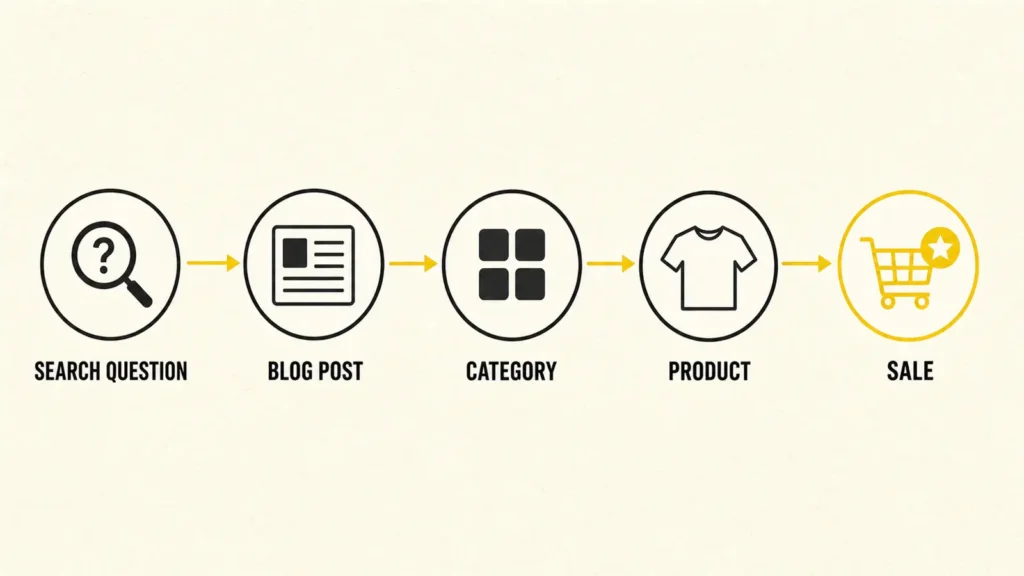
Blogging creates ecommerce SEO revenue by attracting pre-purchase searches, linking readers to relevant commercial pages, reducing buying uncertainty, and earning visibility beyond product names. The revenue comes from the path between query and purchase, not from pageviews alone. If the path stops at the article, you built a library, not a sales channel.
Blog Expands How Customers Find Your Store
A category page for raised garden beds can target shoppers comparing products. It is a poor place to answer “what size raised garden bed do I need?”
A focused guide can answer the question, show the calculation, explain tradeoffs, and then link to the category that fits.
This gives your store visibility earlier in the buying process, before the customers know exactly what to purchase. The key is choosing a topic that captures an earlier stage of the same demand your category and product pages can convert.
Blog Sends Context And Authority Toward Money Pages
Internal links help shoppers continue and help Google understand which pages are the important ones. If a guide attracts links or search demand but never points to an appropriate category, you have trapped value in the article.
I map every post to one primary commercial destination and, where useful, a secondary guide or product family. Our guide to ecommerce internal linking explains the revenue-first logic: demand, margin, conversion, inventory, and ranking opportunity decide which pages deserve support.
Blog Builds Confidence Before the Purchase
Good ecommerce content handles customer hesitation.
When people shop in person and don’t know what they need, what do they do? They ask the store employees.
The blog mimics that for your ecommerce store. You tell the customer which materials last outdoors, whether an ingredient suits a routine, or how two sizes compare to help them make a decision.
I’ll review how your articles connect to your categories and products, identify where qualified shoppers are getting stranded, and show you how to turn useful content into a clearer path to revenue.
Book a strategy callWhen Is Blogging The Wrong Priority For Ecommerce?
Blogging is the wrong priority when Google cannot reliably crawl or index the store, category pages do not match commercial demand, products are frequently unavailable, conversion tracking is broken, or the team cannot maintain accuracy. Fix the revenue path first. More entrances will not help if the shop floor is missing.
I would delay a blog program when any of these are true:
- Core categories do not have clear, search-led URLs, useful copy, or internal links.
- Faceted navigation creates thousands of thin, duplicate, or crawlable filter URLs.
- Mobile product pages are slow or the purchase path breaks.
- Stock changes so quickly that article recommendations become misleading.
- GA4 ecommerce events or basic Search Console reporting are not configured.
- Nobody owns fact-checking, updates, and product-link maintenance after publication.
I saw this with a retailer that was publishing useful articles every week while allowing search engines to crawl thousands of combinations created by color, size, price, and sort filters. New posts were being discovered inconsistently, and Search Console was full of filter URLs that offered no distinct search value. We paused the publishing increase and cleaned up the crawl paths first. That is why I check what Google is spending time on before recommending more content. If the site keeps generating near-duplicate URLs faster than you can publish worthwhile ones, another article is not the most urgent addition.
I am all for blogging, but only when the store underneath it is ready. The categories need clear roles, the filters need proper controls, the purchase path needs to work, and every article needs somewhere useful to send the reader. When you have a bad ecommerce site structure, you are driving people into a store that is difficult to navigate and buy from.
What Should You Write About on an Ecommerce Blog?
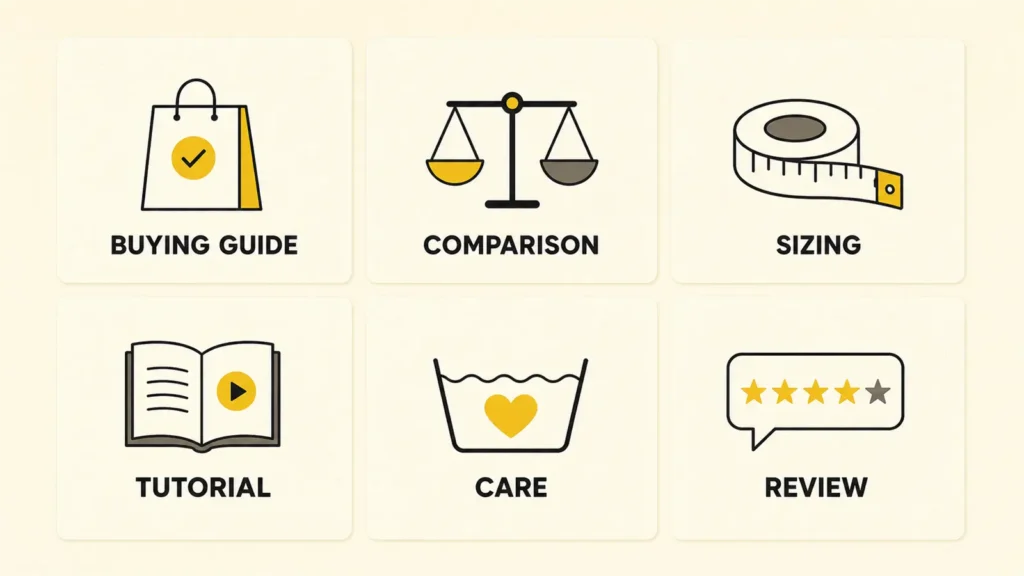
An ecommerce blog should cover searchable questions that arise before, during, or after a purchase and connect naturally to products or categories. Prioritize buying guides, comparisons, sizing and compatibility help, use-case tutorials, care advice, and evidence-led reviews. Skip generic lifestyle topics unless the store has a specific commercial reason to own them.
The best topics meet four criteria: customers ask the question, search demand exists, your team can answer with real expertise, and the answer supports a commercial destination.
That is how I uncover subjects rooted in real buying friction rather than attractive keyword metrics. A good ecommerce topic does not begin with “What can we rank for?” It begins with “What does the customer need to understand before this product makes sense?”
| Content Type | Example | Commercial Purpose |
| Buying guide | How To Choose A Carry-On Suitcase | Help travelers compare sizes, materials, wheels, and features before visiting a luggage category. |
| Product comparison | Air Fryer vs Convection Oven | Explain meaningful differences and direct readers toward the appliance that fits their needs. |
| Sizing guide | How To Measure Yourself For A Winter Jacket | Reduce uncertainty and help shoppers choose the correct size. |
| Compatibility guide | Which USB-C Charger Wattage Does Your Laptop Need? | Help customers find a compatible charger without guessing from technical specifications. |
| Use-case tutorial | How To Set Up A Home Espresso Station | Show how machines, grinders, scales, and accessories work together. |
| Care and maintenance | How To Clean And Store Leather Boots | Protect the original purchase and introduce suitable care products. |
| Troubleshooting guide | Why Is My Aquarium Water Cloudy? | Diagnose common causes and connect each solution to relevant filters, treatments, or testing equipment. |
| Materials comparison | Stainless Steel vs Cast Iron Cookware | Compare maintenance, durability, weight, and cooking performance before linking to each collection. |
| Feature explainer | What Does IP67 Waterproofing Mean? | Turn a technical specification into a useful buying criterion. |
| Product-led tutorial | How To Install Peel-And-Stick Wallpaper Around Corners | Remove installation anxiety and help readers decide whether the product suits their project. |
| Evidence-led review | The Best Office Chairs For Shorter People | Compare adjustment ranges, dimensions, testing, and comfort criteria. |
| Replacement guide | When Should You Replace A Bicycle Helmet? | Explain wear, damage, age, and safety considerations before directing readers to replacement options. |
The content type should follow the decision the customer needs to make. A buying guide must explain how to choose. A comparison must show where the options differ. A tutorial must help the reader complete a task. Putting “complete guide” in the title does not complete anything by itself. Sadly, adjectives remain terrible project managers.
For example, a carry-on suitcase guide should not merely list products. It should explain airline dimensions, hard-shell versus soft-shell construction, wheel types, internal capacity, weight, and how those factors affect different travelers. Once readers understand the tradeoffs, links to the relevant suitcase categories feel useful rather than promotional.
The same principle applies in less consumer-focused industries. A warehouse label-printer guide might compare print volume, resolution, label width, connectivity, durability, and software requirements. The products are different, but the job is the same: reduce uncertainty and help the buyer choose intelligently.
Whatever the niche, show your reasoning. Explain the criteria, tradeoffs, limitations, and situations in which one option makes more sense than another. Use original photographs, measurements, product tests, expert input, specification tables, or clearly defined evaluation criteria when they improve the answer.
How To Build A Revenue-First Ecommerce Blog Strategy
Build an ecommerce blog strategy by starting with commercial priorities, collecting real customer questions, researching search intent, assigning each topic a page and funnel job, creating original evidence, adding deliberate internal links, and measuring qualified outcomes.
The sequence matters because it prevents the content calendar from becoming a list of vaguely relevant ideas.
- Choose the commercial pages that deserve support
Start with categories or product families that have demand, healthy margin, stable inventory, and realistic ranking potential.
- Collect the language customers already use
Pull it from site search, support tickets, product reviews, sales calls, Reddit, Google Search Console, and merchandising questions. It reveals how customers describe their needs, so you can target and answer them in language they recognize.
- Research the live SERP
Identify the dominant intent, repeated formats, evidence standard, PAA questions, and gaps. Do not force a blog post when Google clearly prefers category pages, videos, tools, or product listings.
- Give each article one primary purpose
Decide whether it should introduce a category, compare options, reduce objections, support an existing ranking page, earn links, or retain customers after purchase.
- Plan evidence before drafting
List the tests, product knowledge, expert review, customer insight, images, examples, and primary sources needed to make the page more useful than a generic synthesis.
- Design the next click
Add descriptive internal links where a reader becomes ready to compare or act. Match the destination to the reader’s stage; a category is often better than an individual SKU.
- Set a measurement and refresh date
Record the target query cluster, destination page, conversion action, owner, publication date, and first review window before the post goes live.
This is also why I prefer content clusters built around commercial architecture, not a pile of unrelated keywords. One strong category can support a buying guide, comparison, care guide, sizing resource, and FAQ.
Each page answers a different question while reinforcing the same product universe.
I’ll connect search demand with your priority categories, identify the customer questions worth answering, and show you what each article should do—not just which keywords it should contain.
Plan your content strategyHow Often Should An Ecommerce Site Publish?
Publish as often as you can maintain useful evidence, editorial quality, internal links, product accuracy, and updates. For many stores, two excellent posts a month will outperform eight generic ones. Cadence should follow opportunity and capacity – not a superstition that Google rewards a blog merely for looking busy.
I start with the topic backlog and production constraints. If you have four high-value questions, original input from the team, and one capable editor, publish those four properly. Do not stretch them into twelve pieces of oatmeal.
A practical starting cadence is one to four posts per month, then increase only when quality and maintenance hold.
Update cadence matters too. Review posts when prices, stock, regulations, product formulas, platform behavior, or SERPs change.
A guide recommending discontinued products is not evergreen.
How To Measure Ecommerce Blog Revenue
Measure an ecommerce blog with a chain of metrics: search visibility, qualified organic entrances, movement to commercial pages, conversion actions, revenue, and assisted influence. Compare cohorts and trends. A post succeeds when it contributes to a valuable customer path – even if the purchase happens after another visit.
This is also why the cost of ecommerce SEO cannot be reduced to a price per article. The same content budget can produce very different returns depending on whether the store supports the work or forces every article to compensate for structural problems.
Use Google Search Console to track query, page, click, impression, and click-through-rate trends. I focus more on sustained changes in impressions and clicks than average position alone because position is aggregated, volatile, and easy to overinterpret.
Use GA4’s Landing Page report to isolate sessions that begin on an article. Then connect those entrances to ecommerce events and visits to commercial pages. This shows whether the blog is attracting potential customers and moving them deeper into the store.
Track these layers:
- Discovery
Target-query impressions, non-branded clicks, and relevant query breadth.
- Engagement
Entrances, meaningful interactions, and return visits where your setup supports them.
- Progression
Clicks to categories, product pages, email signups, samples, quizzes, or calculators.
- Commercial outcome
Add-to-cart events, purchases, revenue, leads, and assisted conversion paths.
- Portfolio effect
Ranking and organic-traffic changes on the commercial pages the article supports.
To calculate content ROI, count the full cost of producing and maintaining it, from strategy and expert input to design, promotion, and updates. Then compare that investment with the gross profit the content influenced over a realistic buying period.
And you know what? Gross profit may make the result look less impressive than revenue does. That is exactly why I want to see it. It tells me whether the content produced meaningful value for the business.
Attribution is where things are a little less tidy. Search Console shows how content earns visibility, while GA4 shows what visitors do after they arrive.
Consent gaps and last-click reporting leave parts of that journey out, so I look for the same commercial pattern across several reports. You should too. When visibility, movement into the catalog, and sales rise together, you have much stronger evidence that the content is earning its keep.
The Most Common Ecommerce Blogging Mistakes
The most common ecommerce blogging mistakes are choosing topics with no buying connection, publishing before commercial pages are ready, paraphrasing competitors, making unsupported claims, omitting internal links, measuring only traffic, and abandoning content before it has enough time or support. Each mistake breaks the path between useful information and revenue.
Choosing Lifestyle Topics Too Far From the Product
Relevance is not a vibe. A home-and-garden retailer can credibly cover patio layout or planter sizing. A generic post about “living your best life outdoors” will attract nobody, help nobody, and sell nothing with admirable efficiency.
Treating AI Output As Expertise
AI can help organize research, but it cannot invent product tests, customer conversations, or regulatory judgment. Google’s people-first guidance asks whether content demonstrates first-hand expertise and gives readers a satisfying answer. Add what only your business knows.
Adding Product Links Without a Clear Next Step
Five unrelated product links do not create a customer journey. Link at the moment the reader understands which category, specification, or option fits. The anchor should describe what comes next.
Stopping At Traffic
A high-traffic article can still be commercially useless. Separate branded from non-branded search, inspect the queries, follow readers into the store, and compare their actions with the article’s intended job. Traffic is nice. Outcomes pay the invoices.
Make The Blog Earn Its Shelf Space
Blogging for ecommerce is worth doing when it reaches qualified demand, supports commercial pages, removes buying friction, and produces evidence you can measure. It is not mandatory, and it is not a substitute for the store itself. Fix the foundation, choose topics with a commercial job, and make every article lead somewhere useful.
Your next decision is not “Should we publish a blog?” It is “Which customer question can we answer better than anyone else, and which valuable page should that answer support?”
That question produces a strategy. The first one merely produces a tab in the navigation.
I’ll review your organic visibility, commercial priorities, and content opportunities. You’ll leave knowing whether blogging deserves the budget-and exactly where I would focus first to turn SEO content into qualified traffic and revenue.
;Book a strategy callFrequently Asked Questions About Blogging For Ecommerce
Do Ecommerce Sites Need A Blog?
No. Ecommerce sites can rank through strong category and product pages without a blog. A blog becomes valuable when customers search for comparisons, guidance, compatibility, care, or reassurance before buying, and the store can connect those answers to relevant commercial pages.
Does Blogging Help Ecommerce SEO?
Yes, when posts satisfy searches your commercial pages cannot, earn relevant links, and internally support important categories or products. Blogging does not repair poor site structure, duplicate filters, slow templates, thin categories, or broken tracking. Those foundations still need their own work.
What Should An Ecommerce Blog Write About?
Write about real pre- and post-purchase questions: buying criteria, comparisons, sizing, compatibility, ingredients, use cases, care, troubleshooting, and evidence-led reviews. Choose topics that your team can answer credibly and that lead naturally to a product family, category, tool, or next step.
How Often Should An Ecommerce Site Blog?
Publish at the fastest pace that preserves research, expert input, accuracy, editing, internal linking, and maintenance. One to four strong posts per month is a practical starting range for many teams, but there is no universal SEO quota. Increase cadence only when quality and commercial focus remain intact.
Should An Ecommerce Blog Be On The Same Domain?
Usually, yes. Keeping the blog on the store’s primary domain makes it easier for readers and search engines to move between articles, categories, and products. A separate domain creates another property to build, maintain, measure, and connect, usually without a useful business reason.
How Long Does Ecommerce Blogging Take To Work?
Expect months, not days, for meaningful organic-search evidence, but do not use a universal countdown. Timing depends on site authority, competition, crawl and indexation, topic difficulty, content quality, internal links, external links, and how quickly the team improves pages after early data appears.